
NLP for Multilingual UX: Challenges and Fixes
Fix detection, translation, and low-resource gaps to keep meaning, trust, and task completion in multilingual interfaces.


Multilingual NLP can hurt UX fast - even when your overall model scores look good. I’d treat this as a product problem first: if routing is wrong, meaning drifts, or one language lags behind, users stop tasks and leave. In fact, 90% of users may abandon a platform after one bad localization experience, and translated UI text can grow by 30% to 55%, which can break layouts.
If I had to boil the article down, I’d focus on four things:
- Route with care: short text, mixed-language input, and dialects often confuse language detection
- Protect meaning: translation without UI context can break labels, errors, search, and chat
- Test each locale on its own: “supported” does not mean quality is the same in every language
- Show uncertainty: let users switch language, edit output, compare source text, or reach a human
A few fixes stand out right away:
- Use confidence-based language routing instead of forcing one guess
- Keep the original user text beside any translation
- Use locale-specific copy, glossaries, and review for billing, legal, safety, and onboarding flows
- Fine-tune with native-language data, not translated English alone
- Track per-language results, not rolled-up averages
Here’s the simple takeaway: good multilingual UX is about trust and task completion, not just model accuracy. The article explains where teams get this wrong and which fixes tend to keep working after launch.
Problem 1: Language detection, routing, and mixed-language input failures
Language detection sounds easy at first: figure out the language, then send the user to the right place. But short messages often don't give you enough signal for solid detection. That can send people into the wrong locale or format right away. At that point, the product feels off before they even begin. The toughest cases tend to be mixed-language input and regional variants.
And the fallout stacks up fast. If the system picks the wrong language, it can also make the wrong locale assumptions. Then dates, number separators, and currency symbols show up the wrong way.
How code-switching and regional variants confuse NLP pipelines
People don't write in neat, one-language sentences. A bilingual user may mix English and Spanish in the same message. Someone else may write in Hinglish. Standard pipelines often try to force that input into one language bucket, or they just fail.
This is code-switching, and it shows up all the time in actual products. Users do it on purpose. Technical terms, product names, and product-specific terminology often stay in their original form even when the rest of the message shifts. If a system treats those terms like mistakes and “fixes” them, it can wreck the meaning. Then there's another layer on top of that: regional variants and formality level.
Formality is one of those failure points that gets missed until users react badly. Even when language detection is correct, the system can still get the social tone wrong. In German, for example, using the informal "du" in a business setting instead of "Sie" can come across as rude or dismissive. That's not just a translation issue. It's a relationship issue. So even when detection works, formality mistakes can still erode trust.
Fix: Use confidence-based routing and fallback paths
The main fix is simple in concept: stop treating language detection like a yes-or-no call. Give every detection result a confidence score instead. If confidence is high, route the user automatically. If confidence is low, show a clear language switcher so the user can fix it.
A few production habits make this work much better:
- Keep the original user input intact. Store it next to any translation so slang, code-switched terms, and product names don't get quietly mangled.
- Use native language names in the selector, such as "Español" and "Deutsch", instead of flags. Flags point to countries, not languages, and that can leave people out in multilingual regions.
- Put language selectors on login and landing screens so users can correct the choice before they're buried in a workflow.
The table below shows common routing failures, what users feel when they happen, and what to do about them:
| Failure Mode | UX Impact | Countermeasure |
|---|---|---|
| Wrong dialect | Output sounds unnatural or wrong for the context | Locale and dialect controls per region |
| Wrong formality | Feels too casual or cold for context | Formality settings with tone examples |
| Names and product terms mistranslated | Names or product terms get incorrectly translated | Lock-lists for proper nouns; preserve original terms |
| Short message routed incorrectly | Routes to the wrong language model | Confidence threshold triggers clarification UI |
Prompt localization shapes tone and meaning, not just model selection. If the system prompt stays in English, the model may still follow English-language norms and produce output with the wrong social register. Localizing the system prompt, not just the interface copy, is what helps close that gap. Even then, correct routing doesn't guarantee correct meaning, because translation itself can still shift what's being said.
sbb-itb-124fdbf
Problem 2: Translation, ambiguity, and loss of meaning
Even when routing is correct, translation can still bend the meaning of what users see. Literal translation - word-for-word text with no context - can quietly hurt understanding across onboarding copy, error messages, help center search results, notifications, and chat replies. One bad mistranslation can lead to costly brand damage.
Where meaning drift appears in interfaces
Meaning drift usually shows up first in microcopy, labels, and support text. Terms like "Charge" and "Save" can mean very different things depending on where they appear. If the translator or model doesn't get context, the wrong meaning can slip in and stay there.
That problem gets worse in languages like Spanish and French, where wording may need gendered or formal variants. If a product defaults to just one version, the experience can feel off. And when the same product term gets translated in different ways across the product, search and support become harder to use.
These issues tend to surface in places like:
- Labels
- Error messages
- Help search
- Chat replies
This isn't just a translation quality problem. It's a context problem.
Fix: Add domain context, locale-specific copy, and human review for critical flows
The fix isn't only to change the string. It's to fix the context around the string.
Send each string with details about where it appears in the UI, what action the user is taking, and how much space the text can use. Use a glossary for key terms, and translation memory for approved phrasing that should stay consistent. Then save human review for the flows where mistakes cost the most: onboarding, billing, errors, legal, and safety copy.
Western Union did this in its global money transfer journey. It rewrote error messages and tooltips with localized, conversational copy, and saw a 23% increase in conversion rates.
The copy became more useful at the exact moment users needed clarity most.
Problem 3: Low-resource languages, dialect gaps, and uneven model performance
Even when routing works and translation is correct, one problem still sticks around: model quality can vary a lot by language. A language may show up as "supported" on paper and still break down in production. That gap isn't always easy to spot from the outside, but users notice it fast.
Why listing a language as supported is not enough
Many multilingual models still lean heavily toward English. Low-resource languages have much less representation in the model's training data, so the model has a harder time generalizing well across languages. There’s another issue too: more than 80% of non-English training data in major models comes from low-quality machine translation instead of native text.
That leads to very real UX problems.
- Arabic token inflation: Arabic needs about 3x more tokens than English to say the same thing. That can split up the input and make it harder for the model to hold onto constraints.
- Subject omission in Japanese and Vietnamese: In languages where subjects are often left out, models can lose track of who or what is being discussed over several turns. The result is replies that feel vague or confusing.
- Retrieval gaps in complex scripts: Languages with complex morphology, like German, or non-Latin scripts, like Thai and Arabic, may return zero results in help search even when the answer is there.
This points to the deeper issue: translation by itself doesn't fix the data problem. What helps is locale-specific data. Benchmarks like MMLU-ProX show a gap of up to 24.3% between high-resource languages such as English or French and low-resource ones. For users, that means a plainly worse product experience.
Fix: Combine multilingual models with local adaptation and targeted data work
A good starting point is a strong multilingual base model. After that, add locale-specific fine-tuning instead of leaning on translation alone. Even a small batch of native-language examples, written in that language from the start rather than translated from English, can improve output quality for that locale.
For harder reasoning tasks, there’s a practical workaround. If the model reasons best in English, you can translate in, reason in English, and translate out. That can cut coherence errors without hurting fluency.
Evaluation matters just as much as model choice. Translated benchmarks can miss 30% to 60% of actual failure modes because they reward answers that fit English patterns. That’s why evaluation sets should be written by native speakers in-region. They need to cover local idioms, regional spelling, and register, not just grammar. Teams building multilingual interfaces can also find practical guidance at DeveloperUX.
| Failure Mode | UX Countermeasure |
|---|---|
| Sparse training coverage | Fine-tune on native-language examples; avoid translation-only data |
| Retrieval gaps in complex scripts | Use morphology-aware tokenization and script-specific indexing |
| Overconfident errors | Uncertainty cues, citations, and verification prompts |
| Named entity drift | Preserve names via lock lists; highlight edits |
Treat each locale as its own deployment target, not just an English product run through translation.
Fixes that hold up in production: trust, evaluation, and rollout
Multilingual NLP Fix Types: Strength, Risk & Best Fit
Once routing, translation, and coverage start changing by locale, production quality stops being just a model issue. It becomes a trust issue too.
Design for uncertainty instead of hiding it
If a model isn’t sure, hiding that uncertainty usually backfires. It doesn’t protect trust. It just pushes the damage further down the line.
A better move is to make uncertainty visible. Show confidence scores. Let users compare the original text with the translation. Make the output editable. Then pair that with clear ways to recover, like human handoff, suggestion prompts, or a fallback language pipeline, so people don’t hit a dead end.
And there’s another layer here: localize confirmation patterns, not just translated strings.
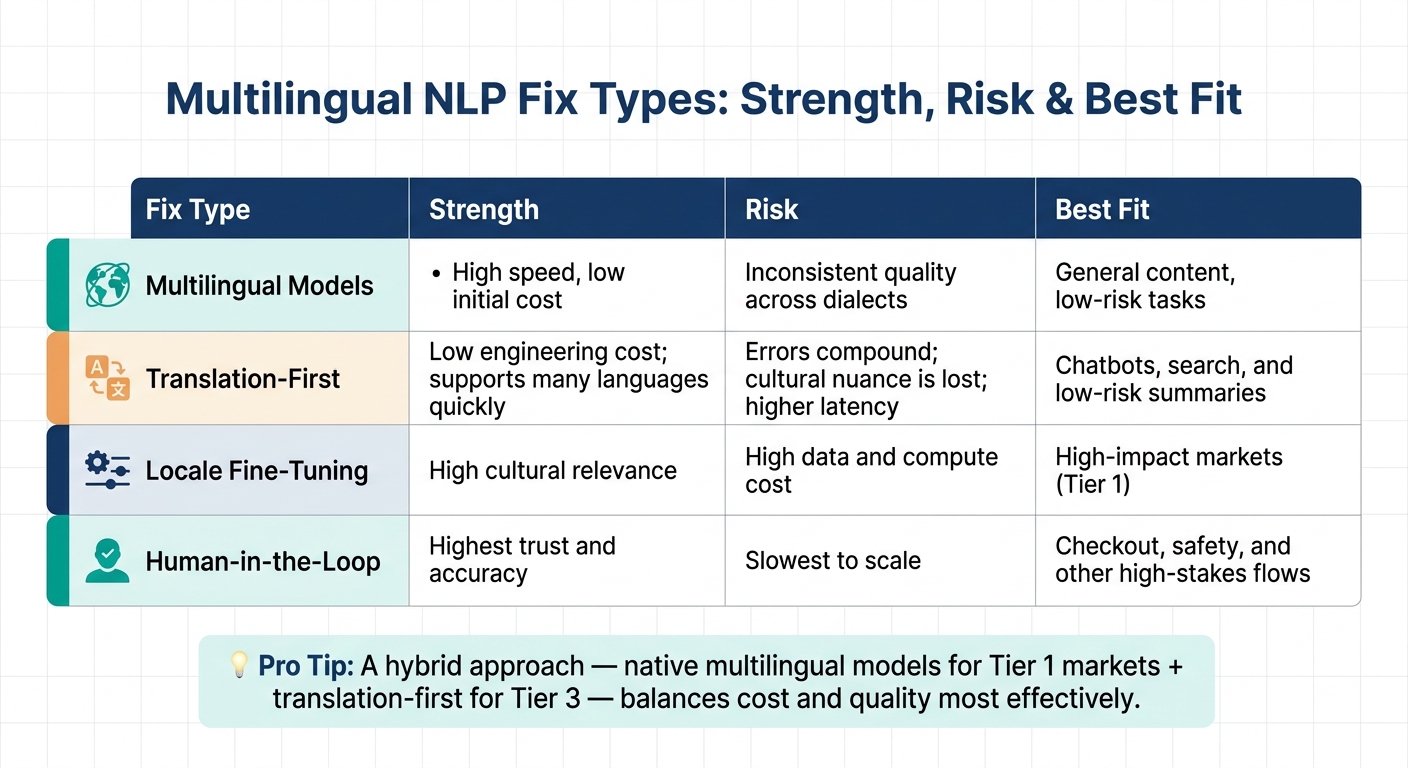
Multilingual UX fixes compared by strength, risk, and best fit
These fixes each make different tradeoffs across speed, cost, and trust. That means teams need to match the fix to the flow, not just pick one approach and use it everywhere.
| Fix Type | Strength | Risk | Best Fit |
|---|---|---|---|
| Multilingual Models | High speed, low initial cost | Inconsistent quality across dialects | General content, low-risk tasks |
| Translation-First | Low engineering cost; supports many languages quickly | Errors compound; cultural nuance is lost; higher latency | Chatbots, search, and low-risk summaries |
| Locale Fine-Tuning | High cultural relevance | High data and compute cost | High-impact markets (Tier 1) |
| Human-in-the-Loop | Highest trust and accuracy | Slowest to scale | Checkout, safety, and other high-stakes flows |
For most teams, a hybrid approach tends to work better than betting on a single method. Native multilingual models for Tier 1 markets and translation-first for Tier 3 can balance cost and quality more effectively.
Conclusion: A practical checklist for better multilingual UX
Before shipping a multilingual NLP feature, check each locale on its own. Don’t look only at rolled-up numbers.
- Detect language reliably, including short text and code-switched input, with confidence-based routing and fallback paths.
- Handle meaning, not just words by using domain context, locale-specific copy, and human review for any high-stakes flow.
- Account for dialect and low-resource gaps. If a language is listed as "supported", that still calls for per-locale evaluation, not just a translation pass.
- Expose uncertainty with confidence scores, editable outputs, and escalation paths. That often builds more trust than overconfident automation.
- Evaluate per language, not in aggregate. Never average metrics across languages; per-language failures are user failures.
The biggest mistake is treating localization like a last-mile task. Language detection logic, fallback paths, uncertainty cues, and locale-native evaluation sets need to be part of the design from day one, not bolted on right before launch.
FAQs
How do I handle code-switched input?
Use models and strategies built for mixed-language text, not monolingual processing. Multilingual models like mBERT or XLM-Roberta can map words from different languages into shared embedding spaces.
It also helps to use subword tokenization like BPE, since mixed-language text often blends words, spellings, and grammar in messy ways. Add language identification so the model can mark where one language ends and another begins.
Then fine-tune on code-mixed datasets such as SEAME or Hinglish. That gives the model more exposure to the kinds of switching patterns people use in everyday text, which can improve how well it handles mixed input.
Which multilingual flows need human review?
Human review matters most in high-stakes interactions, where machine translation can miss intent, nuance, or technical precision.
Put extra review into flows tied to sensitive decisions, legal or compliance updates, high-risk escalations, and safety-critical content such as policy translations, refusals, and warnings. Native-speaker review also helps with typography and layout checks across target languages.
What should I track per language?
Track the key details that shape usability and fit in each language:
- regional norms like dates, times, currency, and units
- language structure, including text expansion, reading direction, spacing, and font support
- market-specific availability, legal rules, and product terms
This helps keep content accurate, consistent, and relevant in each market.