Version Control Tools for Design Systems
Compare design-system versioning tools, workflows, and release control to pick the right stack for your team.


If your design system spans design files, code, and docs, one tool will not cover all of it. In most cases, I’d use Figma for design changes, GitHub/Git for shipped assets and release tags, and then add Supernova, zeroheight, Abstract, Kactus, or Plant based on whether the team needs token sync, versioned docs, or Sketch file history.
Here’s the short answer:
- Figma works best for design-side versioning, branching, and review.
- GitHub/Git works best for components, tokens, docs-as-code, and
MAJOR.MINOR.PATCHreleases. - Supernova works best when I want tokens, component data, and docs tied to one published system version.
- zeroheight works best for versioned documentation and published guidance.
- Abstract works best for file-level design history and branch review, mainly for Sketch-based workflows; I’d verify product status before choosing it.
- Kactus works best for Sketch teams that want Git-based diffs and tags.
- Plant works best for small Sketch teams that only need simple file history.
In plain English, the comparison comes down to 3 checks:
- What is being versioned? Design files, code, tokens, docs, or Sketch libraries.
- How are changes reviewed? Branches, pull requests, draft publishing, or file history.
- How are releases controlled? Manual process, semantic tags, locked doc releases, or published system snapshots.
A simple pattern shows up fast:
- Git-backed setups give the strongest traceability and release control.
- Docs-first tools help teams publish the right guidance at the right time.
- Sketch-only tools solve a much narrower problem.
- Small teams can often start with just Figma + manual Git tags.
- Mid-sized teams usually need Figma branching + Git repos.
- Large or regulated teams often need Supernova or zeroheight + Git for tighter release control across products and brands.
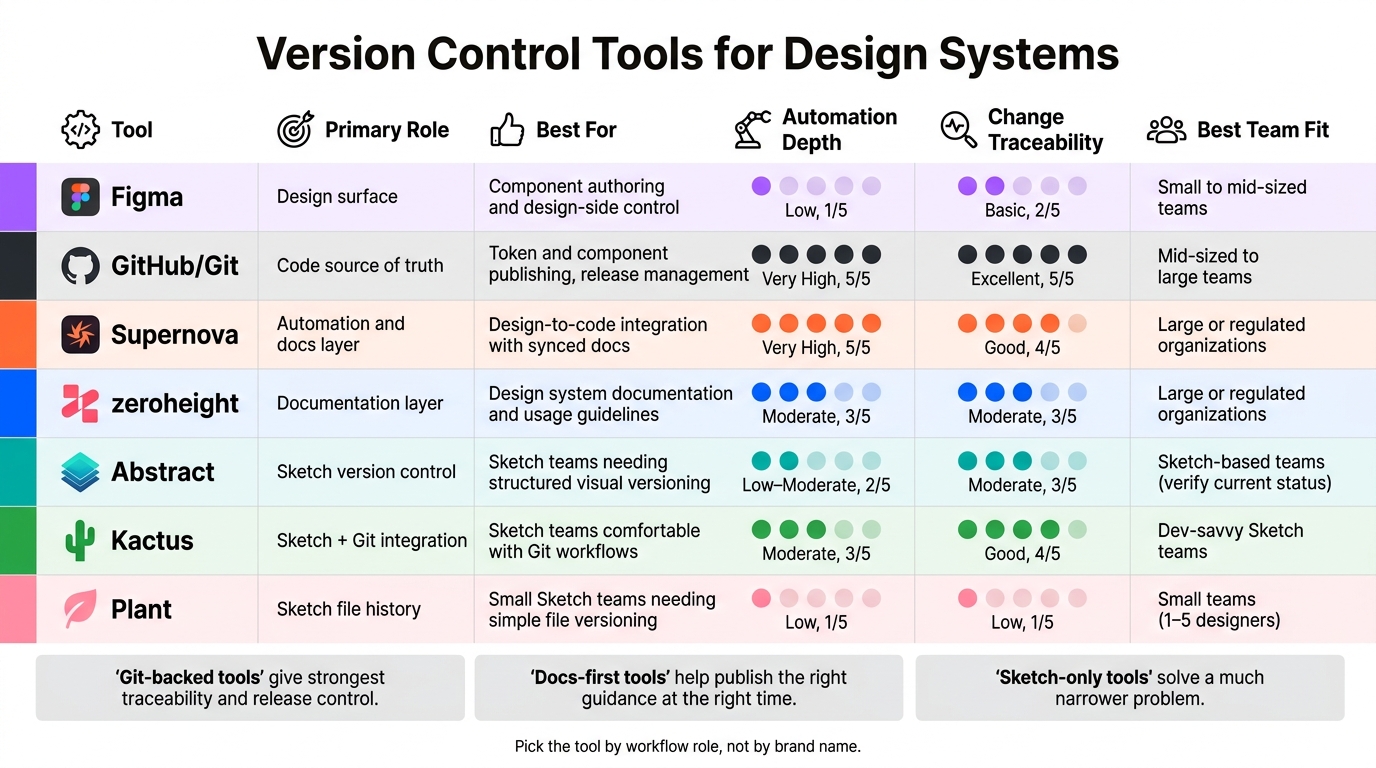
Version Control Tools for Design Systems: Side-by-Side Comparison
Quick Comparison
| Tool | Main Use | Best For | Main Limit | Release Control |
|---|---|---|---|---|
| Figma | Design-side versioning | Variables, styles, library changes | Stops at the design layer | Light, process-based |
| GitHub/Git | Shipped assets | Components, tokens, docs-as-code | Harder for non-dev users | Strong, with tags and CI/CD |
| Supernova | System versioning | Tokens, component data, docs in one system | Setup can take more work | Published versions |
| zeroheight | Docs releases | Published design system guidance | Not the source of truth for code or files | Locked doc releases |
| Abstract | Design file versioning | File history, branch review, visual compare | Check current product status | Controlled merges to Main |
| Kactus | Sketch + Git | Sketch files with text diffs and tags | Needs Git comfort | Git tags and releases |
| Plant | Sketch history | Small teams with simple Sketch libraries | Light governance and scale limits | Limited |
If I had to boil the whole article down to one line, it would be this: pick the tool by workflow role, not by brand name. That keeps design, code, and docs from drifting apart as the system grows.
sbb-itb-124fdbf
1. Figma

Figma is often the first versioning layer for design systems, but that layer lives inside the design environment. It versions variables and styles, which matters a lot for themeable systems. But that coverage stops at the design layer. Once tokens need to ship into code, release and implementation move to other tools. So Figma is strong for design-side control, but it doesn't cover end-to-end versioning.
Versioning Scope
Figma versions variables and styles inside the design environment, but it doesn't manage delivery into development. When teams need tokens to move into code, they bring in other tools.
Branching and Review
Figma branching lets teams isolate changes, review them, and merge approved updates into the main library. That's useful when design changes need a clear approval step before they go live across a system.
Design-Dev Alignment
Figma helps design and development stay aligned by giving both sides a shared source of truth. The catch is handoff. Manual handoff often leads to drift, while automated token delivery is more reliable than doing it by hand.
Release Governance
Figma helps teams keep a shared language in design, but release governance needs more than the design file alone. If a team needs traceability outside the canvas, Git-based workflows become the next layer.
When teams need version history and release control beyond the canvas, Git-based workflows take over.
2. GitHub/Git

Where Figma stops at the design file, Git handles the assets that actually ship. It becomes the system of record for design system work, especially when teams need version control for text-based assets like component code, design tokens, and documentation.
Versioning Scope
Git works best with UI components, tokens in JSON or Sass, and docs-as-code. Since these files are text-based, teams can track changes, review edits, and manage them right next to application code.
That’s the big win.
Git is less useful for binary design files, so most teams use it alongside design tools instead of trying to force everything into one place.
Branching and Review
Pull requests add a review step for component and token updates. That gives design system teams a clear way to check changes before they land.
Tools like Storybook and Lookbook make this process more practical. Reviewers can test behavior before merge, not just scan code and hope for the best.
Design-Dev Alignment
Design tokens act as the shared language between designers and developers. When those tokens live in Git as variables or JSON files, developers can use them directly across different frameworks.
Automation can also sync design tokens into the repo. That helps keep design and code in step, instead of letting them drift apart over time.
Release Governance
Git supports semantic version tags and npm releases, which gives teams control over how tokens and components roll out.
The next tools build on that base by adding documentation and release orchestration.
3. Supernova
Supernova sits in a different lane than Git or Figma. It’s a design system management platform built to manage tokens, component metadata, and documentation in one place.
Versioning Scope
Instead of tracking single files or code commits, Supernova versions the data model of your design system. When you publish a version, it captures the state of the system as a whole. That keeps tokens, component definitions, and docs aligned.
It also does a good job with complex token structures, including multi-brand setups and theme-based systems like light and dark mode. Those token sets can be versioned together, rather than split across scattered files.
Branching and Review
Supernova uses a Drafts and Versions workflow. Changes stay in draft until someone publishes a new version. That creates a clear release checkpoint before updates become official.
Design-Dev Alignment
Supernova turns design data into code-ready assets, and it versions documentation alongside those assets. That helps designers and developers work from the same source of truth and check the right documentation for each version of the system.
Release Governance
The publish-to-version model gives teams deliberate control over releases. Supernova works best as a management layer inside a broader design system workflow, especially for teams that need centralized token management and versioned documentation.
4. zeroheight
zeroheight uses a documentation-first versioning model. Figma tracks design file versions. Git tracks code. zeroheight sits in a different spot: it manages documentation releases, not design file history or code commits.
Versioning Scope
Each release is a fixed snapshot of component guidelines, usage rules, tokens, and synced assets from tools like Figma and Storybook. In plain English, teams get a clear record of what the system looked like at the moment that release went live.
zeroheight also recommends lining up documentation version numbers with the broader design system across design, code, and docs, instead of trying to match every single library or repo version one by one. That keeps the numbering easier to follow.
So, zeroheight works as a docs layer, not the source-of-truth layer for design files.
Branching and Review
zeroheight uses a draft-and-publish workflow. Editors make changes in draft mode, viewers see the published version, and releases are locked after publication.
That setup draws a clean line between work in progress and what the rest of the company should rely on.
Design-Dev Alignment
zeroheight syncs Figma assets into documentation. It also connects with Git providers to sync design tokens into code repos. And Storybook embeds let teams put live components right next to usage guidance.
When docs and tokens stay in sync, handoff gets a lot less messy. The main issue then shifts to publication control: who gets to push changes live, and when.
Release Governance
zeroheight supports centralized, federated, and hybrid governance models, along with role and permission controls to match. In a hybrid setup, a core design system team can publish official releases after component changes have been reviewed. That means only checked and approved updates make it into the published style guide.
Teams can also:
- map releases to products
- hide deprecated versions
- generate release notes
If your team needs file-level version history rather than documentation snapshots, Abstract is the better fit for that job.
5. Abstract
Where zeroheight versions documentation, Abstract versions the design files behind it. It uses a Git-like workflow for design version control, with a Main branch as the single source of truth. Abstract was built first around Sketch, and Figma integrations came later. Before you adopt it, check its current status. Some 2026 comparison sites list Abstract as discontinued or shut down.
Versioning Scope
Abstract tracks Sketch and Figma files at the layer, symbol, and artboard level. It also keeps commit history, comments, and annotations, so teams can see both what changed and why. Teams can manage libraries, flows, and handoff files in one place. That matters when a team needs file-level history, not just a saved snapshot of the whole document.
Branching and Review
Designers can work in branches without changing the stable library. Those branches move through WIP, feedback, and review states, which gives the team a clear path to approval. If two branches change the same artboard, Abstract shows a side-by-side visual comparison so designers can decide which version stays.
Design-Dev Alignment
Developers can inspect designs, check measurements, and export assets like JPG, PNG, and SVG without opening the source file. The commit history and annotations also give developers more context around intent and past decisions. That ties design reasoning more directly to handoff and implementation.
Release Governance
Each merge to Main works like a controlled release. Review requests and collections act as checkpoints before changes reach the main library. Some teams limit Main merges to maintainers, so accessibility, localization, and feasibility get checked before release.
6. Kactus
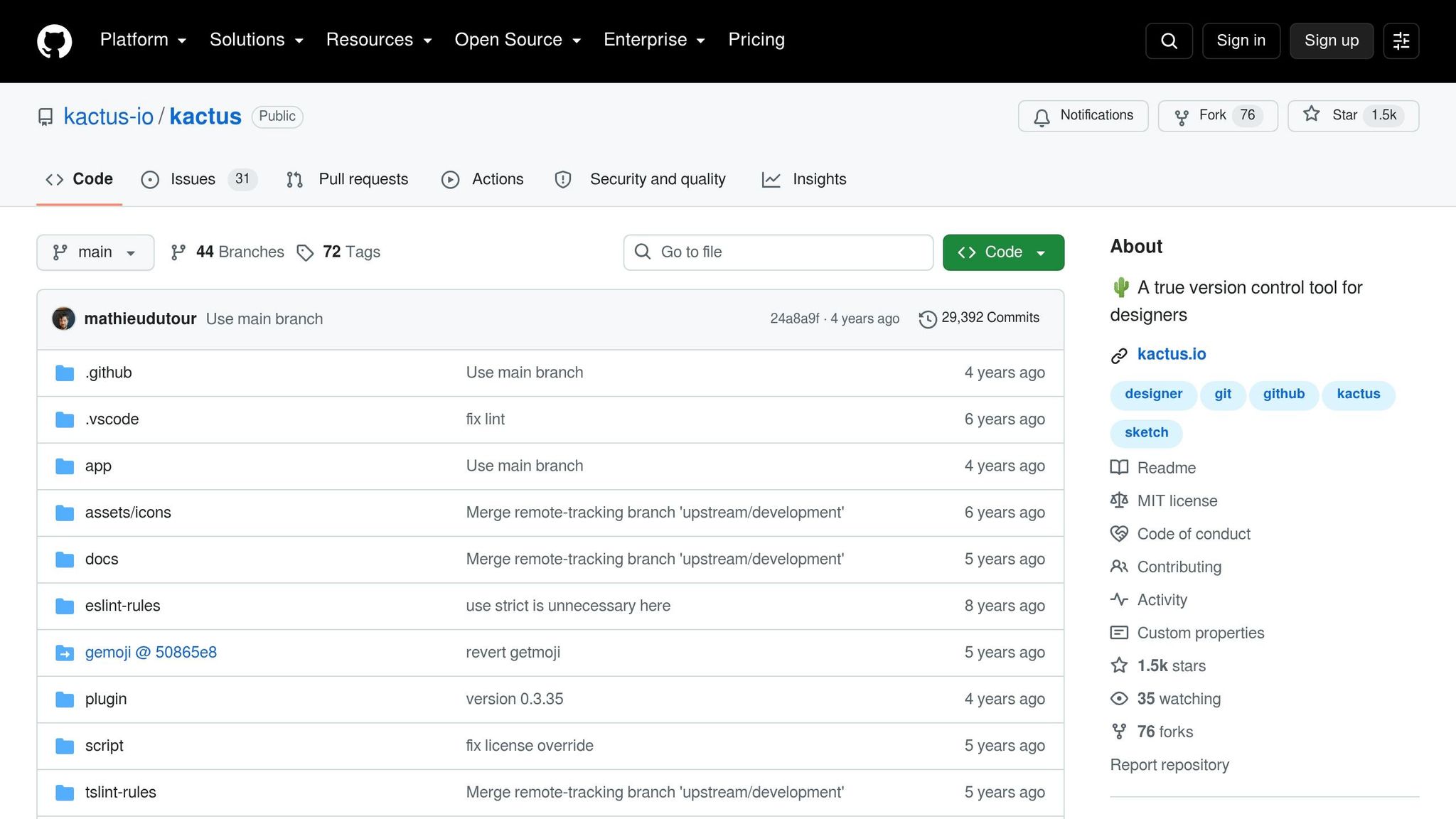
Kactus brings Git-native version control to Sketch files. If your team still works in Sketch, it adds Git-style control without forcing you to switch file formats.
Versioning Scope
Kactus converts binary Sketch files into human-readable JSON. That means standard Git can track design changes at a much more detailed level. Instead of treating a Sketch file like one big binary blob, Git can track symbols, artboards, shared styles, and layer properties as text diffs.
Change a button’s hex color, for example, and Git logs that exact property change.
Branching and Review
Designers can use standard Git workflows with Sketch files. Feature updates can sit in isolated branches, and once a change is ready, it can move through a pull request on GitHub, GitLab, or Bitbucket.
Reviewers don’t have to guess what changed. They can see text diffs for exact updates, like a color value change or a coordinate shift.
Design-Dev Alignment
Kactus lets design libraries and code components live in the same repository and move through synchronized release cycles. In plain English, design and code stay in the same release flow instead of drifting apart.
Release Governance
Kactus supports Git tags and releases, so v2.1.0 can map to one immutable Sketch state. That makes it a solid fit when Sketch is still the source file and Git is still the release system.
7. Plant
Plant covers the narrowest slice of version control: Sketch file history for design libraries. It’s a Sketch-only version control tool that tracks artboards, symbols, and shared styles inside .sketch files.
That makes Plant a good fit when the design file itself is the thing you need to manage, not the release pipeline around it. If your team lives in Sketch and wants tighter control over library files, that’s where Plant sits.
Versioning Scope
Plant tracks artboards, symbols, and shared styles inside .sketch files, which makes library changes easier to manage.
Branching and Review
Plant's branching and review workflow is not documented here, so the tool should be evaluated mainly for file-level versioning in Sketch.
Design-Dev Alignment
Plant does not show a documented design-to-development workflow, so treat it as a design-file tool, not a delivery system.
Release Governance
Plant does not document semantic versioning or release-pinning controls, so teams that need formal release governance should verify that workflow before adoption.
Strengths and Tradeoffs by Workflow
Now let’s compare these tools based on where they sit in the release workflow.
The simplest way to think about it is by workflow role. Some tools control the design canvas. Some control what ships through Git. Some control what teams read in docs. And some only track the design file itself. When teams blur those roles, things can get messy fast: overlap creeps in, version drift shows up, and handoffs turn into manual work.
Here’s the short version:
- Design-side tools control the canvas
- Git-based tools control releases
- Docs-first tools control published guidance
- Sketch-only tools control the file
The table below narrows the choice to the factors that matter most: automation, traceability, and workflow fit.
| Tool | Primary Role | Distinguishing Trait | Key Tradeoff | Automation Depth | Change Traceability | Best Fit |
|---|---|---|---|---|---|---|
| Figma | Design surface | Token and variable versioning inside the design environment | Governance is process-driven, not enforced | Low (plugin-dependent) | Basic file history | Component authoring and design-side control |
| GitHub/Git | Code source of truth | Semantic version tags, protected branches, CI/CD release control | High technical barrier for non-developers | Very high | Excellent | Token and component publishing, release management |
| Supernova | Automation and docs layer | Continuous Figma-to-Git token sync with versioned documentation | Complex setup; strict Figma naming required | Very high | Good | Design-to-code integration with tightly synced docs |
| zeroheight | Documentation layer | Draft-and-publish doc releases with embedded Storybook components | Limited code automation; no token pipeline | Moderate | Moderate | Design system documentation and usage guidelines |
| Abstract | Sketch version control | Git-like branching with visual conflict resolution for Sketch files | Sketch-only; verify current status before adopting | Low–Moderate | Moderate | Sketch teams needing structured visual versioning |
| Kactus | Sketch + Git integration | Layer-level text diffs for Sketch via JSON conversion | Requires Git proficiency; conceptually complex for designers | Moderate | Good | Sketch teams comfortable with Git workflows |
| Plant | Sketch file history | Lightweight adoption for basic Sketch library versioning | No branches; limited scalability | Low | Low | Small Sketch teams needing simple file versioning |
Automation is the clearest dividing line. A Figma + Supernova + GitHub stack gives teams the deepest automation: tokens move from Figma into Git, and docs stay in sync. A Figma + zeroheight stack gives up some of that in exchange for a setup that’s easier to get live and easier for stakeholders to use.
Sketch-only tools are much more narrow. Abstract gives the strongest structure of the three. Kactus feels more familiar to developers who already work in Git. Plant is the easy on-ramp, but that simplicity comes with limits once a team grows.
Traceability follows the same pattern. Git-backed tools - GitHub on its own, or Supernova and Kactus when they write to Git - give the clearest record of change. Figma and zeroheight are lighter here. Plant is the weakest of the group. Those tradeoffs shape which stack makes sense for each kind of team.
Which Tool Fits Your Team: Recommendations and Conclusion
Choose based on team size and governance needs.
Start with the workflow role from the previous section, then match it to your team size and the level of control you need.
| Team Scenario | Recommended Stack | When to Upgrade |
|---|---|---|
| Small team (1–5 designers) | Figma + manual Git release tags | Moving from ad hoc styles to shared tokens and release history |
| Mid-sized team (6–20 designers + devs) | Figma branching + Git repositories | When you need to automate token distribution and reduce manual synchronization between design and code |
| Large or regulated U.S. organization | Supernova or zeroheight + Git | When multi-brand theming, release governance, or accessibility audits become requirements |
For small teams, a more structured stack often adds more work than help. Figma covers the day-to-day design work, and manual Git release tags give you a simple way to track releases. The downside is pretty plain: governance depends more on team habits than on the toolset.
For mid-sized teams, things change once design and code start drifting apart. If both need to ship on a steady cadence, you need more structure. Figma branching makes parallel work easier, and Git repositories add reviewable history for token and component releases. Pull requests help teams track and review changes without bringing in another platform.
For large or regulated U.S. organizations, release control usually has to be tighter across products and brands. At that point, accessibility auditing and release snapshots become part of core governance. Supernova or zeroheight plus Git can support multiple products, platforms, or brands with versioned docs and controlled releases. Supernova helps teams build, mature, and scale design systems through centralized documentation and management.
As systems grow, version control needs to move beyond file history and into governed releases.
FAQs
Which tool should I start with?
Start with Figma if you need real-time collaboration and a simple way to keep design specs aligned. Its commenting and version history make it easier to track feedback as the team works through each round of changes.
If you want to test reusable components before they go live, add Storybook. And for dependency and version security in your design system code, begin with NPM. It’s easy to get started with and comes with an audit command built in.
When do I need Git in my stack?
You need Git when you treat design system assets like code that changes over time.
It helps you manage iterations, cut down on miscommunication, and support branches and experiments before you merge work back into the main spec.
Git also matters when you want one trusted source for design docs and components. That way, your design system can stay in sync with repositories, and design and development stay aligned.
How do I prevent design and code drift?
Centralize design files, code, and documentation in shared, version-controlled sources. Put design files under the same kind of version control mindset you use for code, use consistent versioning so changes are easy to track, and automate updates so teams stay on the same component versions.
It also helps to audit tokens, components, and docs on a regular basis. Update documentation as work happens, not weeks later, and build in feedback loops plus release checkpoints so decisions are recorded and still make it through when branches merge.