
AI Bias in UX Design: Problem-Solution Map
Map practical checks to detect and fix AI bias in UX: review suggestions, error recovery, access barriers, and feedback loops.


I start AI bias reviews with four checks: who gets shown, who gets errors, who gets blocked, and whose reports lead to fixes. For each, I trace the cause, choose a fix, and test whether it reduces harm.
Here’s how I map those problems to action:
- Skewed suggestions: Check ranking and screen layout separately, then let users change or turn off personalization.
- Uneven errors: Compare error rates across user groups, preserve entered data, and offer correction or human review.
- Blocked access: Test critical tasks with keyboards, screen readers, supported languages, and a non-AI route.
- Weak feedback loops: Make reporting easy, assign review owners, and measure whether fixes resolve reported harms.
I compare results before and after release, tracking task completion, recovery time, and reports per 1,000 interactions. My rule: <u>test outcomes, not just controls</u> - and remove AI from a task when the remaining risk is too high.
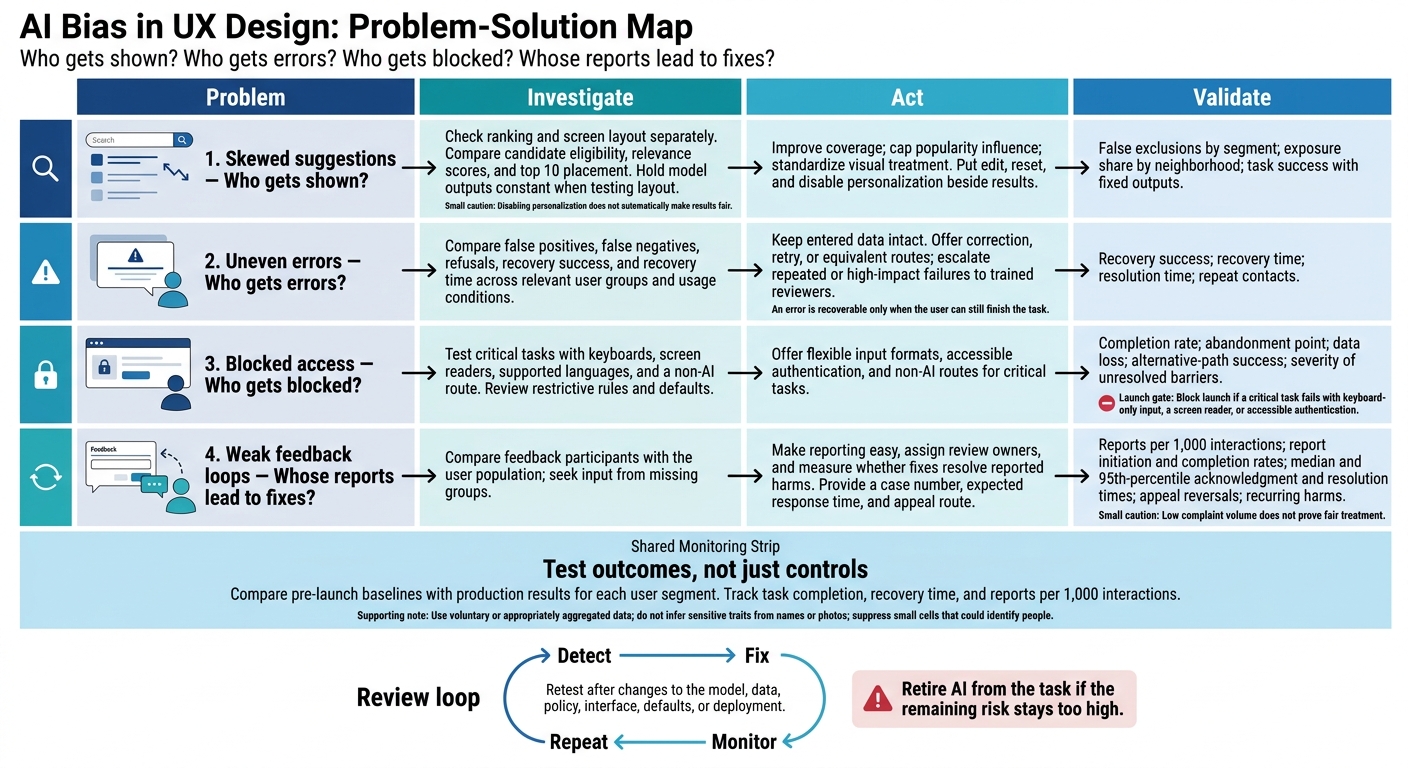
AI Bias in UX Design: Problem-Solution Map
Skewed Suggestions: Review Rankings and Personalization
First, consider the future of UX and AI to check whether the interface shows the right options at all.
Historical clicks measure attention - not necessarily quality. Recommendations and search results can favor groups already well represented in the data. That extra exposure can then reinforce future rankings. Missing language, geographic, or accessibility information can also make qualified providers seem less relevant. Check exposure first, layout second, and user control third.
Hypothetical example: NeighborHelp service directory. A search for “family dentist near me” ranks a downtown provider with more historical clicks above a provider in a lower-visibility neighborhood with equally relevant insurance coverage and availability.
Separate Model Errors From Display Effects
Compare candidate eligibility, relevance scores, and top 10 placement before reviewing the layout. Audit geographic, linguistic, demographic, disability, and behavioral segments, including intersections where sample sizes allow. Use voluntary or appropriately aggregated data. Do not infer sensitive traits from names or photos, and suppress small cells that could identify people.
Next, hold model outputs constant while testing ordering, labels, card sizes, and map prominence. A neutral layout helps show whether the interface makes an existing gap worse.
Use the following checks to separate ranking bias from display bias.
| Bias signal | Likely cause | UX risk | Design response | Validation measure |
|---|---|---|---|---|
| Qualified providers never appear in results | Data/model: missing coverage | Relevant options disappear | Improve coverage | False exclusions by segment |
| Popular neighborhoods dominate rankings | Ranking: raw clicks outweigh verified relevance | Prior visibility looks like superior quality | Cap popularity influence | Exposure share by neighborhood |
| Similar scores, unequal visibility | Display: unequal visual prominence | Users overlook suitable options | Standardize visual treatment | Task success with fixed outputs |
Give Users Control Over Recommendations
After separating ranking from layout, give users a direct way to correct the inputs that shape their results.
Place edit, reset, and disable personalization beside the results - not just in account settings. Let users change location, language, price, accessibility needs, and availability, or sort by explicit criteria such as distance. Explain the actual ranking reasons in plain language, and provide a direct way to change the relevant preference. Disabling personalization should remove history-based tailoring, but it does not automatically make results fair. Fix the ranking rather than relying on a workaround.
Test whether affected users can find these controls, use them with keyboards and screen readers, and understand how results change. Measure discovery time, successful resets, relevance, option visibility, the number of distinct qualified providers shown, and task completion - not clicks alone.
For high-impact or disputed recommendations, offer trained human review with access to relevant inputs and ranking history. Set a service-level target, such as a response within two business days. Record the decision, rationale, escalation path, and outcome. Retest ranking changes separately from control changes, including multilingual searches, areas with sparse data, and personalization opt-outs.
sbb-itb-124fdbf
Uneven Errors and Blocked Access: Offer Other Paths
Fairer recommendations still fall short if users can’t finish a task after an error. An error is recoverable only when the user can still finish the task. Users may be able to edit a transcription. But unsupported language detection, accent-related voice errors, inaccessible identity checks, and device-locked flows can leave them stuck.
After identifying a failure, test whether users can recover without losing their progress.
Test Error Recovery Across User Groups
Measure false positives, false negatives, refusals, recovery success, and recovery time by language, accent, disability, device, and input method. Break down test results by relevant, lawfully collected characteristics and usage conditions.
Keep entered data intact and offer correction, retry, or equivalent routes. Send repeated or high-impact failures to trained reviewers who can override decisions and accept equivalent documents or proof. Track resolution time and repeat contacts. Never treat model uncertainty as user misconduct.
| Failure response | Transparency | User control | Accessibility | Cost |
|---|---|---|---|---|
| Opaque failure | Very low; gives little or no explanation | Very low; provides no clear next step | Often poor because assistive technologies cannot expose hidden state | Low upfront, high support cost |
| Generic fallback path | Low to moderate; acknowledges failure but gives limited context | Low; usually offers only a broad retry | Better if the fallback fully supports keyboards and screen readers | Low to moderate; best for low-impact failures |
| Guided correction | High; identifies the likely issue and explains how to fix it | High; preserves data and offers retry, editing, or an equivalent route | Strong when instructions, fields, status messages, and controls meet WCAG requirements | Moderate; best default for recoverable errors |
| Human escalation | High when the reviewer can explain and resolve the issue | Very high; provides an alternative with authority to resolve the issue | Strong if contact channels support text, voice, relay, and accessible documents | Highest per case; reserve for repeated or high-impact failures |
Remove Barriers in Access Rules and Defaults
Rules and defaults create bias problems when they stop some groups from finishing a task. Review mandatory phone numbers, rigid legal-name matching, binary gender options, country restrictions, recent-device checks, and English-only instructions. For each rule, ask whether it’s needed, acts as a proxy for a sensitive trait, or collects sensitive information the task doesn’t require.
Offer available languages, text and manual input, flexible name and address formats, accessible authentication, and non-AI routes for critical tasks.
Run end-to-end tests with disabled participants and representative assistive technologies. Block launch if a critical task fails with keyboard-only input, a screen reader, or accessible authentication. Record completion rate, abandonment point, time on task, number of assistance requests, data loss, alternative-path success, and the severity of unresolved barriers.
Then remove AI entirely to check that the core workflow still works.
Test Task Completion Without AI
Turn off AI and test whether users can enter information, understand requirements, correct mistakes, authenticate, and finish. Include older devices, limited connectivity, supported languages, keyboard-only input, and screen readers.
Compare completion, abandonment, data loss, error recovery, support requests, and time to recovery with the AI-assisted route. Similar outcomes across demographic groups don’t establish fair treatment if the process is inaccessible to everyone.
Hypothetical small-business booking test: A small-business owner attempts to reserve a commercial service appointment, but automated identity verification rejects the owner because the business record uses a shortened name and the owner’s government document uses a different format. Preserve the reservation details, explain the mismatch, allow manual entry or an alternative document route, provide text-based or human review, and hold the booking without penalty. Test the same journey across languages, accents, disabilities, devices, connectivity levels, and name formats. Report reservation completion, verification refusal, recovery success, abandonment, escalation time, and alternative-path use.
Weak Feedback Loops: Improve Reporting and Review
Users need a way to report problems - even when they fail or abandon a task. Low complaint volume does not prove fair treatment. Feedback often leaves out power users, dropouts, and people who fear retaliation. These gaps can hide bias, even when recommendations, recovery flows, and access rules look acceptable.
Separate Feedback Signals From Quality Measures
After errors and blocked paths, feedback provides another way to spot problems. Measure satisfaction, task success, safety, accessibility, and equity separately. Clicks, dwell time, and acceptance tell you different things; none tells the whole story.
Compare feedback participants with the user population. Then seek input from missing groups through privacy-conscious interviews, usability tests, and support-ticket reviews.
| Feedback source | Bias risk | Appropriate use | Review requirement |
|---|---|---|---|
| Passive behavior | Acceptance may reflect limited choice | Friction and abandonment | Validate against task success, safety, and accessibility |
| Ratings | Satisfied users may dominate | Perceived usefulness | Check response rates and missing groups |
| Corrections | Technical skill may skew submissions | Specific errors | Verify accuracy; screen for abuse and sensitive data |
| Appeals | Difficult reporting paths exclude users | Harms with serious effects | Assign reviewers; document decisions and response times |
| Targeted user testing | Recruitment may miss relevant contexts | Underrepresented users’ outcomes | Record consent, accommodations, and conditions; retest changes |
Do not feed raw reports directly into training. If reuse is allowed, require consent, verify corrections, remove sensitive data, and set access and retention limits.
Assign Review Owners and Retest Changes
Feedback needs a named owner and a clear review process. Put a clearly labeled report control near AI outputs. Support keyboard access and screen reader labels, and offer another contact route. Give users a case number, an expected response time, and a way to appeal.
Assign named owners for triage, investigation, mitigation, and user updates - and give them authority to act. Set response targets based on severity. Keep a privacy-protecting audit trail of decisions, unresolved harms, and remaining risk.
Retest after any change to the model, data, policy, interface, defaults, or deployment. Use a versioned baseline and newly reported failures. Track report rates per 1,000 interactions, report initiation and completion rates, median and 95th-percentile acknowledgment and resolution times, appeal reversals, and recurring harms.
Compare these measures with task success and safety outcomes for each user segment. Fewer reports may mean things improved - or that users stopped trying. For every change, check whether each mitigation still works for the group it was meant to help.
Conclusion: Repeat Bias Reviews After Release
After launch, use the same map again: detect, fix, monitor, repeat. Keep updating it as you recheck affected users, harms, and outcomes for each segment.
When a new issue appears - skewed suggestions, uneven errors, blocked access, or weak feedback loops - match each harm to the narrowest fix that works. Retire AI from the task if the remaining risk stays too high. Monitoring plans should cover recovery, override, and retirement.
Compare production results with pre-launch baselines. Keep assumptions, limits, decisions, remaining risks, owners, and the next review date in one record, and make repeat reviews a standing responsibility.
FAQs
How can I audit AI bias with limited user data?
Look beyond aggregate metrics. Test edge cases and scenarios involving underrepresented groups. Run the same queries across employee, manager, and auditor accounts to check whether the system treats users consistently and fairly.
Use ethnographic research, international user testing, and cultural prompting to identify local needs and align responses with local values. Track hesitation before clicks and error rates for signs of frustration. These patterns may point to bias even when overall engagement stays stable.
Which AI bias issues should I fix first?
Focus bias testing on critical user flows. Test varied, representative scenarios to spot advantages or disadvantages that affect specific groups. Address skewed suggestions and blocked access that undermine users’ control and trust. Use confidence thresholds above 80% and provide clear manual overrides.
Use dashboards to track fairness metrics across demographic groups. Make error recovery specific and actionable so users can fix issues without restarting or losing their task context.
How do I decide when AI is too risky to use?
Assess the task and what its outcomes could affect. Don’t fully automate high-stakes decisions. Have users review and approve AI outputs instead. When AI encounters ambiguity or uncertainty, provide detailed explanations or a manual fallback rather than letting it guess.
Be clear about how decisions are made. If you can’t explain the reasoning behind a decision or identify its data sources, AI may be too risky for that application.