
How APIs Improve Cross-Team Collaboration
Make handoffs clear, automatic, and measurable—map workflows, pick the right API pattern, and track cycle time, errors, and manual touches.


Most cross-team delays come from handoffs, not the work itself. When teams use separate tools and only 29% of 1,061 apps are connected on average, work gets stuck in email threads, spreadsheets, and status checks.
Here’s the short version: APIs help teams move data between tools without manual copy-paste, but they only work well if I first map the workflow, pick the right connection pattern, define clear triggers and field rules, and track whether handoff time and error rates go down.
If I want this to work, I should focus on:
- One workflow first, not every department at once
- Teams, tools, and handoffs involved in that flow
- Clear metrics like cycle time, sync errors, and manual touches removed
- API fit such as webhooks, access scope, rate limits, and logs
- A simple integration pattern that matches the workflow
- Visible status, ownership, and history so people know what happened
- Retries, alerts, and idempotency so failures don’t create duplicate work
- Post-launch feedback from both technical and non-technical teams
A few numbers stand out: teams with mature API connections often cut manual cross-tool updates by 30% to 70%, and some handoffs drop from days to minutes when updates run on events instead of meetings.
Below, I’d treat the article as a practical guide for one goal: make handoffs clear, automatic, and easy to track.
Map the Workflow Before You Build Anything
Map how work moves between teams as it happens today - not how the process looks on a slide deck, but how people do it day to day.
A good way to do this is to run a 60–90 minute workshop with each team involved. Ask them to walk through one workflow from start to finish. If a deal closes, what happens next? Who finds out first? Which tool gets opened first?
Write each step as a workflow event, like customer signs contract or support ticket escalated to engineering. Then mark the moments where ownership changes, status gets stuck, or context disappears. If two people describe the same workflow in different ways, that's not a small detail. Map it before you automate anything.
Once the workflow is on the page, list every team, tool, and handoff involved.
List the Teams, Tools, and Handoffs Involved
Start with one high-value workflow, such as closed deal to implementation kickoff. For each team that touches it, note the tool they use and what they pass to the next team.
In a common sales-to-implementation handoff, a sales rep closes a deal in a CRM, then emails the implementation team a PDF or spreadsheet with contract details. That's a manual handoff, and it's often an easy place to start.
Document each handoff in a simple format:
- Team → Tool → Artifact → Next Team
- Example: Sales → CRM → contract details spreadsheet → Implementation
This makes it easier to spot where an API can take over work that people are doing by hand. Also track wait time. A 5-minute approval that sits for 3 days is still a 3-day delay.
Turn Pain Points Into Clear Success Metrics
Look for the steps that cause the most friction: copy-paste work, unclear ownership, and delays. For each one, ask two plain questions: What failure does this create today? And how will we know it's better?
That turns vague complaints into something you can track. A manual CRM-to-project-management copy step can become:
- Reduce manual data entry errors on customer records from 10% to 2%
- Cut average cycle time from 5 business days to 3
Get your baseline numbers now. Pull timestamps from your CRM, use error counts from quality audits, or keep a one- to two-week log of manual work. Without that starting point, it's hard to tell whether the integration fixed anything.
Those metrics are what tell you if the automation is doing its job.
Include Internal UX Requirements Early
APIs don't help much if people using internal tools can't tell what's going on.
While mapping the workflow, define how someone will know where a piece of work stands, what happened to it, and who owns it. Set the status states, choose the system of record, and decide what activity history needs to be visible.
That usually means agreeing on states like New, In Progress, Blocked, Waiting on Customer, and Done. It also means deciding which history people need to see, such as status changes, handoff times, and customer replies.
When status, ownership, and history are clear, teams spend less time chasing updates and sitting through extra meetings.
These are design requirements. They shape how APIs expose data and how internal interfaces show it. They should guide the integration from the start - not get bolted on later.
sbb-itb-124fdbf
Choose the Right APIs and Integration Approach
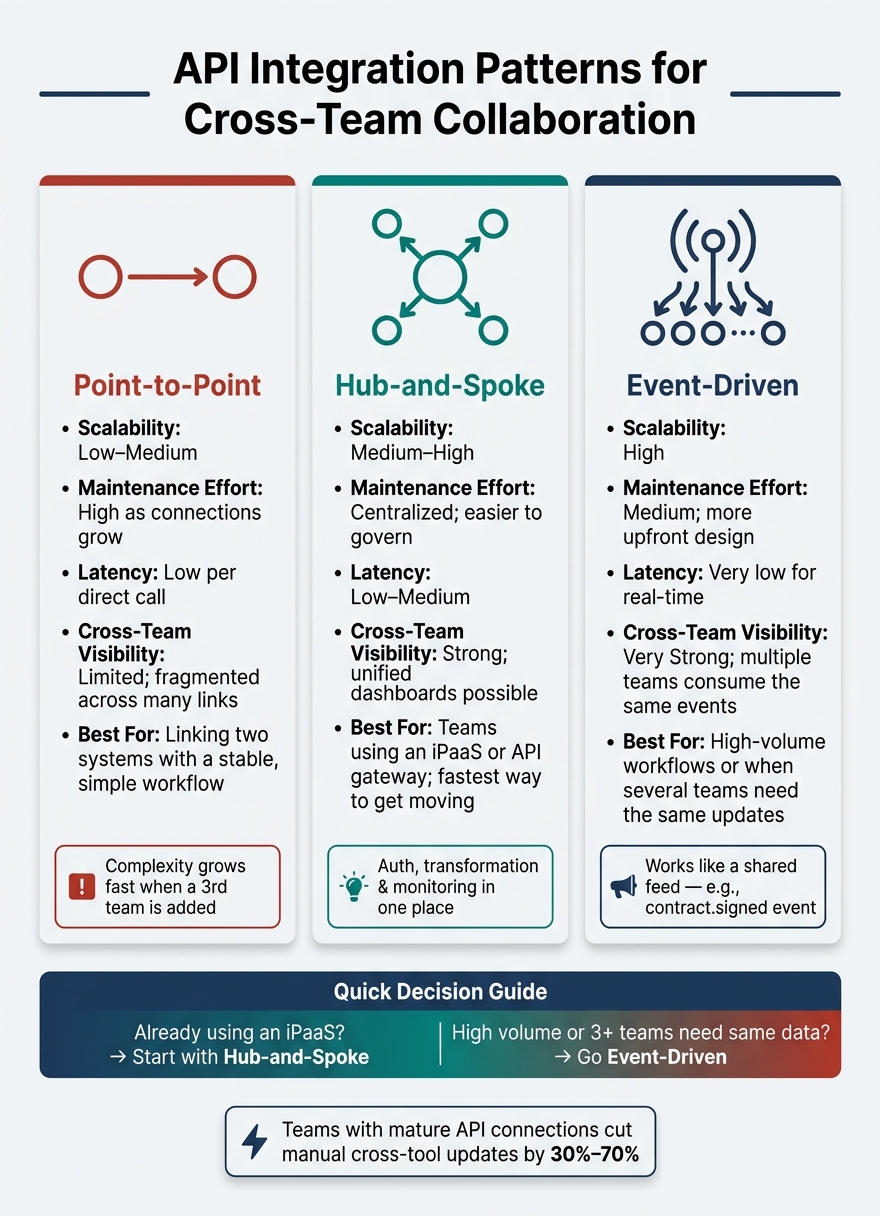
API Integration Patterns for Cross-Team Collaboration: A Visual Comparison
Once you've mapped the workflow and set your success metrics, the next step is simple: pick the APIs that can handle the job and decide how they'll connect. Do that before you build the first handoff.
Check API Capabilities That Affect Collaboration
Not every API works well for cross-team processes. A read-only API might be fine for a dashboard. But if the workflow includes approvals, status changes, or handoffs, you need create, read, update, and delete access to the shared records behind that workflow.
If you don't have that, people usually end up copying data by hand to patch the gaps.
Four capabilities have the biggest impact on whether cross-team automation holds up:
| API Capability | Why It Matters for Cross-Team Work |
|---|---|
| Webhooks / event notifications | Push real-time updates when something changes, so teams aren't working from stale data |
| OAuth 2.0 / scoped API keys | Let different teams use the same integration through service accounts or scoped credentials without giving too much access |
| Rate limits (documented) | Help avoid silent failures during busy periods like month-end closes or product launches |
| Audit logs / correlation IDs | Show which system triggered a change and when, which matters when tracing ownership across departments |
Audit logs and correlation IDs matter even more once automation takes over manual handoffs. At that point, people need to see what happened without digging through guesswork. Choose APIs that expose status fields, readable error payloads, and request history so internal users can trust the flow.
Match Integration Patterns to Workflow Complexity
For the handoffs you mapped earlier, pick the pattern that fits the level of complexity. That choice shapes both maintenance cost and how easy the workflow is to see across teams.
| Integration Pattern | Scalability | Maintenance Effort | Latency | Cross-Team Visibility |
|---|---|---|---|---|
| Point-to-point | Low–Medium | High as connections grow | Low per direct call | Limited; fragmented across many links |
| Hub-and-spoke | Medium–High | Centralized; easier to govern | Low–Medium | Strong; unified dashboards possible |
| Event-driven | High | Medium; more upfront design | Very low for real-time | Very strong; multiple teams consume the same events |
Point-to-point is fine when you're linking two systems and the workflow doesn't change much. But as soon as a third team needs the same data, you add yet another custom connection. That's where things start to pile up.
Hub-and-spoke, often set up through an iPaaS or API gateway, puts auth, transformation, and monitoring in one place. That makes the setup easier to manage.
Event-driven takes a different route. Instead of one system calling another directly, it publishes events like contract.signed or ticket.escalated. Any team's system can subscribe on its own. Think of it like a shared feed instead of a chain of one-off calls.
If your team already uses an iPaaS, hub-and-spoke is often the fastest way to get moving. If you're handling high-volume workflows or several teams need the same updates, event-driven can be the better fit, even if it takes more design up front.
Pick the First Workflow to Automate
Don't wire up every department at the same time. Start with one workflow that is frequent, painful, and easy to measure. The best first target usually has a clear baseline, a high manual cost, and happens every day or every week. It should also include a clean handoff between two teams and a business cost you can put a number on.
A good first candidate usually has a few traits:
- One team owns the workflow
- The data model is already understood
- Only two or three systems are involved
For example, automating the handoff from a signed contract in your CRM to a provisioning request in your internal admin tool is contained enough to launch fast and visible enough to show value.
Give one team ownership of requirements, results, and exceptions. Otherwise, decisions can get stuck between departments.
Keep the first release narrow. That tight scope gives you a workable trigger, a defined data flow, and a clear ownership model for implementation.
Implement API-Based Handoffs and Automation
With the workflow and APIs picked, focus on three areas: data mapping, secure automation, and failure handling. Use the field map and success metrics from the planning stage to steer the build.
Map Data Fields and Define Trigger Events
Turn the workflow map into field-level rules. Get both teams in the room and map the fields that need to move between systems. Start with the business basics: record IDs, external IDs, status values, owner or assignee, timestamps, priority, and any custom fields the target system needs to process the handoff the right way. Standardize formats and ID matching across systems.
You also need conflict rules before anything goes live. If the same field lives in both systems and the values don’t match, decide which system is the source of truth for that field and write that rule down.
After the fields are mapped, define the trigger events. Tie them to business moments that call for a handoff, like a deal closing, a high-severity ticket escalation, renewal risk detected, approval completed, or a project milestone reached. Event-based triggers keep the handoff tied to something that actually happened in the business. Document the exact payload each event sends.
Once the trigger is set, lock down access and logging before launch.
Set Up Secure, Observable Automations
Apply least-privilege access from day one. Give each workflow only the permissions it needs. Scope every API key or OAuth token to the smallest set of endpoints and methods required. If a workflow only reads data, use read-only access. Store credentials in a secret manager, rotate tokens on a set schedule, and revoke them when the integration is retired or a partner relationship ends.
Security and traceability need to be part of the build, not something you bolt on later. Log each step with structured data: event, time, source system, result, and a business key like a deal ID or ticket number. Send errors to the places your teams already watch, whether that’s an incident channel, a ticket queue, or a shared dashboard.
Silent failures can break handoffs for days before anyone notices.
For retry logic, sort failures before retrying them. Transient errors, such as timeouts, rate-limit responses, and 503s, are safe to retry with exponential backoff and jitter. Permanent errors like 401s or validation failures should never be retried on autopilot; they need human review. Use idempotency keys on write operations so a retry doesn’t create a duplicate record or fire the same downstream action twice.
Then document the automation so every team knows what the workflow does.
Common Automation Scenarios to Document
Keep the workflow in a shared table that every team can read. The goal is simple: one live reference that shows what the automation replaced and what result it should improve.
| Workflow | Trigger | Source System | Target System | Success Metric |
|---|---|---|---|---|
| Sales-to-delivery handoff | Closed-won deal | CRM | Project tool | Delivery project created with the right owner and due date |
| Support-to-engineering escalation | High-severity ticket escalated | Help desk | Engineering tracker | Engineering issue created with the correct severity and owner |
| Renewal risk alert | Renewal risk detected | Customer success platform | Account management CRM | Account owner notified |
| Finance approval handoff | Approval completed | Approval workflow tool | ERP or billing system | Invoice or order record updated without manual entry |
Update it as workflows change.
Measure Results and Improve the Workflow Over Time
Track Collaboration Metrics That Reflect Real Work
Once the automation is live, don't fall into the trap of tracking only uptime or API request volume. A dashboard with 10,000 API requests a day shows the integration is active. It does not show whether work is moving faster between teams.
Before launch, record a baseline for handoff time, manual touches, mismatch rate, and workaround use. Stick to the same workflow and handoff definitions you mapped earlier so your before-and-after data lines up.
After launch, measure the change from that baseline. Focus on the handoff you automated, not the API by itself. The metrics that matter most are cycle time, manual handoffs removed, sync error rate, exception resolution time, and share of work completed through the automated path. If the workflow touches customers or heavy operations work, also track:
- SLA adherence
- Rework rate
- Time spent waiting for another team's approval
- Time spent waiting for data correction
Numbers tell you what changed. Feedback tells you why.
Use Team Feedback to Refine the Internal Experience
Engineers and non-technical users tend to spot different problems, so you need input from both. Short post-launch interviews, in-tool feedback forms, ticket trends, and periodic workflow reviews each show a different part of the picture.
When you group feedback, sort it by frequency and business impact. For example, if 20 support agents say a sync failure message doesn't make it clear whether a ticket was created, that's not a small wording issue. It's a high-priority fix because it creates repeat confusion and pushes people back into manual fallback steps every time it happens.
Internal UX shapes whether teams trust the automation enough to use it every day. Use feedback to spot where people still lose context, second-guess the system, or switch back to manual work. Post-launch fixes often focus on:
- Clear error messages
- Visible status history
- Ownership labels
- Recovery steps that help people fix issues without guesswork
Conclusion: Start Small, Make Handoffs Visible, Then Expand
Use both metrics and feedback to decide whether to expand. Move forward only after the pilot shows measurable gains, like lower cycle time, fewer manual steps, and steady exception handling, and after the team trusts the automation enough to depend on it every day. APIs improve cross-team collaboration most when integration logic, process design, and the internal user experience are treated as one system instead of three separate parts.
FAQs
Which workflow should I automate first?
Start with the workflow in your internal tools that gets repeated the most and breaks the easiest when people handle it by hand. In most teams, that means approvals, task assignments, data entry, or notifications.
If you’re picking an API pattern, start with asynchronous, non-blocking follow-on work. Good examples include invoice creation, lead enrichment, or subscription renewals. That approach usually gives you better responsiveness and safer retries.
How do I know if an API is enough for this handoff?
An API is usually enough if it supports the full workflow and can deal with failures in a reliable way. Start by mapping the workflow and the systems it depends on.
Then check for a few things that matter in day-to-day use: timeouts, retry logic for transient errors, idempotency keys to avoid duplicate actions, and observability for latency, error rates, and circuit breaker events.
If those pieces are missing, you’re more likely to run into integration bottlenecks or failures that seem to come out of nowhere.
What metrics should I track after launch?
After launch, track technical, usage, and experience metrics to make sure your integrations and tools are doing their job.
Here’s a simple way to think about it:
- Technical: latency (p95/p99), error rates, retry counts, circuit breaker changes
- Usage: login frequency, feature adoption, time saved, error reduction
- Experience: NPS, support tickets, design cycle time, defect rates, revision requests, task success, customer effort
This mix gives you a clearer picture. Technical metrics tell you if the system is stable. Usage metrics show whether people are using what you shipped. Experience metrics reveal what those numbers can miss: whether the product feels smooth, useful, and easy to work with day to day.