
Data Sharing Risks in Collaboration Tools
Fast sharing often beats safe sharing—use MFA, RBAC, DLP, sensitivity labels, retention limits, and audits to curb oversharing.


Most data sharing risk in collaboration tools comes from normal work, not from advanced attacks. If I had to boil this down to one point, it’s this: fast sharing often beats safe sharing, and that leaves files, chats, links, recordings, and guest access open longer than people think.
Here’s the short version:
- People share sensitive data all the time. 71% of workers say they’ve shared sensitive or business-critical information in collaboration tools.
- Attacks are climbing. Attacks on collaboration tools went up 7% in 2024, and 44% of organizations said attacks increased year over year.
- Oversharing is a big part of the problem. About 16% of business-critical files are open to people who should not have access.
- Risk hides in everyday features. Chat, shared links, file uploads, meeting recordings, transcripts, and AI summaries can all expose private data.
- The main weak spots are simple: permissions, data leakage, and long retention.
- The fix is also simple in concept: use MFA, SSO, RBAC, DLP, labels, short retention windows, audit reviews, and tighter guest rules.
What I see in this article is a clear pattern: one wrong link setting, one old guest account, or one recording left in shared storage can turn normal teamwork into a security problem. And because these actions look harmless, they often stay in place for months.
The core takeaway: make safe sharing the default. That means fewer public links, less standing access, more review of shared spaces, and better controls around chats, files, and meetings.
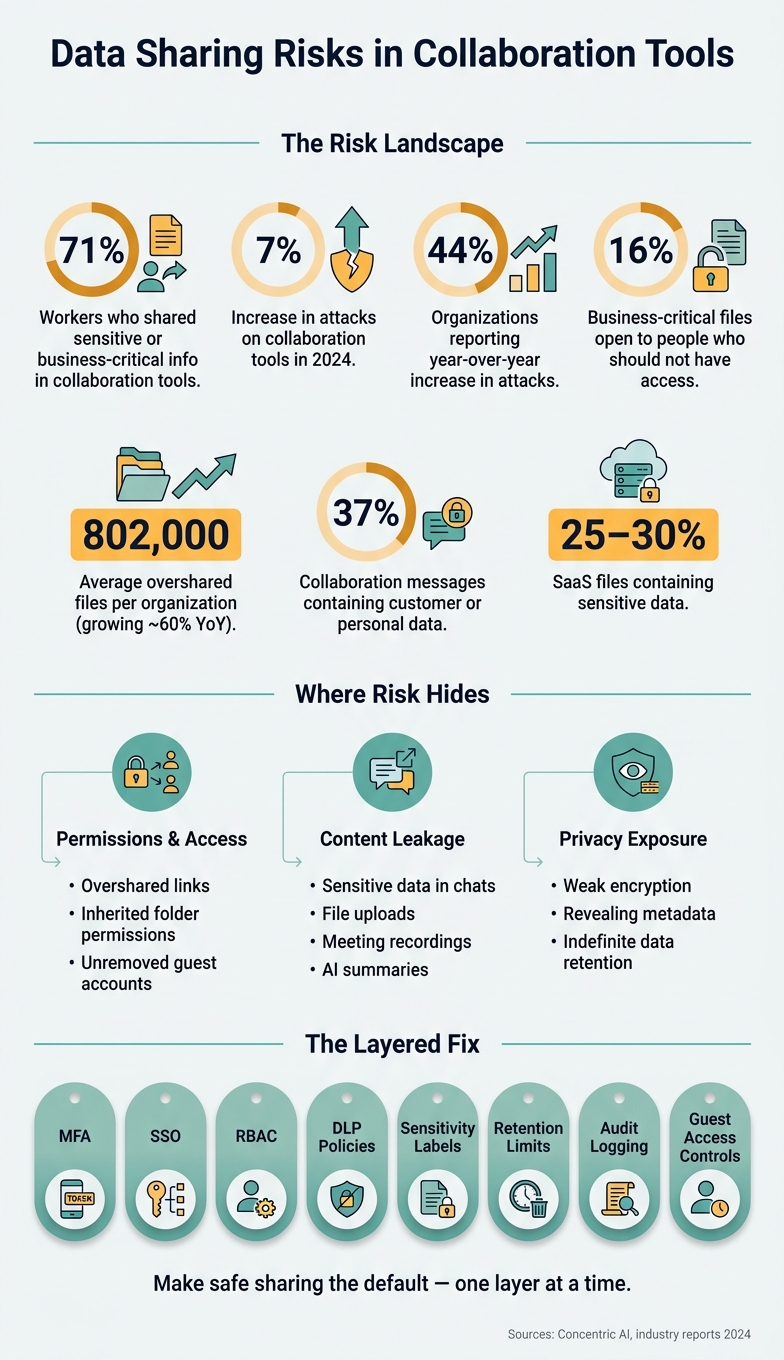
Data Sharing Risks in Collaboration Tools: Key Stats & Safeguards
The main data sharing risks
These risks land in three buckets: permissions, content leakage, and privacy exposure.
Oversharing, persistent access, and weak permission boundaries
Data exposure often begins with one permission setting that nobody checks.
Link-based sharing is the most obvious case. A forwarded link can end up with the wrong person, and it’s hard to track where it went after that. Reviews of enterprise setups show that about 16% of business-critical files are open to people who should not have access. Another report says organizations have about 802,000 overshared files on average, and that number is growing by roughly 60% year over year.
Inherited permissions make the problem spread fast. In tools like SharePoint, Teams, Confluence, and Notion, one parent folder with the wrong setting can pass access down to every file inside it. That can include engineering docs, UX research, and unreleased product specs.
Guest accounts add another weak spot. In Microsoft 365, guest users can get the same file access rights as internal employees unless admins lock that down. So when a project wraps up and no one removes access, former contractors or clients may still be able to read everything they used during the project.
Permissions are just one part of it. Chat, files, and meetings open up other leak paths too.
Data leakage through chat, files, and meeting features
About 37% of collaboration messages contain customer or personal data such as Social Security numbers or addresses, and roughly 1 in 17 messages may include three or more pieces of sensitive information like credentials, code, or intellectual property.
You can see how this happens in day-to-day work. An engineer drops a database connection string into Slack to help a teammate move faster. A designer shares a screenshot of an admin dashboard during a critique. Nobody means to create risk, but the risk is there all the same.
Files and meetings carry the same problem. Around 25–30% of files in SaaS environments contain sensitive data, yet most teams don’t have a clear view of where that data sits or who can access it. Meeting recordings are an easy one to miss. They can include incident response calls with live logs, user research sessions with identifiable participants, and design reviews that show unreleased features. Then those recordings sit in broadly shared storage long after the meeting is over. Synced folders on personal laptops push that data even farther outside company controls.
Even when people don’t share sensitive content on purpose, encryption and retention settings can still leave it exposed.
Privacy exposure from weak encryption, metadata, and retention
Most platforms encrypt data in transit and at rest, but end-to-end encryption is often missing for group chat, file sharing, and large meetings. That matters because without it, the platform provider - or an attacker with server access - may be able to view message and file content. Some AI meeting tools ask for full Slack histories, including messages, private channels, and DMs, which creates a major privacy risk.
Even if the content itself is encrypted, metadata can still reveal a lot. Participant lists, timestamps, channel memberships, file access logs, and device details can expose org charts, project timing, and key decision-makers without showing a single line of the actual content.
Private and restricted channels hold over 90% of messages in some studies, so retention there is especially risky.
When deletion rules are vague, data can stick around much longer than anyone expects. That extends exposure far beyond the moment the work happened and adds risk during a breach or legal discovery.
These gaps call for access controls, content protection, and retention limits - not just user caution.
These risks stick around because the controls behind them are often hard to use or easy to work around.
sbb-itb-124fdbf
Why these risks persist in real teams
These risks stick around for a simple reason: safe sharing usually takes more work than fast sharing. And in most companies, people aren't working inside one controlled system. They're bouncing between separate tools that don't line up well.
Security settings that are hard to use or easy to bypass
Most collaboration platforms come with security controls. On paper, that sounds fine. In practice, those controls are often buried in menus, hard to read, or set up in ways that nudge people toward shortcuts.
Permission settings are a good example. Many collaboration tools put individual access, group access, company-wide access, and public links in the same screen without making the active setting clear. So users can't tell, at a glance, who can view a file. They end up giving more access than they meant to.
At the same time, the settings that would block risky sharing - like turning off public link sharing - often live in admin consoles that regular users can't even open. But the one-click share button? That's sitting on every document, front and center. If the risky option takes one click and the safer one takes five, people on a deadline usually hit the one-click option.
When the secure path takes more effort than the unsafe one, users route around it.
Shadow IT and cross-department workflow gaps
That kind of friction leads straight to shadow IT. When approved tools feel slow or don't fit the job, teams look elsewhere. Research puts 85% to 90% of SaaS applications outside IT oversight. That's not random behavior. It's what happens when the official route gets in the way.
A design team may use an outside prototyping tool because the approved platform can't handle its file types. An HR coordinator may send a recruiting spreadsheet through a personal cloud drive because the internal request process drags on. In the moment, each choice feels reasonable. But over time, sensitive data ends up scattered across tools with no central logging, no retention policy, and no clean way to cut off access when someone leaves.
Cross-department workflows add another layer of mess. Engineering, design, HR, and operations often work in different platforms, use different naming habits, and follow different unwritten rules about access. One product launch might have specs in a ticketing system, mockups in a design tool, and launch plans in a project management platform - each overlapping a bit, and none with clear ownership.
When no one owns the question of who should have access, or when that access should stop, data hangs around in places no one is watching closely.
The result is sensitive data spread across tools no one fully controls.
Practical safeguards that reduce data sharing risk
The safest setup uses layers: identity controls, content controls, and retention rules. Each one deals with a different kind of data-sharing risk. Put them together, and you cut down the chance of accidental exposure or misuse.
Strengthen identity and access controls
Start with MFA and single sign-on (SSO). MFA can cut account takeover risk in a big way. SSO helps by routing your collaboration tools through one central identity provider, so the same sign-in rules apply across every platform.
Then tighten access with role-based access control (RBAC). Instead of setting permissions one person at a time, create a small set of roles, such as workspace owner, project contributor, and external reviewer, and assign people to those roles. That makes permissions easier to handle and helps cut down on one-off oversharing. It also works best when paired with least-privilege defaults, so people get only the access they need at the start.
Guest access needs extra care. Keep it:
- time-bound
- limited to specific channels or folders
- tied to an internal owner
That last part matters more than teams often think. If no one inside the company owns the guest relationship, access tends to drift.
Protect sensitive content with technical controls
Once access is limited, the next step is to protect the content itself.
Sensitivity labels are one of the most flexible controls you can use. In Microsoft 365, for example, one label on a document can enforce encryption, add content markings, and carry Teams-specific meeting and chat settings. In other words, the protection can move with the content instead of staying stuck to one location.
Labels tend to work best when they match categories employees already know, like Internal, Confidential, and Restricted. You can also add automatic rules so labels trigger when content includes Social Security numbers, health data, or financial account details.
DLP policies should not go live all at once. A slow rollout is usually the smarter move. Start in monitor-only mode for 30–60 days. That gives you time to see where sensitive data shows up in chat, shared files, and meeting transcripts before you begin blocking anything.
After that, use stepped enforcement:
- user prompts first
- soft blocks with override options next
- hard blocks only for the highest-risk patterns, such as unencrypted export of payment card data or customer Social Security numbers
This keeps work moving because people aren't suddenly running into unexplained blocks when they're trying to do legitimate tasks.
For meetings, a few controls can lower leakage during live collaboration: lobby enforcement, host-only recording, no copying or forwarding of chat or transcripts, and watermarking.
Limit long-term exposure with retention and auditing
Even with access and content controls in place, risk sticks around if data stays available forever.
Indefinite retention increases exposure. A more practical setup uses shorter retention windows for routine collaboration. That often means 90 to 365 days for general chat and 30 to 180 days for meeting recordings. Longer retention should be kept for formal records under a separate governance policy, not left sitting in day-to-day shared drives or channels.
Audit logs can expire sooner than many teams expect, so set explicit lookback windows instead of assuming the data will still be there when you need it.
It also helps to review access on a schedule. Check high-risk spaces every 30 to 90 days. Review standard project spaces every 6 to 12 months. Each space should have a named business owner. Without one, reviews tend to stall.
Conclusion: Make Safer Sharing the Default
The main issue isn't the tool itself. It's that insecure sharing is still the default.
Concentric AI reported that overshared file volumes were up about 60% year over year, with more than 160,000 companywide-shared documents per enterprise. That isn't just a user mistake. It's a design problem and a governance problem.
The fix isn't one magic control. It takes layers.
Use layered controls like:
- MFA
- RBAC
- DLP
- encryption
- retention limits
- logging
- auditing
- governance
Each one covers a different weak spot. Take one away, and the risk creeps back in.
But even strong controls can fall flat if the workflow makes it easier to dodge them. That's the part teams often miss. Security tools don't help much when people have to fight the product just to do the right thing.
This is where UX has a direct effect on security. Sensible permission presets, clear sensitivity labels, and sharing prompts that appear before a risky action make safe behavior easier than unsafe behavior. That's the whole point: make the safe choice the default.
For product teams and internal-tool teams, security needs to live inside the sharing flow, not get tacked on later.
Safer collaboration means sharing, access, and cleanup happen by default because the tool is built that way.
FAQs
What counts as oversharing?
Oversharing means exposing sensitive information to people who shouldn’t have it or using it in ways it wasn’t meant for. That can include proprietary designs, financial data, or customer lists shared without the right safeguards.
This often happens in pretty ordinary ways: data stored on unsecured devices, files shared through unprotected channels, information sent outside the company without consent, or access given to people who don’t need it to do their job.
Which collaboration features create the most risk?
The biggest risks usually come from features that make sharing too broad or too loose, especially when people can’t clearly see who gets access and what happens after they share.
Risk goes up fast when sensitive files move through unprotected channels, sit on unsecured personal devices, or stay visible in session recordings or internal documents. And when security feels clunky, people often look for workarounds that are easier to use but a lot less safe.
Where should teams start reducing sharing risk?
Start with user research. Talk to employees across departments to see how work gets done today, where security slows them down, and where data protection falls short.
Then assess risk by sorting data based on sensitivity. Work with IT and security teams early so protections match both regulatory rules and internal policy requirements from the start.