Multilingual UX Design for Global Enterprises
Practical guide to building multilingual UX: i18n foundation, locale-aware APIs, RTL, text expansion, QA, and release governance.

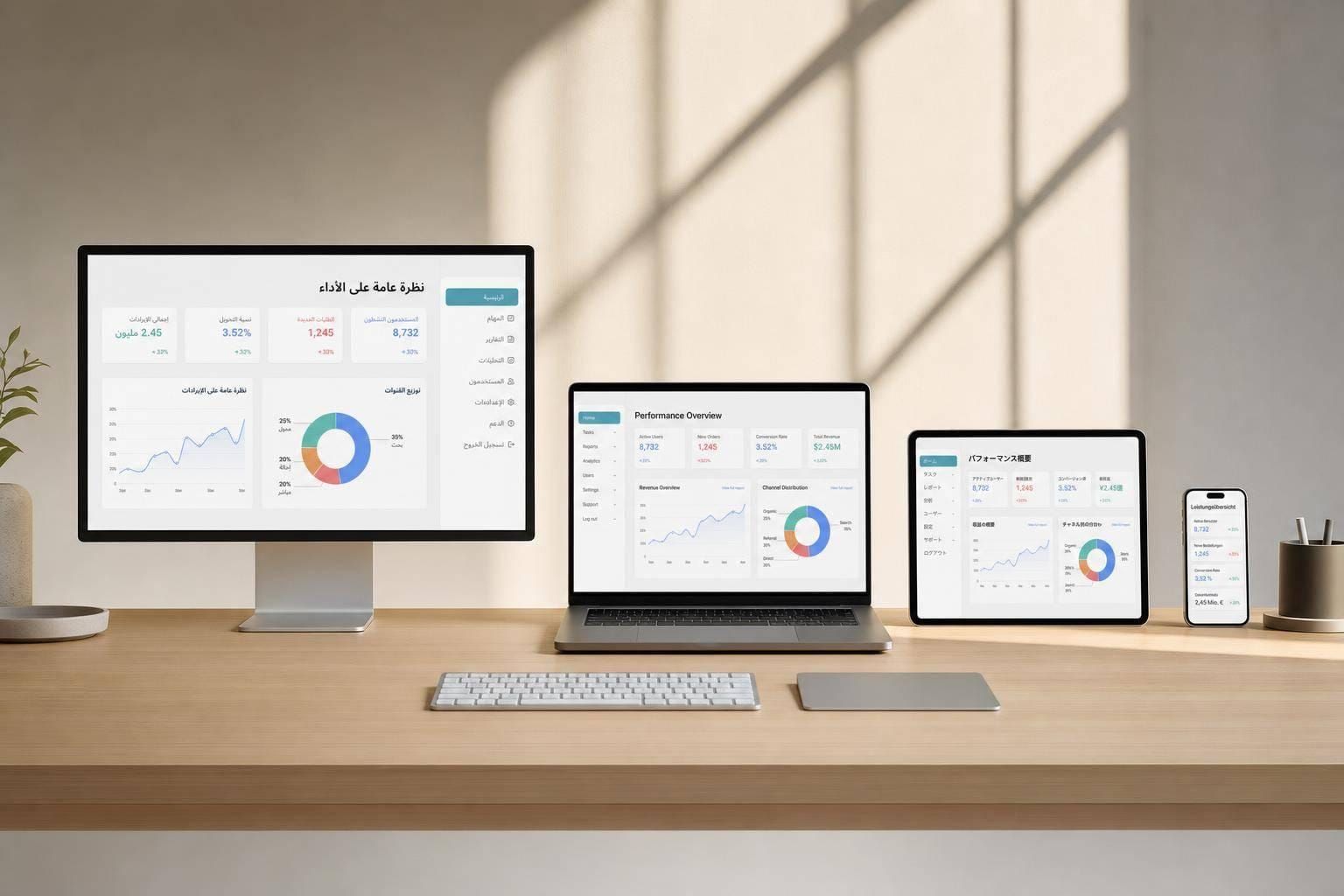
If your enterprise product supports more than one locale, translation alone is not enough. I need to build for dates, times, currencies, plurals, layout direction, text growth, legal rules, accessibility, QA, and release checks from the start.
Here’s the short version:
- i18n sets up the product so it can support many locales
- l10n changes each locale for language, formatting, terms, and region rules
- German text can expand by 30%–35%, and short labels can grow far more
- A date like 2/1/2025 can mean two different things depending on locale
- Plural rules change by language: English uses 2 forms, Russian 3, and Arabic 6
- RTL support affects layout, arrows, spacing, and mixed-direction text
- QA must cover language, function, visual layout, accessibility, and formatting
- Release rules should block launch when strings are hardcoded or formatting is wrong
What I take from the article is simple: multilingual UX is a product system, not a translation task. That means I should externalize all strings, use locale-aware APIs like Intl.DateTimeFormat and Intl.NumberFormat, design for text expansion, test counts like 0, 1, 2, 5, and 21, and assign clear owners across product, design, engineering, QA, legal, and release teams.
A few checks matter most before launch:
- All UI text lives in resource files
- Layouts survive at least 50% text growth
- Dates, numbers, and currencies follow the active locale
- RTL views mirror correctly
- Native speakers review wording and fit
- Legal and accessibility sign-off is done
- Errors block release before users see them
| Area | What I need to handle |
|---|---|
| Setup | Externalized strings, ICU MessageFormat, locale-aware APIs |
| UI | Flexible widths, logical CSS, RTL support, pseudolocalization |
| Content | Locale terms, legal text, labels, plural rules |
| Testing | Language review, edge cases, screen readers, formatting checks |
| Governance | Severity rules, release blocks, audits, ownership |
So if I want fewer bugs, fewer locale-specific fixes, and fewer release delays, I have to treat multilingual UX as part of product design and engineering from day one.
Build the internationalization foundation
Before translation starts, get the codebase and design system ready for more than one locale.
Prepare code, content, and metadata for multiple locales
Keep all user-facing text in external resource files, such as JSON. That includes labels, error messages, tooltips, and empty states. Doing this helps you avoid rework and release bugs without changing application logic.
Also, don’t build sentences by stitching together fragments like "Showing " + start + " of " + total. That looks fine in English until you hit a language with different grammar. Use full-sentence templates with variables instead. For plurals and other grammar rules, use ICU MessageFormat. English has two plural forms, while Arabic needs six and Russian needs three.
For dates, times, decimals, and currencies, use locale-aware APIs like Intl.DateTimeFormat and Intl.NumberFormat. They format values for the active locale instead of forcing one style on everyone. You should also set lang and dir on the <html> element so the document uses the right language and text direction.
For locale selection, a simple fallback chain works well:
- explicit user preference
- browser or OS settings
- IP geolocation
- a system default such as
en-US
Once this base is set, locale-specific UX can shift formats, terms, and layout without forcing another round of rework.
Design components that handle text expansion and script changes
Text gets longer in some languages, sometimes by a lot. So skip fixed-width containers where you can. Use flexible layouts instead. Properties like width: fit-content, min-width, max-width, and padding-inline give components room to grow without clipping text.
Pseudolocalization is one of the easiest ways to spot layout trouble early. It swaps English strings for expanded, accented versions - [Šübmîţ ŝübmîţ] - so you can test spacing and wrapping before translation begins.
For right-to-left scripts like Arabic, Hebrew, and Persian, use logical CSS properties such as margin-inline-start and padding-inline-end instead of left/right properties. These work with dir="rtl" on the root element. And when user-generated content, like a name or phone number, appears inside an RTL sentence, wrap it in <bdi> so its direction stays isolated.
Use this checklist to review components before translation. It treats each item as a risk check for enterprise UI components:
| Component | Risk | Mitigation |
|---|---|---|
| Buttons | Overflow | width: fit-content with min-width / max-width |
| Navigation | Directionality | Mirror position and arrows for RTL |
| Forms | Label truncation | Top-aligned labels to allow horizontal expansion |
| Tables | Column crowding | Flexible column widths or horizontal scrolling |
| Notifications | Variable length | Flexible-height containers; avoid fixed-size toasts |
| Data visualizations | Text overlap | Locale-aware number formatting for axis labels and tooltips |
sbb-itb-124fdbf
Adapt the UX by locale, not just by language
Localization changes behavior, not just text. The harder part is changing how your product works for each locale - how it shows a date, names a workflow state, or places a navigation bar.
Localize formats, units, and enterprise terminology
Format differences can trigger mistakes in enterprise workflows. The date "2/1/2025" means February 1 in the U.S. but January 2 in Europe. That’s not a small detail. In a billing flow, approval queue, or reporting screen, it can create confusion fast.
Focus on the values that shift by locale, then make sure each one is handled the right way.
Here’s how the same data point appears across four common enterprise locales:
| Format | US (en-US) | UK/EU (en-GB) | Germany (de-DE) | Japan (ja-JP) |
|---|---|---|---|---|
| Date | 1/15/2025 | 15/1/2025 | 15.01.2025 | 2025年1月15日 |
| Currency | $100.00 | £100.00 | 100,00 € | ¥100 |
Measurement and temperature units matter too. U.S. users expect miles, inches, pounds, and °F. Other locales may need different unit systems, so convert them where the locale calls for it.
Once the core formats are right, shift to the product language layered on top. Permissions, workflow states, billing terms, and compliance notices often need locale-specific wording. A billing term or workflow label that works in one market may need different phrasing elsewhere - not just a direct translation. Compliance rules change by region too: GDPR in the EU is different from LGPD in Brazil. Build those differences into your content model from the start.
Then update the visual system so it fits local reading patterns and social cues.
Adjust visuals, layout direction, and cultural signals
Colors and icons don’t mean the same thing everywhere. Red can signal danger in Western markets but stands for luck and prosperity in China. A thumbs-up icon feels positive in the U.S., but in some places it can land badly.
For RTL locales, mirror navigation, progress indicators, and directional arrows. But keep logos, media controls, and phone numbers in their original orientation. It also helps to let users choose their locale settings instead of depending only on Geo-IP.
That split should be clear: some parts stay global, and some need to change by locale.
Map global patterns against locale-specific decisions
Use this split to decide what belongs in the design system and what regional teams should localize.
| Element | Global (shared) | Locale-specific |
|---|---|---|
| Writing direction | - | LTR or RTL per locale |
| Date/time format | - | Varies by locale |
| Number/currency format | - | Varies by locale |
| Legal/compliance content | - | GDPR, LGPD, regional mandates |
| Enterprise terminology | Core product concepts | Billing terms, workflow labels |
| Visual conventions | Logos, media controls, checkmarks | Color meaning, icon choice, metaphors |
| Brand identity | Always global | - |
Use the matrix to separate global standards from local decisions. That line cuts rework and keeps compliance risk in plain sight.
Create a repeatable localization workflow
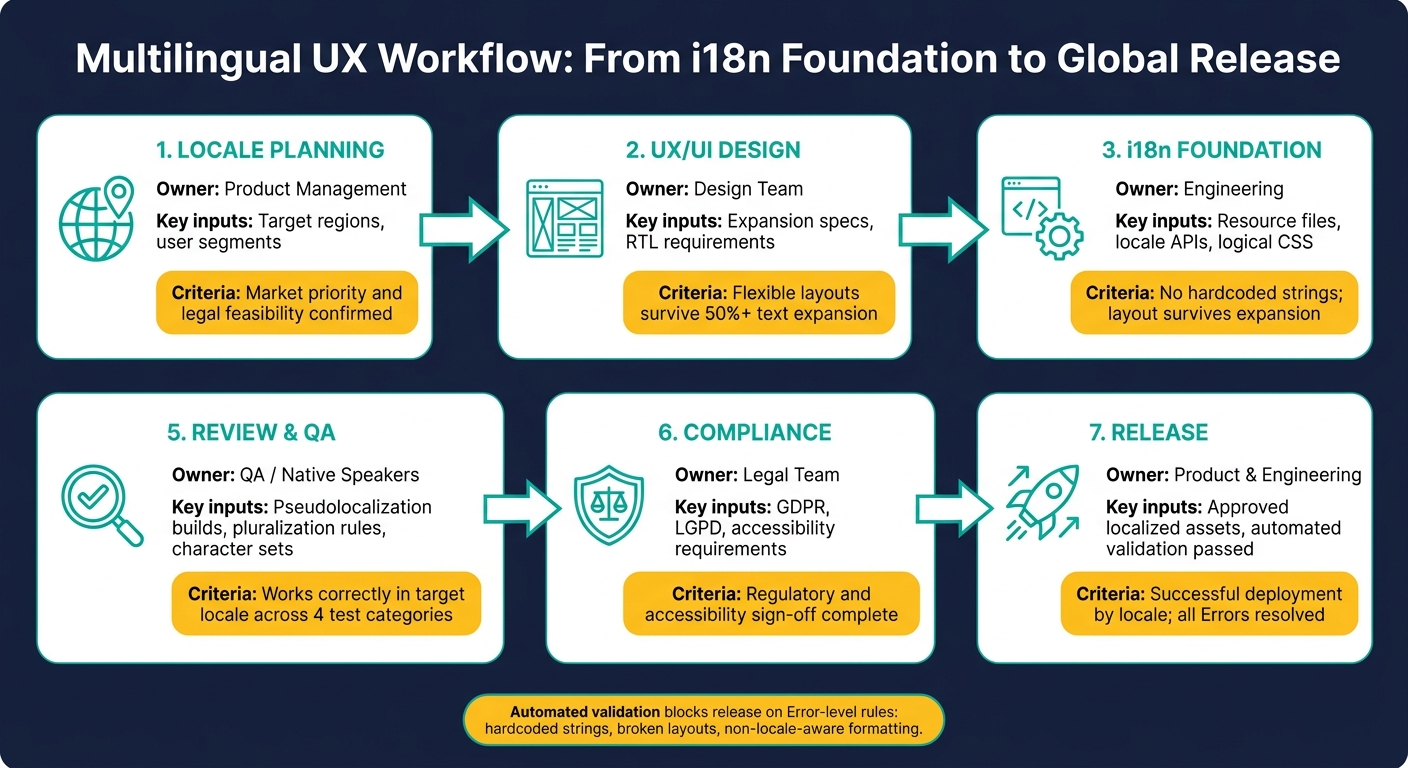
Multilingual UX Workflow: From i18n Foundation to Global Release
After you set locale-specific rules, your workflow needs to carry them through every release. Once you've mapped what changes by locale and what stays global, the next step is building a process that ships those changes in a steady way across each release and locale.
Move from locale planning to release by design
A localization workflow isn't one handoff at the end. It's a chain of decisions and checkpoints that runs alongside product work: define target locales, audit locale-sensitive content, design for text expansion and script differences, localize strings with context, QA the result, and ship locale by locale.
Treat localization as part of the design process, not a last-minute pass. When locale requirements show up in design specs and engineering tickets from day one, the workflow is easier to manage and less likely to fall apart.
Assign ownership and give translators the context they need
Each stage needs one clear owner. If nobody owns a step, locale details tend to slip through the cracks. Assign one owner to each stage so review doesn't stall between teams.
Here's how ownership maps across a typical enterprise team:
| Stage | Accountable Team | Required Inputs | Approval Criteria |
|---|---|---|---|
| Locale Planning | Product Management | Target regions, user segments | Market priority and legal feasibility confirmed |
| UX/UI Design | Design | Expansion specs, RTL requirements | Flexible layouts with min/max constraints; layout survives expansion |
| i18n Foundation | Engineering | Resource files, locale APIs, logical CSS | No hardcoded strings; layout survives expansion |
| Translation | Localization/Translators | Screenshots, variable rules, terminology standards | Accurate terminology, matching tone, and no limit overruns |
| Review & QA | QA / Native Speakers | Pseudolocalization, test builds, pluralization rules, character sets | Works correctly in the target locale |
| Compliance | Legal | Regional regulations (GDPR/LGPD), accessibility requirements | Regulatory and accessibility sign-off |
| Release | Product/Engineering | Approved localized assets | Successful deployment by locale |
Translators are only as accurate as the context they get. A string like "Submit" looks simple, but without knowing where it appears in the UI, what character limit applies, and what tone the product uses, the translator is left guessing. Screenshots, UI location notes, character limits, variable rules, and terminology glossaries help translators produce accurate work.
Machine translation can speed up the first pass. But native-language review still catches tone, register, and terminology errors that automated output can miss.
Use systems and standards to cut rework
Once owners and context are in place, systems help keep the workflow from sliding back into manual cleanup. A TMS centralizes source strings, version history, and handoffs.
It also helps to pair that with automated validation rules that flag hardcoded strings, fixed-width containers, and non-locale-aware formatting calls during development. Catching those issues early instead of during QA is what keeps the workflow moving instead of getting stuck.
Test, govern, and improve multilingual UX over time
Once your localization workflow and automation are in place, the next job is simple: test each locale like it matters. Because it does.
Code checks can catch a lot. But they won't spot awkward wording, broken plural rules, clipped buttons, or a screen reader that sounds off in the target language. That's where locale-specific QA comes in.
Test language quality, functionality, accessibility, and regional fit
Multilingual UX testing needs to cover four areas: language, function, accessibility, and regional fit.
Linguistic QA needs native speakers. They should review register, terminology, and cultural fit.
Functional QA should test pluralization edge cases. That means checking counts 0, 1, 2, 5, and 21 to trigger each locale's grammar rules.
Visual QA can begin before translation starts. Pseudolocalization helps surface overflow, truncation, and clipped controls early, before those problems spread through the product.
Accessibility QA needs locale-specific checks too. Test screen readers in the target language. Make sure alt text is translated. Check that keyboard shortcuts don't clash with local input methods. For RTL locales, verify mirrored navigation, progress bars, and directional arrows. At the same time, keep media controls and phone numbers left-to-right.
| Test Category | Method | Key Checks |
|---|---|---|
| Linguistic | Native speaker review | Register, terminology, cultural fit |
| Functional | Edge case testing | Pluralization at counts 0, 1, 2, 5, 21 |
| Visual | Pseudolocalization | Layout at 50% expansion; long compound words |
| Accessibility | AT testing (NVDA/JAWS) | Screen reader pronunciation; RTL handling |
| Formatting | API validation | Date order, currency symbols, decimal separators |
Set governance rules for global consistency and local control
QA only helps if the findings feed into release decisions. So fold those results into governance rules that apply across locales, with room for documented exceptions when needed.
The goal is a clean split between what stays global and what can change locally. Some things should not move, like design tokens and compliance rules. Other things should flex by market, like tone, imagery, and regional formatting.
QA findings and exception requests should go back to the same owners who signed off on locale planning, design, engineering, translation, and compliance. That keeps decisions clear and cuts back on last-minute back-and-forth.
Automated validation should block release when defined errors appear. It helps to group rules by severity so everyone knows what stops a launch and what only needs review.
| Rule | Severity | Release Decision |
|---|---|---|
| All user-visible text externalized to resource files | Error | Blocks release |
| Text containers expand 50% without breaking | Error | Blocks release |
| Dates, numbers, and currencies use locale-aware APIs | Error | Blocks release |
| Layout mirrors correctly for RTL locales | Warning | Requires documented exception |
| Icons and gestures reviewed for cultural fit | Warning | Requires documented exception |
CSS uses logical properties instead of left/right |
Warning | Requires documented exception |
Governance should also plan for the strictest regional rules, such as GDPR in the EU or LGPD in Brazil, so teams can cut market-specific legal rework. Regular audits help catch regressions like hardcoded strings or fixed-width containers before users run into them.
Conclusion: A practical framework for enterprise multilingual UX
These checks shift multilingual UX from a one-time launch job to a repeatable release practice.
At enterprise scale, multilingual UX works best when it's built like a system, not patched together locale by locale after the fact. Start with internationalization first: externalize strings, use logical CSS, and apply locale-aware APIs for dates, numbers, and currencies before translation begins. Then localization can adjust formats, terminology, visuals, and layout direction for each locale.
A clear workflow with named owners at each stage keeps work moving and cuts rework. Testing across linguistic, functional, visual, and accessibility areas catches problems that automated tools miss. Governance rules with defined severity levels make release calls more consistent.
Use this checklist before each locale launch:
- [ ] All strings externalized to resource files using ICU MessageFormat
- [ ] Text containers validated at 50% expansion (pseudolocalization complete)
- [ ] Dates formatted with
Intl.DateTimeFormat; numbers and currencies use locale-aware APIs - [ ] RTL layouts tested with logical CSS properties and validated in NVDA/JAWS
- [ ] Pluralization tested at counts 0, 1, 2, 5, and 21
- [ ] Native speaker review completed for linguistic and cultural fit
- [ ] Compliance sign-off obtained for regional requirements such as GDPR and LGPD
- [ ] Automated validation rules run; all Errors resolved before release
- [ ] Audit schedule confirmed for post-launch governance
FAQs
When should multilingual UX work start?
Multilingual UX work should start at the very beginning of design and development. When teams push internationalization to the end as a last-minute task or final audit, they often end up paying for messy, expensive redesigns.
Starting with i18n from day one gives your codebase and design room to handle different languages, date formats, and layouts before those needs turn into structural problems. That includes things like text expansion and right-to-left reading directions, which can break a product fast if no one planned for them early.
How many locales should we support first?
There’s no fixed number. Start small, keep the scope manageable, and put quality over quantity first.
A locale isn’t fully supported just because the text has been translated. Each one needs its own review. That means checking how it works in practice and making sure your setup can handle local norms, language patterns, and market-specific needs from day one.
What should block a locale release?
Block a locale release for any critical technical or design issue that harms user experience or accessibility. That includes:
- hardcoded strings that aren’t externalized to resource files
- fixed-width layouts that break when text expands by up to 300%
- failure to use locale-aware formatting for dates, numbers, and currencies
Also, review each language-specific feature on its own. If something fails in even one locale, that’s still a user-facing failure.