
How to Balance Diversity in Usability Testing
Recruit by task-based segments, set small quotas, provide access accommodations, and analyze results by segment—not demographics.

Most usability studies do not need broad demographic spread. What I need is a sample built around the differences most likely to change task success, access, or understanding.
Here’s the short version:
- I start with the product decision
- I recruit by task-based user segments
- I include only the differences that can change use, like:
- device type
- internet access
- disability and assistive tech
- language
- work context
- tech comfort
- I use small quotas so one easy-to-find group does not fill the whole study
- I plan access support before sessions start
- I review results by segment first, then look at the full set
- I write down what the study covered, what it missed, and why
A small qualitative study is for finding patterns and usability problems, not for population estimates. That’s why teams often start with 5 users for one focused group, or 3 to 4 people per key group when comparing groups. If I try to split a small sample across too many traits, I end up with too little signal in each group.
Here’s the core idea in one line: pick the differences that can change the outcome, support people so they can take part, and be honest about gaps.
This article shows how I would choose those dimensions, set quotas, recruit across more than one source, run accessible sessions, and review findings without overstating what the sample shows.
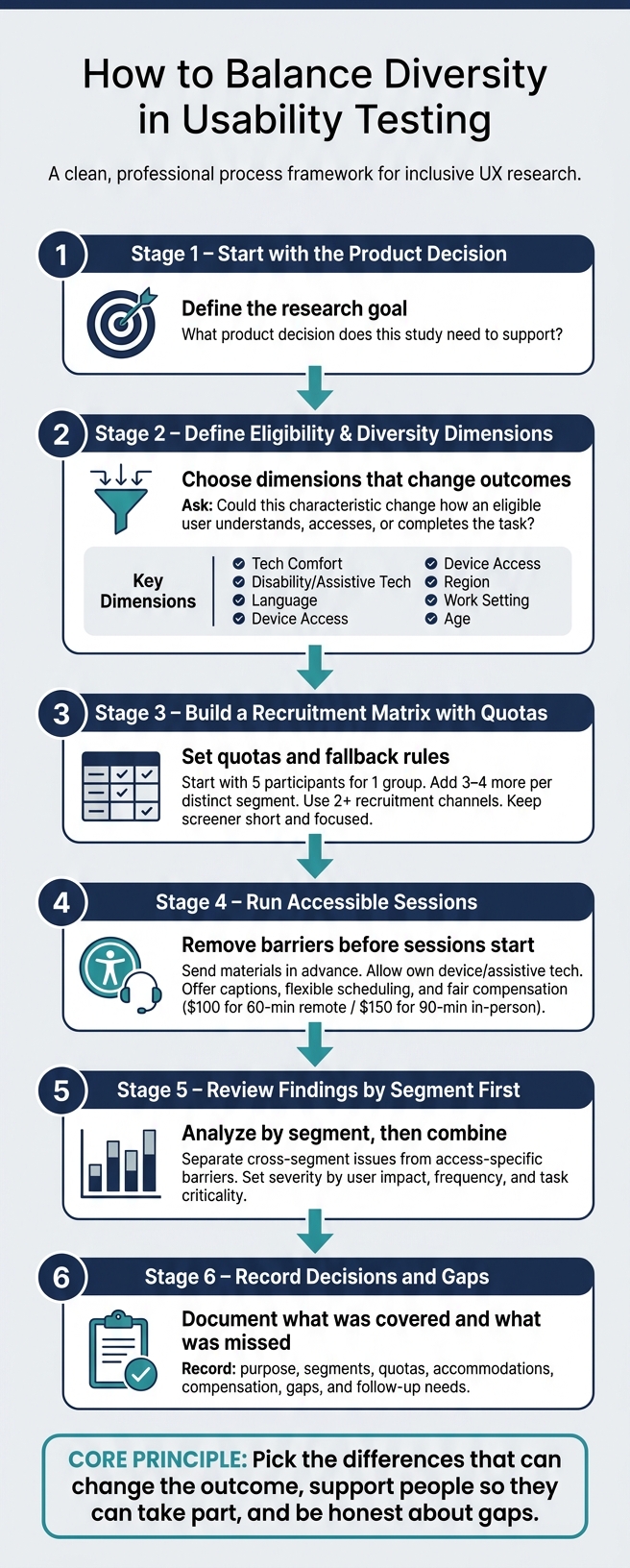
How to Balance Diversity in Usability Testing: A Step-by-Step Framework
Decide Which Diversity Dimensions Matter for Your Study
Start with research goals and user segments
Start with the product decision your study needs to support. Maybe you need to see whether users can finish a checkout flow. Maybe you're checking whether field employees can move through a scheduling tool without getting stuck. Or maybe you need to confirm that a health app can be used on someone’s own, without help. That one decision sets the direction for everything that follows.
From there, define who actually does the task in real life. Look at their role, how often they do the task, which tools they use, and the setting they work in. These become your eligibility criteria. In plain English, they tell you whether a person can give you useful evidence.
Once those criteria are locked in, add demographic or contextual factors. That distinction matters. Eligibility decides who can join the study. Diversity decides which differences are worth accounting for. Use both to figure out which user segments need quotas during recruitment.
Focus only on dimensions likely to change how people use the product
Not every difference belongs in every study. Include only the dimensions that could change task completion, understanding, or access. UserTesting's screening guidance notes that teams should test whether usage or buying behavior may change based on these factors, and that if cultural perspectives and segmentation will not affect the research data, teams may not need to collect that information.
A simple test can keep things tight: Could this characteristic change how an eligible user understands, accesses, or completes the task? If the answer is no, leave it out. If the answer is yes, it likely belongs in your plan.
| Dimension | Include when... |
|---|---|
| Tech comfort | The task involves unfamiliar navigation, security steps, or error recovery |
| Disability / assistive tech | The product must work with screen readers, keyboard-only input, captions, or magnification |
| Language | Terminology, reading level, or English proficiency could affect comprehension |
| Device access/connectivity | Users may rely on older devices, limited data plans, or shared devices |
| Region | Payment methods, address formats, regulations, or other local factors differ by location |
| Work setting | Permissions, schedules, or organizational constraints shape how the product is used |
| Age | Vision, dexterity, or prior technology exposure may affect interaction |
Write down what you excluded and why. Then turn the short list into quotas. That short list becomes the basis for your recruitment matrix in the next step.
sbb-itb-124fdbf
Build a Recruitment Plan You Can Actually Manage
Use a short recruitment matrix with quotas and fallback rules
Take your chosen segments and put them into a simple matrix. Include the required criteria, the dimensions you want to monitor, the target count, the fallback rule, the recruitment source, and the current status. The point is balance. You want enough spread to spot issues tied to each segment, without turning recruitment into a full-blown demographic census.
Here’s what that can look like for a workplace scheduling tool study:
| Segment | Required criteria | Dimensions to monitor | Target | Fallback rule | Source | Recruitment status |
|---|---|---|---|---|---|---|
| Frontline employee | Uses the workflow weekly; no product-design role | Work setting, age range, accessibility needs | 4 | Accept a different industry if the workflow is comparable | Customer list | 2 confirmed |
| Team manager | Approves or reviews employee submissions | Organization size, geography, tech context | 3 | Substitute a supervisor with equivalent responsibilities | Professional network | 1 scheduled |
| Screen-reader user | Uses a screen reader for comparable digital tasks | Assistive technology, experience level | 2 | Accept another screen-reader user from a related workflow; document the difference | Disability advocacy group | 1 confirmed |
Quotas are guardrails, not demographic targets. They stop the easiest-to-recruit people from taking over the sample. AnswerLab recommends using exact or ranged quotas for criteria you can feasibly track, and running a small study in rounds when needed.
Write your fallback rules before outreach starts. That way, if a segment is hard to fill, you already know what to do. In most cases, it makes sense to expand the channel or open up more scheduling options before relaxing a core eligibility requirement.
You can also use the matrix to decide whether one round will do the job or whether each segment needs its own round.
Match sample size to how many distinct segments you have
A good starting point is five participants for one similar group. Then add three to four more for each distinct segment. If you have three or more segments, run separate rounds.
That’s a practical rule of thumb. It keeps the study small enough to manage, while still giving each segment enough room to show where things break, stall, or confuse people.
Recruit through more than one channel and keep the screener short
If you rely on one source, your sample can lean toward whoever is easiest to recruit. That’s a common trap. Use two or more channels instead.
Keep the screener focused on the questions that decide eligibility:
- task frequency
- role
- product familiarity
- device context
- availability
- accommodation needs
Skip sensitive personal data unless it’s needed, clearly explained, and handled securely. A screener that feels too long or too personal can become its own barrier, especially for assistive-technology users or people who don’t feel at ease with research platforms.
Capture accommodation needs in the screener, then build them into the session plan.
Run Accessible Sessions and Review Findings by Segment
Offer accessible formats, accommodations, and fair compensation
Use the accommodation notes from recruitment to remove barriers before the session starts. Send consent forms and task materials ahead of time in the format each participant needs, such as HTML, tagged PDF, plain text, large print, or audio. For remote sessions, use captions, screen-reader-friendly instructions, keyboard-accessible links, and the participant's own device. For in-person sessions, check routes, entrances, restrooms, seating, lighting, and quiet spaces in advance so access differences don't skew comparisons between segments.
Let participants use their own device, browser, screen reader, magnification, and settings.
Pay should cover both time and participation costs. For example, offer $100 for a 60-minute remote session or $150 plus up to $25 for parking or local transit for a 90-minute in-person session. Be clear about what's covered, the maximum amount, whether receipts are needed, how payment will be sent, and when it will arrive. Budget access-related costs like interpreters, captioning, and accessible transit as a separate line item. If you can, offer evening or weekend sessions and include paid breaks in longer sessions.
Keep tasks and moderation consistent across sessions
Keep the task, starting state, and success criteria the same across sessions. The only thing that should change is the accommodation. That's what makes segment comparison fair.
Use a plain-language script and neutral follow-up questions. For example, ask what the participant expected to happen or what they would try next. Avoid leading prompts. Don't make guesses about a participant's technical skill, comfort with assistive technology, or way of communicating. If a participant uses an interpreter, speak to the participant directly, not the interpreter. During screen-reader sessions, pause, wait, and let the participant work.
Use the same help rule every time. One common approach is to allow two minutes of independent effort before giving a neutral, prewritten prompt. If that rule changes from one session to the next, your comparisons start to fall apart.
Compare patterns by segment and decide if another round is needed
After the sessions, review results by segment before combining findings. Start with each segment on its own, then compare patterns across segments.
The goal here is to separate issues that cut across segments from barriers tied to a certain access method or workflow. Some problems hit almost everyone, like unclear labels or confusing navigation. Others show up in a specific setup, like missing keyboard focus or an unlabeled form control. And some issues come from the test environment, not the product itself. A barrier seen by participants using assistive technology can point to a broader problem with semantics, interaction, or content that affects many users in different situations.
Use a table to turn raw notes into findings the team can act on:
| Segment | Task Outcome | Observed Barrier | Severity | Supporting Evidence |
|---|---|---|---|---|
| Screen-reader users | 1 of 3 completed checkout without help | Form fields lacked reliable accessible names | High | Two sessions included repeated field-navigation errors; recordings at task steps 4–6 |
| Keyboard-only users | 2 of 3 completed account setup | Focus moved behind a modal dialog | High | Three focus-loss incidents across two sessions |
| Mobile users | 3 of 3 completed appointment search | Date control was difficult to operate on a small screen | Medium | All three participants increased zoom or reopened the calendar repeatedly |
| New customers | 1 of 3 completed task | Product terminology was unfamiliar | Medium | Participants asked what service tier meant before continuing |
Set severity based on user impact, frequency, task criticality, and available workarounds, not just participant count alone.
Run another round when:
- A severe barrier appears in only one session but affects a critical task
- Different segments produce conflicting results
- An accommodation may have affected completion or time-on-task
- The team can't tell whether the issue came from the product or from the device or test environment
- The sample is too small for a segment the product must support
Record these segment-level findings and rerun decisions in your research plan.
Record Your Decisions and Make This a Team Habit
What to record in your research plan
After segment review, write down the sampling choices that shaped the study. Once you've compared findings by segment, record the decisions that drove the sample. This gives the team a plain record of what the study covered, what it left out, and why.
Add a section to every research plan with the details below:
| Decision area | What to record |
|---|---|
| Research purpose | The specific product decision the study will inform |
| Priority segments | Users whose context or needs could change the outcome |
| Diversity dimensions | Only dimensions tied to product use (for example, language, device, disability, or digital confidence) |
| Recruitment | Channels used, screener version, dates, and any constraints |
| Quotas | Target count per segment, achieved count, and approved substitutions |
| Accommodations | Captions, alternative formats, assistive technology, interpreter, flexible scheduling |
| Compensation | Amount in U.S. dollars, payment method, timing, cancellation and no-show policy, and reimbursement policy for travel or other costs |
| Gaps | Missing segments, underrepresented contexts, and the likely effect on confidence |
| Follow-up | Questions that need another round or a dedicated accessibility study |
When a substitution happens - for example, when a hard-to-recruit segment is replaced with a closely related group - record who approved it, what risk it adds to the research, and whether the related findings should be labeled provisional. That creates a clear audit trail.
It's also smart to keep a planned-versus-achieved table that shows the target, the actual result, and a short reason for each gap. Be specific. If only one participant reflected a certain context, don't say that group was "represented." Say something like "one participant with this characteristic contributed an exploratory perspective; findings were not compared statistically."
Give one person ownership of this record from kickoff through handoff. Then store it with the study materials so product, design, and engineering can all check the same assumptions and compare study coverage over time.
Conclusion: Keep diversity practical, relevant, and transparent
A balanced usability test should spell out its tradeoffs in plain language. Start with the research goal. Focus only on the diversity dimensions that are likely to change how people use the product. Recruit through more than one channel, and make participation accessible from the start.
Then analyze findings by segment before combining them. Write down tradeoffs and gaps clearly, without smoothing them over. The goal isn't to make the sample look perfect. It's to make the study honest, useful, and easy for the team to interpret.
FAQs
How do I choose which differences matter?
Prioritize behavioral factors over basic demographics. Age and location can help, sure. But in most cases, they tell you less than how people use tech, what they know about the field, and how they get their work done.
What tends to matter more for product performance? Users’ goals, pain points, technical skill, and the device or setting they work in. A person on a slow laptop in a noisy warehouse may use the same product very differently than someone at a desk with two monitors.
It also helps to look at social and cultural context, since that can shape how people give feedback. Some people speak up right away. Others may hold back, soften criticism, or wait for direct prompts.
Pilot testing can help you tighten your participant criteria before the main study. It’s a simple way to check whether you’re talking to the right people - or if your screeners need work.
How many participants do I need per group?
Aim for 5–8 participants per user segment or group. That range usually gives you a good balance between cost and your chances of finding most usability issues.
This works best when recruitment is screened well and participants are given the right incentive.
What if I can’t recruit every segment?
If you can’t recruit every segment, simplify the plan. Focus on the traits that matter most and build the most representative sample you can.
Use targeted screener surveys, more than one recruitment channel, and stratified sampling to fill gaps where possible.
If one segment is still missing, run fewer sessions with the segments you can recruit. Then use remote moderated testing and short pilot tests to collect more behavioral evidence.
A good target is 5–8 participants per segment that you’re able to recruit.