
7 Best Post-Purchase Feedback Tools for E-commerce
Choose a post-purchase feedback tool based on store, timing, and follow-up needs — not price.

I’d choose a post-purchase feedback tool based on your store, survey timing, and follow-up needs - not just price. Start with 1–3 questions: ask about checkout after purchase, delivery after arrival, and product quality after customers have used it.
My shortlist covers seven options, from Shopify survey apps to tools for tracking satisfaction across channels. Here’s how I’d compare them.
Quick Comparison
| Tool | What I’d use it for | Survey channels | Pricing listed in this guide |
|---|---|---|---|
| ReConvert | Shopify feedback alongside upsells | Thank-you and order-status pages | From $9.99/month |
| Delighted | NPS, CSAT, and CES tracking | Email, web, links, and SMS, depending on plan | From $19/month for 50 responses |
| Grapevine | Shopify feedback and marketing attribution | On-site, email, and Shopify POS | $25/month |
| Zigpoll | Custom survey placement and response routing | On-site surveys and connected workflows | Free tier; paid starting prices differ by source |
| UserLoop | Simple surveys with purchase-based targeting | Shopify pages, email, links, popups, and embeds | Free tier; Unlimited listed at $200/year |
| Retently | Satisfaction tracking, segmentation, and support follow-up | Email, SMS, widgets, popups, and links | From $99/month |
| SurveyMonkey | Detailed questionnaires and analysis | Web links and email; purchase triggers need an external workflow | Free tier; paid plans around $30/user/month with annual billing |
Prices and plan access can change. Before paying, I’d <u>test whether responses connect to the right order</u>, confirm delivery-based triggers, and check how low scores reach support.
I compare integrations, purchase data, channels, reporting, privacy, and total cost at your expected volume. A low starting price won’t help if the plan lacks the exports, response allowance, or automation you need.
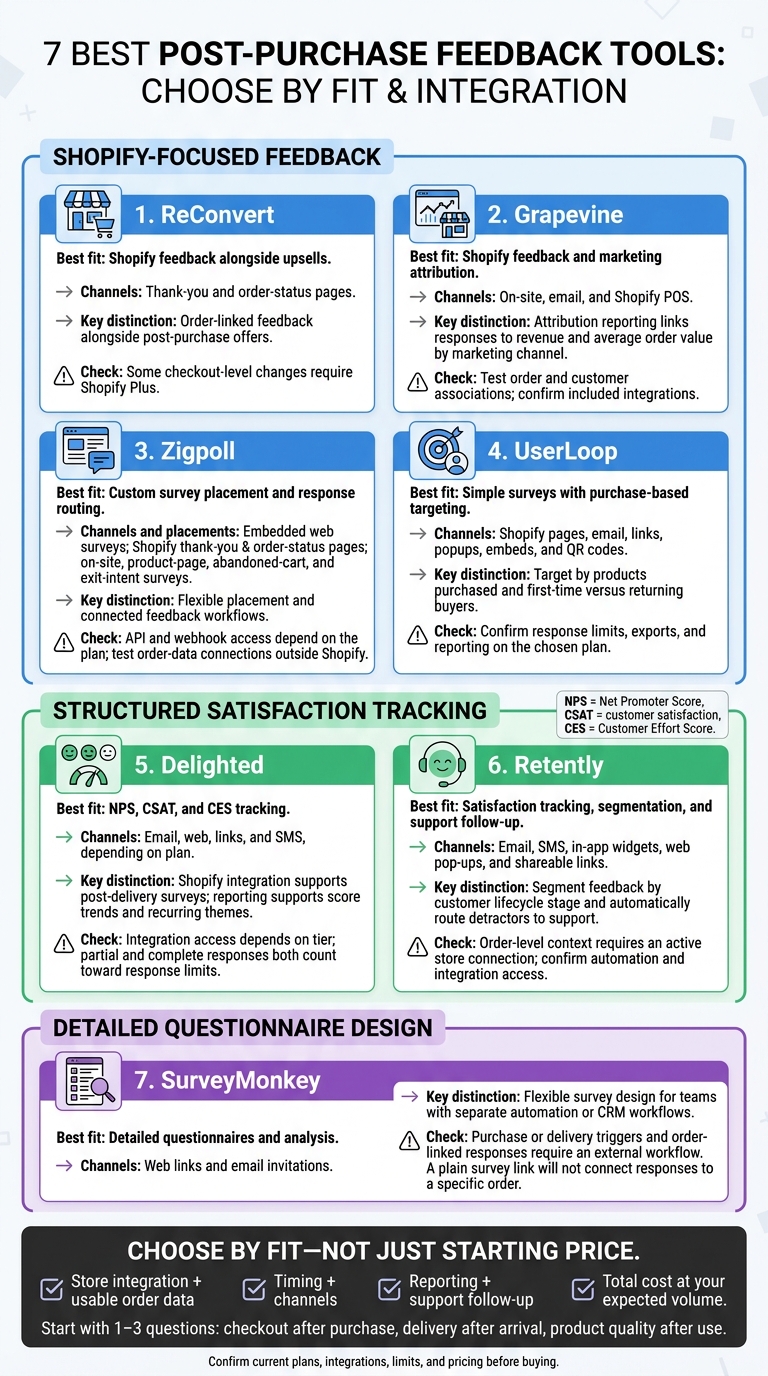
7 Post-Purchase Feedback Tools: Find Your Best Fit
Post-Purchase Feedback Tools Compared
Post-purchase feedback tools differ in price, survey channels, and how they connect to your store. Compare those details alongside your team's needs to build a shortlist.
| Tool | Main capability | Starting price / pricing model | E-commerce integration type | Survey channels | Best fit |
|---|---|---|---|---|---|
| ReConvert | Post-purchase upsells with survey widgets | From $9.99/month; pricing based on orders or upsell revenue. | Native Shopify app | Thank-you and order-status pages | Shopify stores combining feedback with offers |
| Delighted | Customer-experience surveys across multiple channels, plus reporting | From $19/month for 50 responses. | Shopify integration; connections to CRM and support systems. | Email, web, survey links, and SMS, depending on the plan. | Teams running structured customer-experience programs |
| Grapevine | Shopify post-purchase and attribution surveys | $25/month for unlimited surveys and responses. | Native Shopify app; Shopify Flow and Klaviyo connections | On-site, email, and Shopify POS | Shopify merchants wanting predictable survey costs |
| Zigpoll | Flexible survey placement and response routing | Free tier; paid plans start around $9/month. | Shopify app; API and webhooks on higher tiers. | Embedded web surveys | Stores needing customizable feedback workflows |
| UserLoop | Lightweight post-purchase surveys | Free and paid tiers; paid pricing is unconfirmed. | Shopify-focused | Embedded and post-purchase surveys | Shopify teams needing simple feedback collection |
| Retently | NPS, CSAT, and CES tracking | Pricing based on contact or response volume. | E-commerce, CRM, and messaging integrations | Email and SMS workflows | Businesses tracking satisfaction and retention trends |
| SurveyMonkey | Advanced questionnaires and analysis | Limited free plan; paid monthly or annual plans. | API or automation workflows rather than a native e-commerce tool | Web links; email or SMS through configured workflows | Organizations needing mature survey administration and analysis |
The next section explains how to choose the right tool.
sbb-itb-124fdbf
1. ReConvert
Survey Formats, Channels, and Triggers
Add a short survey to the Shopify thank-you page: one multiple-choice question with an optional open-text follow-up. Test it on mobile and desktop so order details stay visible. This context helps you match feedback to the order behind it.
Shopify Integration and Purchase Data
ReConvert links responses to order context, helping you ask more relevant follow-up questions. Check checkout-level changes separately, since some require Shopify Plus.
Analysis, Segmentation, and Follow-Up
Use ReConvert when you want order-linked feedback to trigger tags, discounts, or targeted offers. For deeper reporting, export responses or connect your analytics stack.
Pricing and Usage Limits
Pricing starts at $9.99/month, though lower tiers and a free development-store plan have also been reported. Check the live Shopify App Store for current billing details.
2. Delighted
Survey Formats, Channels, and Triggers
Delighted supports NPS, CSAT, CES, 5-star ratings, and custom templates with logic-based follow-ups. Zapier extends delivery to email or SMS. Use Autopilot for recurring sends and the API to time surveys around specific events. Before launch, confirm frequency limits and rules for orders in a refund state.
E-commerce Integrations and Purchase Data
Delighted’s Shopify integration supports post-delivery surveys. HubSpot and Salesforce sync feedback into customer records. Zapier, the REST API, and webhooks handle custom workflows.
Use the REST API and webhooks for custom metadata, and check your plan: some integrations depend on the tier. These connections help you use survey scores for analysis and follow-up.
Analysis, Segmentation, and Follow-Up
Snapshot and Over Time reports show scores, comments, trends, and recurring themes. Stores can segment feedback by product category or first versus repeat purchase when those properties are available.
Confirm the export format before signing up. Route low scores and negative comments to support through Slack or your CRM.
Pricing and Usage Limits
Pricing starts at $19 per month for 50 responses. The free plan includes 25 responses per month and one user. Partial and complete responses both count toward the limit, and caps apply across projects. Check current pricing and integration access before subscribing.
Next, compare a more Shopify-native option.
3. Grapevine
Use Grapevine to connect post-purchase feedback directly to revenue and attribution, rather than satisfaction alone.
Survey Formats, Channels, and Triggers
Grapevine supports post-purchase, NPS, CSAT, attribution, and product-feedback surveys. You can use conditional logic and target customers by segment, order, product, country, or tag. Surveys run on Shopify Thank You and Order Status pages, through email, and on Shopify POS.
Ask a short attribution or satisfaction question right after checkout. Save questions about product use or delivery for later email surveys.
E-commerce Integrations and Purchase Data
Grapevine links responses to order details, including average order value for attribution reporting. It integrates with Shopify Flow, Klaviyo, Google Analytics 4, and Google Sheets.
Test order and customer associations before using the data to group customers or automate follow-up. These links help you send targeted follow-ups and report results by channel.
Analysis, Segmentation, and Follow-Up
Grapevine’s attribution reports link survey responses to revenue and average order value by marketing channel. It also reports NPS, CSAT, and survey answers.
Use Shopify Flow to trigger actions based on responses, and Klaviyo or Google Sheets for segmented follow-up and export workflows.
Pricing and Usage Limits
Before subscribing, check current billing details and any limits on email sends, exports, or automation events.
4. Zigpoll
Zigpoll lets you place surveys beyond checkout, giving you more ways to collect customer feedback.
Survey Formats, Channels, and Triggers
Zigpoll supports post-purchase surveys on Shopify thank-you and order-status pages. It also offers on-site, product-page, abandoned-cart, exit-intent, NPS, and CSAT surveys.
E-commerce Integrations and Purchase Data
Shopify is the clearest native integration. Its checkout extensions pass customer and order data, tags, notes, and metafields.
For other platforms, test the embed, API, webhook, or Zapier connection before relying on order data. Order context helps only if it reaches the survey response.
Analysis, Segmentation, and Follow-Up
Zigpoll exports survey data and provides weekly AI insights on applicable plans. Merchants can send feedback to marketing tools such as Klaviyo, Mailchimp, ActiveCampaign, Attentive, and Omnisend.
It also connects with Google Analytics and Triple Whale for analytics, Gorgias for support, Slack and Google Sheets for internal reporting, and Shopify Flow, Zapier, and webhooks for automation.
Pricing and Usage Limits
The Shopify listing includes a free tier with 50 responses per month, plus paid tiers with 200, 600, or unlimited monthly responses. A separate pricing page lists paid plans starting at $29 per month.
5. UserLoop
Survey Formats, Channels, and Triggers
UserLoop runs post-purchase surveys on Shopify’s thank-you and order-status pages using a native app block. It also supports email, links, popups, embeds, and QR codes.
For physical products, send feedback emails 7–14 days after fulfillment. This makes UserLoop a fit for simple Shopify feedback loops once orders are fulfilled.
E-commerce Integrations and Purchase Data
UserLoop connects survey responses to Shopify order data through app blocks. Its documented targeting options include products purchased and whether the customer is a first-time or returning buyer.
Analysis, Segmentation, and Follow-Up
Use purchase data to sort feedback by product, order value, and customer type. You can also group open-text responses by theme.
Paid plans include CSV exports, PDF and email reports, and scheduled reporting. They also connect with Klaviyo, Slack, Meta Conversions API, OpenAI, and Claude.
Pricing and Usage Limits
UserLoop lists Unlimited at $200/year and Plus at $950/year. Other listings show a plan starting at around $19/month.
The free plan allows 50 responses/month, one active survey, and 3 questions per survey. Higher tiers support up to 100 active surveys, 100 questions per survey, and 10,000 survey emails/month.
For more advanced reporting, the next tool goes deeper into analysis and retention.
6. Retently
Survey Formats, Channels, and Triggers
Retently supports order-triggered CX surveys through email, SMS, in-app widgets, web pop-ups, and shareable links. Run one-time, recurring, or event-triggered campaigns to collect feedback around fulfillment, support, or purchase events. Frequency controls limit repeat contact, while order-level context requires an active store connection.
E-commerce Integrations and Purchase Data
Retently’s Shopify integration can store product, variant, discount code, sales channel, and shipping destination data with each response. These details help you segment scores and automate follow-up.
Klaviyo, Gorgias, and Zendesk connect marketing and support follow-up. Zapier, webhooks, and the API add more automation options. Check which integrations your plan includes.
Analysis, Segmentation, and Follow-Up
Retently’s main strength is feedback segmentation and follow-up. You can group post-purchase scores by customer lifecycle stage and automatically route detractors to support. Rewards, referrals, and loyalty programs may require a separate system.
Pricing and Usage Limits
Retently starts at $99/month for 2,500 surveys, 10 campaigns, and 3 seats. A $299/month tier is also listed. Before buying, confirm current pricing and whether your plan includes automation, the API, and e-commerce integrations.
SurveyMonkey offers more advanced questionnaire design and analysis.
7. SurveyMonkey
Survey Formats, Channels, and Triggers
SurveyMonkey works best when flexible survey design matters more than native e-commerce automation. Its Post-Purchase Survey Template covers satisfaction, recommendation intent, and checkout friction. Available question types, branching, and logic depend on your plan.
You can share surveys through web links or email invitations. Sending them after a purchase or delivery requires an external workflow. This makes SurveyMonkey a better fit for teams that already use separate automation or CRM tools.
E-commerce Integrations and Purchase Data
To connect survey responses to orders, you’ll need an external workflow. For Shopify or WooCommerce, options include a connector, Zapier, Power Automate, a custom API flow, or manual upload.
Pass only the order fields you need, such as SKU, purchase date, fulfillment status, order number, or segment, and set the survey to send at the right time. A plain survey link won’t connect responses to a specific order. Order-level analysis requires linking feedback to an order record.
Analysis, Segmentation, and Follow-Up
You can review response breakdowns, compare ratings, read comments, and export data. SurveyMonkey is strongest when you already have a workflow to route low scores, export data, or connect responses to customer records.
To compare first-time and repeat buyers, supply segment data or join responses to store records. CRM integrations can send low scores to support, while recurring comments can be grouped into themes. That reliance on separate workflows is the main tradeoff when comparing SurveyMonkey with more native e-commerce tools.
Pricing and Usage Limits
The free Basic plan includes unlimited surveys, up to 10 questions per survey, and 25 viewable responses per survey. You’ll need an upgrade to view additional responses. Advanced logic, exports, and some question types are also restricted.
Paid individual plans start around $30 per user per month with annual billing. When a paid account exceeds its response limit, additional responses cost $0.15 each.
How to Choose a Post-Purchase Feedback Tool
Once you’ve compared the tools above, check these details before you buy.
Store Integrations and Purchase Data
Check the integration, not the brand name. Confirm how each tool connects to your store: a native app, API, connector, or CSV import. Native apps are the simplest option. APIs offer the most flexibility, connectors add maintenance, and CSV imports work for occasional campaigns.
The connection must also pass usable order data into the survey. Without that data, even an easy setup won’t meet your needs.
Survey Timing, Channels, and Questions
Ask only what customers can answer now. Match your questions to the purchase stage: checkout, delivery, or product use. Check whether the tool supports thank-you pages, order-status pages, embeds, email, and SMS.
Start with 1–3 questions, and put a rating or multiple-choice question before an open-text question. Confirm support for branching, segment targeting, and event triggers. Also check that you can suppress surveys for canceled, refunded, or still-in-transit orders, as well as recent respondents.
Reporting, Follow-Up, and Privacy
Check the built-in reporting for response rates, score trends, product and customer segments, searchable comments, and metadata exports. Find out whether low-score routing and follow-up are built in or require a connector.
Use sentiment and theme analysis to support - not replace - human review. Before launch, review consent, opt-outs, retention, deletion, access controls, and data-processing terms. If the tool can’t turn feedback into action cleanly, its reports are only useful for review.
Pricing and Usage Limits
Compare total cost in U.S. dollars, including the subscription, usage limits, delivery fees, connectors, setup, seats, and required reporting. Billing by contacts differs from billing by completed responses. Use cost per usable response to compare value.
Choose the Right Tool for Your Store
Use the comparison above to build a shortlist around your store’s needs. Before buying, check current plans, integrations, and pricing. Remove any tool that doesn’t include the feature you need on your chosen plan.
| Your main goal | Best-fit candidate | Decision rule or constraint |
|---|---|---|
| Shopify feedback alongside upsells | ReConvert | Choose for Shopify upsells and feedback. |
| Shopify-native feedback with attribution | Grapevine | Choose for attribution needs; confirm which integrations are included. |
| Detailed questionnaire design | SurveyMonkey | Best for teams with a separate workflow already in place; check that the required connector is available. |
| Satisfaction and loyalty tracking | Delighted or Retently | Delighted fits standard NPS, CSAT, and CES tracking. Retently adds more workflow and segmentation options. Check plan limits and follow-up features. |
| Purchase-based targeting | Zigpoll | Check Shopify order targeting, Flow triggers, and which plans include API access. |
| Cross-channel collection | Grapevine or Zigpoll | Choose Grapevine for Shopify-first channel coverage or Zigpoll for flexible web and messaging workflows. Check each channel and its fees on the current plan. |
Compare plans by total cost at your expected volume, not just the starting price. If two tools meet the same needs, favor the one with the simpler integration and lower total cost. Weigh compatibility, timing, and data quality alongside price.
FAQs
How can I improve survey response rates?
Keep surveys to 1 to 3 questions, and send them after a purchase or support interaction instead of through broad, scheduled blasts. Surveys embedded in emails often get more responses than surveys accessed through a link.
For in-app prompts, wait 5 to 15 seconds after a milestone so you don’t interrupt users. Send broad surveys no more than once every 60 to 90 days to avoid survey fatigue.
How many responses make my feedback reliable?
There’s no magic sample size: 5 to 50 responses can give you a useful snapshot of product performance. For moderated usability testing, 5 to 8 participants per segment typically reveal most issues.
Whatever your sample size, keep data clean with automated quality checks and audits for inconsistencies. Pair qualitative survey feedback with quantitative behavioral data. Document your methods so readers can understand how you reached your findings and put them to use.
How do I measure my feedback tool’s ROI?
To measure ROI, track delivery, open, click-through, and completion rates with consistent formulas. This helps separate technical email problems from friction in the survey itself.
Measure business impact with CSAT, NPS, or CES for each customer journey, such as post-purchase. Pair these scores with recurring themes in comments to decide which improvements to tackle first.
Calculate a User Experience Impact Score by comparing engagement among surveyed users with engagement in a control group. Use this comparison to check whether collecting feedback disrupts the user experience.