
Sentiment Analysis vs Emotion Detection in UX
Use sentiment to prioritize feedback and emotion detection to flag friction; validate labels with human review and protect privacy.


I use sentiment analysis to sort feedback by attitude and emotion detection to flag possible feelings - not prove them. The first labels text as positive, negative, or neutral, a core application of artificial intelligence in UX. The second estimates emotions such as frustration or delight from text and, sometimes, audio or video.
My rule: use labels to decide what to review next, not what to ship. I check them against source comments, task results, and participant reports before drawing conclusions.
Quick Comparison
| Criterion | Sentiment analysis | Emotion detection |
|---|---|---|
| Question | Is the feedback favorable? | What emotion might it suggest? |
| Input | Reviews, tickets, and survey text | Text, plus optional audio or video |
| Output | Polarity labels and scores | Estimated emotion categories |
| UX use | Feedback triage, feature reviews, and release comparisons | Usability tests and moments needing follow-up |
| Validation | Product-specific language and human review | Defined labels, participant reports, and observed behavior |
| Common errors | Sarcasm, negation, and mixed-language text | Mistaking pauses or expressions for feelings |
| Privacy | Remove personal details; check storage and retention | Also get explicit consent and restrict recording access |
Before using either method, I test its labels on samples from the intended audience. <u>Neither method explains why a problem happened.</u> I link findings to their sources, check uncertain cases with a researcher, and turn supported patterns into changes I can test.
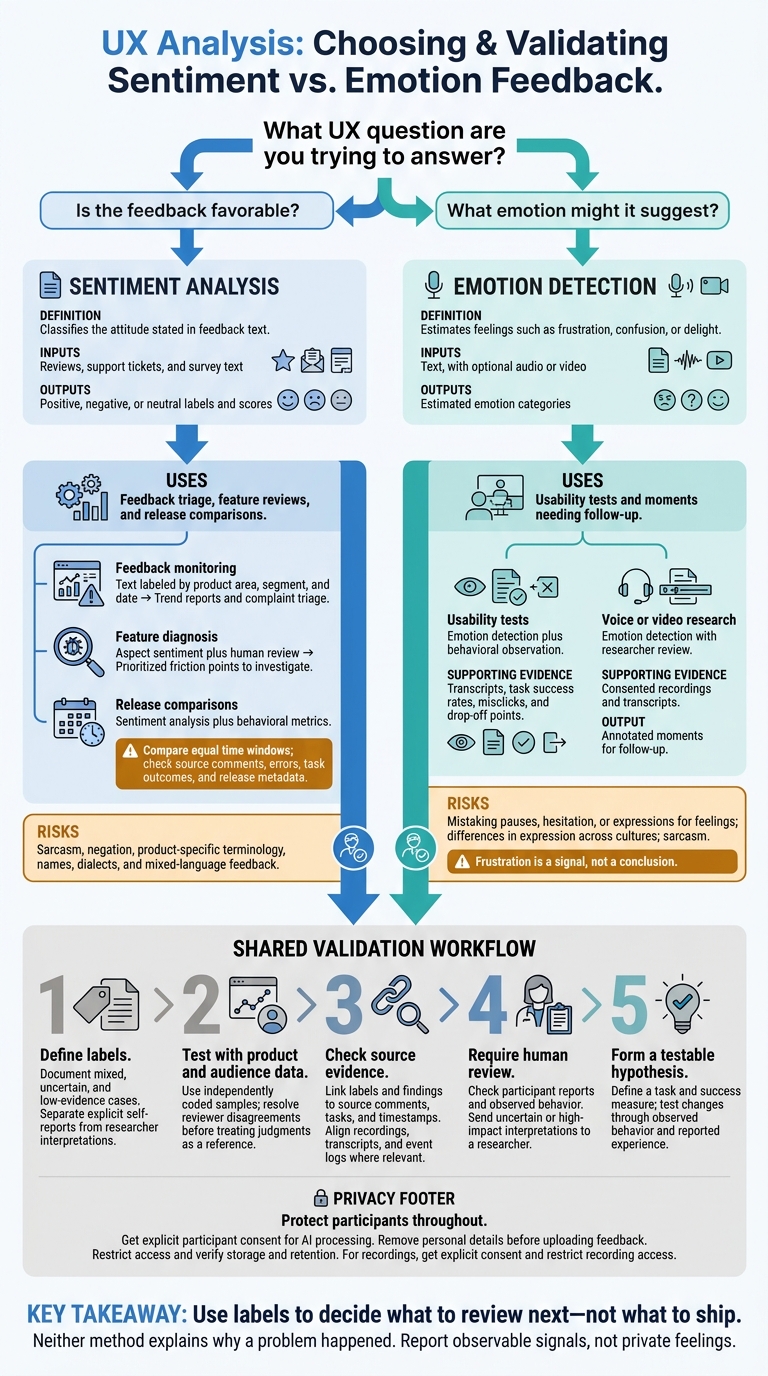
Sentiment Analysis vs Emotion Detection: UX Decision Guide
Sentiment Analysis vs Emotion Detection: Key Differences
What Each Method Analyzes
Sentiment analysis classifies the attitude stated in feedback text. It assigns positive, negative, or neutral labels and can produce scores to help teams prioritize issues across large amounts of feedback.
Emotion detection estimates feelings such as frustration, confusion, or delight. It uses text and sometimes audio or video. These estimates need human validation.
Compare Outputs, Uses, and Data Needs
| Criterion | Sentiment analysis | Emotion detection |
|---|---|---|
| Research question | How favorable is the feedback about this experience or feature? | What emotion does the feedback suggest? |
| Outputs | Polarity labels and scores | Estimated emotion categories |
| Inputs | Reviews, support tickets, and survey text | Text, with optional audio or video |
| UX use | Prioritize topics with frequent negative feedback | Flag moments for closer investigation |
| Data needs | Product-specific language and human review | Clearly defined emotion labels and human validation |
| Interpretation risks | Product terms, names, dialects, and mixed-language feedback can distort labels | Audio/video signals can miss pauses or hesitation without human review. |
Before relying on either method, check its results against your product’s language.
Use the labels to decide what to inspect next: sentiment helps prioritize feedback, while emotion estimates flag moments for closer review. Neither explains the cause. Connect what people said with what they did, then ask follow-up questions to confirm what they meant. Behavior data can point to friction, but it can’t tell you why it happened. The next section maps each method to a common UX review task.
sbb-itb-124fdbf
Choose the Right Method for Your UX Review
Match your review method to the UX decision you need to make.
| Review situation | Recommended method | Required evidence | Expected output |
|---|---|---|---|
| Feedback monitoring | Sentiment analysis | Text labeled by product area, segment, and date | Trend reports and complaint triage |
| Feature diagnosis | Aspect sentiment plus human review | Support tickets, open-ended survey answers, and product context | Prioritized friction points to investigate |
| Usability tests | Emotion detection plus behavioral observation | Transcripts, task success rates, misclicks, and drop-off points | Friction points checked against participant reports and task success |
| Voice or video research | Emotion detection with researcher review | Consented recordings and transcripts | Annotated moments for follow-up |
| Release comparisons | Sentiment analysis plus behavioral metrics | Comparable pre/post feedback, release metadata, and task metrics | Sentiment shifts to investigate alongside performance changes |
Track Feedback and Release Trends
Group feedback by product area, segment, date, and release. Compare equal time windows and check the source comments before linking a sentiment shift to a release.
Before blaming the release, check sentiment against errors, task outcomes, and release metadata from the same window. If the pattern is unclear, move from reviewing trends to observing task behavior.
Examine Friction in Usability Tests
Frustration is a signal, not a conclusion. Check emotion labels against what participants report and how they behave.
Align timestamps across recordings, transcripts, and event logs to connect what users said with what they did. Check each moment against its source evidence before assigning a label.
Turn Labels Into Testable Findings
Link each finding and label to its source, task, and timestamp. Check transcript wording before quoting it, and send uncertain or high-impact interpretations to a researcher. Labels should guide review, not replace it.
Turn strong patterns into a hypothesis with a defined task and success measure. Test the change through observed behavior and reported experience.
Data Quality, Validation, and Privacy
Before using either method in a UX review, test its labels against actual product data and check that its use follows privacy rules.
| Check | Sentiment analysis | Emotion detection |
|---|---|---|
| Label definitions | Positive, negative, neutral, mixed | Defined categories such as frustration or delight |
| Validation data | Independently coded text samples | Independently coded text, audio, or video samples that reflect the intended audience |
| Human review | Resolve unclear polarity and context | Avoid claims about private feelings |
| Common errors | Sarcasm, negation, and product-specific terminology | Hesitation, differences in expression across cultures, and sarcasm |
| Privacy | Remove personal details and verify storage and retention | Remove personal details, restrict access, and get explicit consent for analysis |
Start by making label definitions clear enough for reviewers to apply them consistently.
Define Labels and Test With Product Data
Define each label and document how to handle mixed, uncertain, and low-evidence cases. For emotion labels, separate explicit self-reports from researcher interpretations.
Validate labels using samples coded independently by human reviewers. Use samples from the intended product and audience, rather than generic benchmark data. Resolve coding disagreements before treating those judgments as a reference. Pay close attention to product terms, dialects, and mixed-language passages.
Measure Errors and Check Context
Check each automated label against the source comments and observations. Look for errors involving sarcasm, negation, product terms, names, dialects, and mixed-language passages.
Accuracy is only part of the check. Consent and data handling matter, too.
Limit Data Collection and Require Human Review
Get explicit participant consent for AI processing. Remove personal details before uploading feedback, restrict access, and verify how recordings are stored and how long they're kept.
Require human review before using the output to make decisions. Report observable signals, not private feelings.
Conclusion: Match the Method to the UX Decision
Use sentiment analysis to prioritize broad feedback. Group reviews, support tickets, and survey responses by topic and sentiment. Use those patterns to decide what to investigate - not what to ship.
Turn to emotion detection when specific emotions or moments of friction matter. Compare emotion labels with task completion, misclicks, and drop-off points. A label alone won’t explain the cause.
Use both methods only when the question warrants the extra analysis and privacy burden. Before acting, validate the results on data that represents your product. Choose the method that best supports the decision.
FAQs
How much feedback do I need to validate labels?
You don’t need a flood of feedback to validate labels. Samples of 5 to 50 users can give you a reliable snapshot of product performance.
Look for recurring patterns, not just response counts [2]. Group similar comments or usability hurdles to separate one-off issues from problems that affect more users. Then check that feedback against quantitative metrics or analytics to confirm your findings and guide what to do next [3][2].
What if emotion labels contradict user reports?
When AI emotion labels conflict with what users report, put human judgment and qualitative inquiry first [2]. AI can miss emotional nuance, rely on biased data, and offer little clarity about how it reached a result [2]. Treat its labels as a starting point - not a conclusion.
Follow-up interviews or observational research can help explain the mismatch [3][4]. Human empathy and oversight help keep design decisions grounded in what users need, rather than what an algorithm reports [2].
How can I tell whether a sentiment shift matters?
Don’t rely on isolated comments. A sentiment shift matters when it lines up with product metrics - such as drop-off rates, error frequency, or support ticket volume - or appears repeatedly across a group of users.
Prioritize shifts by severity and frequency so you address system-level problems, not just individual complaints. Pair user feedback with data to confirm that the change points to a real problem you can act on.