
Complete Guide to Comparative Usability Testing
Step-by-step guide to plan, run, analyze, and act on two- or three-version usability tests focused on performance, not preference.

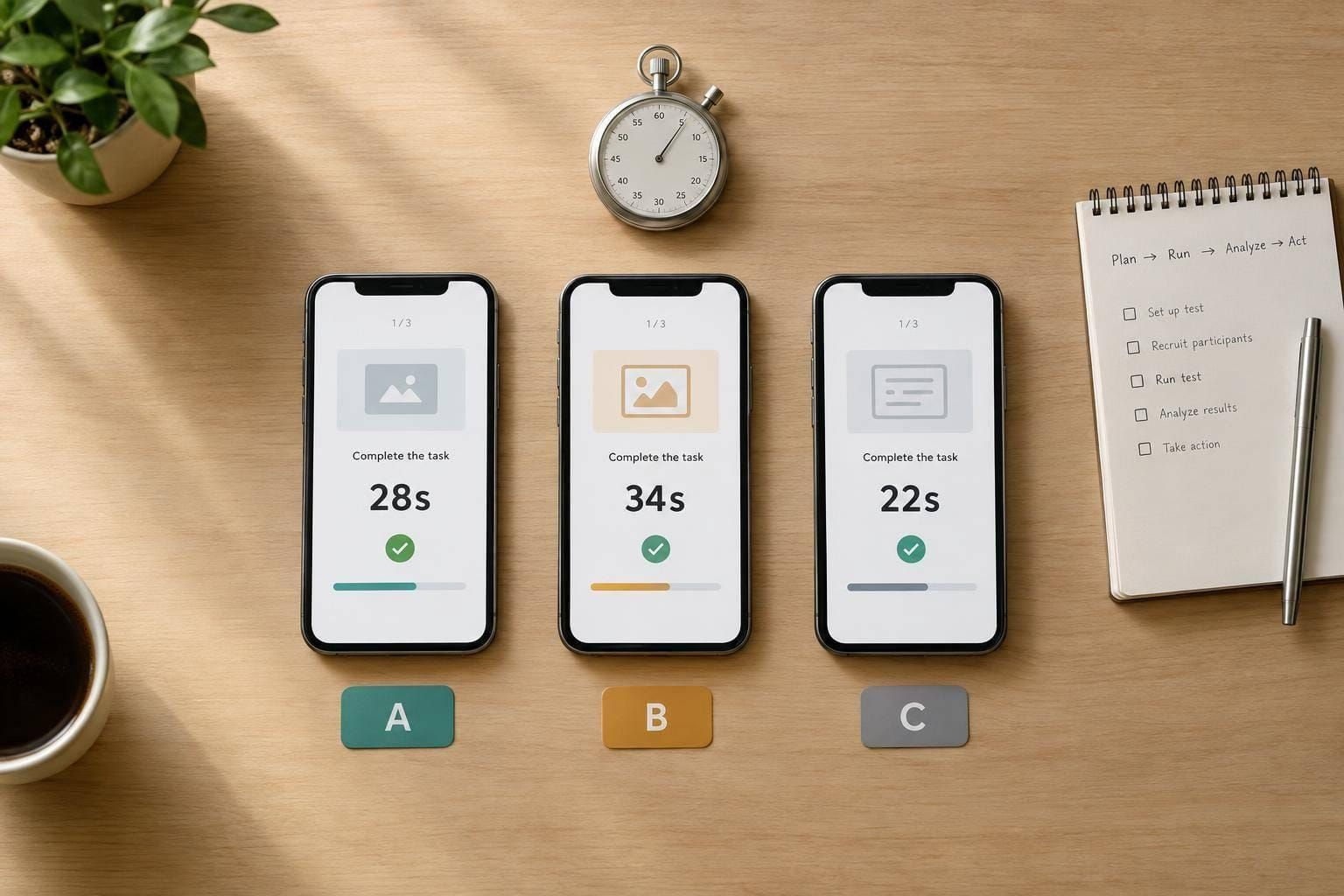
I compare designs by what users can do - not just which version they like. My starting point: test two or three versions with equivalent tasks, choose one primary outcome, and set decision rules before collecting results.
I measure task success, time, errors, and satisfaction, while keeping preference separate from performance. A sample of five to eight participants per similar user group can help identify problems, but it cannot establish a statistically reliable winner.
Here’s the process I follow:
- Plan: Define the decision, metrics, participant groups, and version order.
- Prepare: Recruit target users, check prototype parity, pilot neutral tasks, and get recording consent.
- Test: Keep conditions consistent and log outcomes, assistance, and technical failures.
- Analyze: Compare results, check uncertainty, and assess accessibility barriers.
- Act: Choose, combine, or retest designs; document changes; and validate the implementation before release.
My rule: <u>if results are mixed, I don’t force a winner</u>. I document the trade-offs and test what remains uncertain.
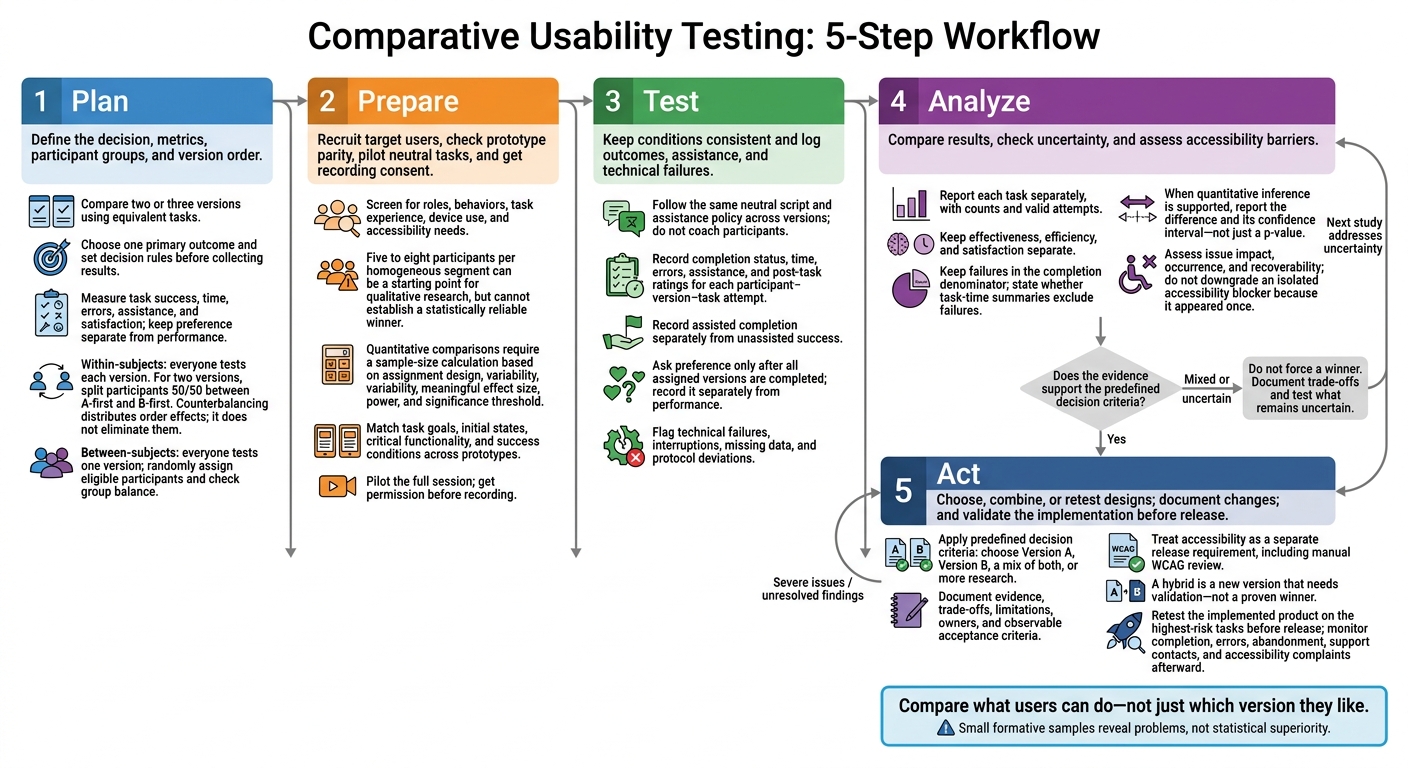
Comparative Usability Testing: 5-Step Workflow
Set Research Goals and Plan the Study
Use the study plan to turn a design comparison into a clear product decision. Specify the decision, target users, workflow, constraint, owner, and decision date. Set a rule for choosing whether to ship, combine, or retest the designs. Compare only two or three versions; adding more increases fatigue and weakens results. Then define the outcomes that will guide the decision.
Define Questions, Metrics, and Decision Criteria
Ask which version helps users complete tasks, reduces errors and assistance, and makes the workflow easier to understand. Choose one primary outcome, supported by measures such as completion rate, task time, critical errors, assistance requests, post-task ease ratings, and preference.
Define when timing starts and stops, plus how you'll record abandonment and assistance. If useful, add the 10-item System Usability Scale (SUS). It produces a subjective usability score from 0–100 - not a success rate.
Before reviewing results, set the minimum improvement that matters and the trade-offs you'll accept. Document exclusions, missing-data rules, and whether the findings will indicate a direction or support a stronger quantitative claim. With those measures set, assign participants and balance version order.
Assign Participants and Balance Version Order
For within-subjects testing, split participants 50/50 between A-first and B-first. Counterbalancing distributes order effects; it does not eliminate them. Use equivalent task variants to reduce the chance that participants remember answers.
For between-subjects testing, randomly assign eligible participants. Check that groups are balanced across task experience, device type, and accessibility needs. Keep settings, moderation, time limits, and measurement rules consistent. Record version order for analysis.
| Consideration | Within-subjects: everyone tests each version | Between-subjects: everyone tests one version |
|---|---|---|
| Benefits | Direct comparisons within each person | Preserves first-use behavior without exposure to another version |
| Limits | Longer sessions; fatigue and carryover | Group differences can obscure design effects |
| Participant needs | Often fewer participants; each must qualify for every condition | Generally more participants; groups need comparable profiles |
| Learning risks | Earlier tasks can improve later performance | No cross-version learning; learning can still occur within tasks |
Choose Moderated or Unmoderated Testing
Choose moderated or unmoderated testing first. Then decide on remote or in-person sessions based on context and troubleshooting needs. Use moderation when you need to understand why performance differs. Use unmoderated testing when the task is stable and you need faster, standardized results.
Before remote sessions, verify the device, browser, network, audio, screen sharing, prototype access, and recording consent. For unmoderated studies, pilot the exact setup and provide recovery instructions. Collect as little personal data as possible, restrict access to recordings, and explain how you'll retain and delete them.
| Dimension | Moderated | Unmoderated |
|---|---|---|
| Observation depth | Live probing of confusion and expectations | Recordings, written feedback, and predefined measures |
| Task complexity | Better suited to complex or unfamiliar workflows | Best for stable, clearly scoped tasks |
| Measurement consistency | Requires a strict script and assistance policy | Standardized delivery, but misunderstandings cannot be clarified |
| Logistics | Scheduling and trained facilitator time | Participants can complete sessions concurrently |
| Limitations | Moderator influence and higher staffing costs | Less context for unexpected behavior; failures may cause abandonment |
Next, verify that each prototype supports the same tasks in the chosen setup.
Check Prototypes and Task Equivalence
Check that each prototype supports the same task goals, states, and success conditions. Build a feature-and-task matrix covering required actions, content, initial states, error handling, and success conditions.
Check that functionality and fidelity are comparable at critical points. Include keyboard navigation, mobile behavior, loading states, reset behavior, recording permissions, and prototype links. Pilot the instructions and task difficulty, then document intentional design differences separately from accidental gaps. If one prototype cannot support a task on equal terms, repair it or drop the task.
Recruit Participants and Prepare Sessions
Once the study design is set, recruit participants and prepare materials that fit the decision you need to make.
Set Recruitment Criteria and Sample Size
Recruit people from your intended user group who can tell the versions apart in ways that matter to the study. Screen for roles and behaviors, not demographics alone. Look at task frequency, domain experience, device use, and prior product exposure. Set quotas for relevant segments before recruitment starts, and keep a reserve list for cancellations.
Ask about functional needs and assistive technology - not medical details you don’t need. Offer accommodations without changing task goals, and document any effects on timing or interaction.
Five to eight participants per homogeneous segment can be a reasonable starting point for qualitative research, but that sample cannot establish a statistically reliable winner. For quantitative comparisons, calculate sample size based on the assignment design, expected variability, meaningful effect size, desired power, and significance threshold. Account for incomplete sessions and any planned subgroup analysis. With the right participants identified, prepare the materials they’ll use.
Prepare Materials, Consent, and Incentives
Keep setup consistent across versions. Prepare test accounts, realistic sample records, accessible instructions, and a moderator guide that includes reset steps and backup plans for failed builds or lost connections.
Send preparation details early and confirm compatibility with assistive technology. Schedule sessions in each participant’s local time zone, allowing time for setup and breaks. Before every session, load the assigned version and reset it to the starting state.
Consent should explain the neutral study purpose, activities, duration, recording, data access, storage, retention, de-identification, withdrawal, and sharing permissions. Get permission before recording, and use a separate opt-in for sharing identifiable video.
Explain the payment method, timing, cancellation terms, and what participants will receive if technical problems prevent them from finishing. Pay should reflect their time and burden - not whether they complete tasks successfully.
Write Neutral Tasks and a Consistent Script
Follow the same flow in every session so results reflect version differences, not differences in facilitation. Start with consent and background questions, then move through a neutral introduction, task scenarios, post-task ratings, version-specific questions, and a final preference question.
Don’t name controls or reveal the paths participants should take. Define timing boundaries, success and failure criteria, time limits, and what assistance moderators may provide.
Pilot the full session with someone who resembles the target audience. Check eligibility, instruction clarity, task equivalence, prototype behavior, actual session length, and metric collection. Leave time after the pilot to revise the screener or materials before live sessions begin.
Run Sessions and Record Observations
Once the setup is ready, use the same neutral protocol for every session.
Moderate Without Coaching
Stay neutral as participants work. Don’t praise, hint, criticize, or signal a preferred answer. Wait until the task ends to ask follow-up questions unless clarification is needed. Apply the study plan’s rules across versions, and log accommodations consistently. The goal is to compare results - not coach participants toward success.
Use think-aloud during tasks only when you need to understand participants’ expectations, interpretations, and decisions. Since it affects timing, use the same approach across versions and flag any affected measures. Keep reminders brief and consistent.
Follow the fixed help sequence. Log the wording and timestamp of every intervention, including think-aloud reminders. Record assisted completion separately from unassisted success.
Record Task Outcomes and Feedback
Create a separate record for each participant, version, and task. Include completion status, timing, errors, assistance, and post-task ratings. Keep observations and verbatim statements in separate fields. Timestamp behavior so you can check the recording rather than rely on memory.
Ask about preference only after participants finish all assigned versions. Record it separately from performance.
Before ending the session, log technical failures, missing responses, skipped tasks, missing recordings, and protocol deviations. Preserve original timings and flag ambiguous trials. Don’t delete delays or blame participants for prototype failures. Use these records to compare performance and interpret differences.
sbb-itb-124fdbf
Analyze Results and Uncertainty
Turn the session log into a comparison file with one row per participant–version–task attempt. Include participant ID, segment, version, task, presentation order, completion status, time, errors, assistance, interruptions, ease rating, preference, and comments.
Use consistent outcome codes: success, partial success, failure, and not attempted. Add a column for researcher interpretation. Keep the raw file and log every exclusion so each summary can be traced back to its source data.
Compare Performance and Preferences
Report each task separately before combining results. For both versions, include counts and valid attempts beside every summary. Keep effectiveness, efficiency, and satisfaction separate so faster times don’t mask worse results: speed only matters alongside accurate, complete outcomes.
| Metric | Version A | Version B | Reporting rule |
|---|---|---|---|
| Sample size | Assigned participants; valid attempts | Assigned participants; valid attempts | Show exclusions and reasons separately |
| Completion | Successes / valid attempts | Successes / valid attempts | Report full, partial, and assisted completion separately |
| Task time | Median seconds; number included | Median seconds; number included | State whether failures are excluded; include spread |
| Errors | Defined errors / valid attempts | Defined errors / valid attempts | Apply the same error definition |
| Assistance | Helped attempts / valid attempts | Helped attempts / valid attempts | Separate clarification from rescue |
| Ease rating | Mean or median; responses received | Mean or median; responses received | Use the same scale; missing ratings are not zero |
| Preference | Votes for A / respondents | Votes for B / respondents | Include only participants who evaluated both |
Keep failures in the completion denominator. If task-time results include only successful attempts, report stopping times separately. Explain interrupted or technically blocked trials instead of quietly removing them.
For paired studies, compare each participant’s outcomes across versions. For independent groups, compare group results and check whether the groups are balanced. When the data supports quantitative inference, report the difference and its confidence interval - not just a p-value. Small formative samples reveal problems, not statistical superiority. Use the results to judge whether the design difference is real or remains uncertain.
Group Issues and Rate Severity
Group findings under navigation, terminology, content clarity, visibility, confidence, accessibility, and workflow friction. Give each issue an ID and link it to its version, task, participant IDs, segment, evidence type, observed outcome, and supporting feedback. Show how each issue affects completion, confidence, or accessibility so the findings can guide design decisions.
Rate impact, occurrence, and recoverability. A critical issue blocks completion or creates serious risk. A serious issue causes major delays or wrong outcomes. A moderate issue causes confusion that users can recover from, while a minor issue adds slight friction.
Report occurrence as a count within the sample, not an estimate for the full user base. Look for patterns by goals, experience, and access needs. Don’t downgrade an isolated accessibility blocker just because it appeared once.
Check Confounds and Unclear Results
Check whether bugs, broken interactions, delays, familiarity, task wording, version order, moderator assistance, or sample imbalance weaken the comparison.
Compare each participant’s preference with their behavior. Familiarity may explain why someone prefers a version that led to worse outcomes. Differences between segments may point to different needs.
If uncertainty spans meaningful gains and harms, the evidence does not establish a winner. Recruit more participants when estimates lack precision, revise biased tasks, or run a better-controlled study to address order and balance problems. Use targeted accessibility testing for severe barriers. When prototype limits affected results, retest the implemented design. If the evidence still points in two directions, move to the design decision step without forcing a winner.
Use Findings to Make Design Decisions
Choose or Combine Designs
Use your predefined decision criteria to turn the findings into a product choice: Version A, Version B, a mix of both, or more research. Don’t let personal preference or implementation cost override the test results. Keep user results separate from engineering estimates.
| Criterion | What to compare between versions | Evidence source |
|---|---|---|
| Task success | Completion and critical errors on priority tasks | Usability sessions |
| Efficiency | Task time and unnecessary steps under equivalent conditions | Recordings and interaction logs |
| Satisfaction | Ease ratings and reasons for preference | Surveys and interviews |
| Accessibility | Barriers affecting keyboard and assistive technology use | Disabled-participant sessions and dedicated accessibility evaluation |
| Implementation effort | Estimated work, dependencies, and technical risks | Engineering estimates |
| Product goals | Support for priority user needs and workflows | Product assessment and user-need evidence |
| Evidence quality | Consistency, participant coverage, and unresolved limitations | Research assessment |
Treat accessibility as a separate release requirement. Verify it through manual WCAG review, not automated checks alone. If you combine elements, the hybrid is a new version that needs validation, not a proven winner.
Once you choose a design, document why it won.
Document Findings and Prioritize Changes
Prepare a decision report that covers the research questions, methods, study dates, tested versions, participant profiles, tasks, results, limitations, and reasons for the decision. Share a one-page summary, a detailed evidence appendix, and engineering tickets ready for implementation. Record the selected design, rejected options, risks, dependencies, owners, and target dates.
For each recommendation, record the issue, affected users or tasks, evidence, severity, proposed change, expected benefit, confidence, and owner. Include observable acceptance criteria and a validation plan in the development ticket.
Prioritize user impact first, followed by frequency, business importance, accessibility risk, implementation effort, and evidence confidence. Completion blockers and serious accessibility barriers come before cosmetic preferences. Effort helps determine scheduling - not severity.
Use the ticket and acceptance criteria to validate the implemented design.
Test the Implemented Design
Retest severe issues, conflicting findings, and combined workflows using the same tasks and measures. Prefer new participants for confirmation. If participants return, document their prior exposure because learning can affect the results.
Check that the implementation matches the tested content, responsive behavior, interaction states, keyboard controls, focus handling, and error recovery.
After release, monitor completion, errors, abandonment, support contacts, and accessibility complaints by relevant segment. Use live experiments to answer remaining production questions, with predefined metrics, comparison periods, guardrails, and stopping rules. Usability findings do not predict revenue or conversion.
Conclusion: Make Decisions With Clear Evidence
A fair comparison starts with a clear decision, equivalent tasks, and consistent conditions. Then compare what users actually did - not just what they preferred.
Treat small qualitative samples as directional, not definitive. When results conflict, state what remains uncertain instead of forcing a winner.
Connect each recommendation to the original decision criteria and the observed evidence. Assess usability in context through effectiveness, efficiency, and satisfaction, not preference alone. If the evidence remains mixed, document the trade-off and prioritize by user impact, frequency, severity, business value, and effort.
After making the decision, check that the chosen design still performs in production. Retest the implemented product on the highest-risk tasks before release.
FAQs
How do I choose a meaningful improvement threshold?
Set your threshold based on business priorities, user needs, and the risks tied to each feature. Before testing, define clear pass/fail metrics and decide which results will call for another round of design changes.
Use measurable outcomes:
For example, at least 70% of participants should complete a flow without prompting.
Focus first on high-impact areas, such as checkout or onboarding, where design changes are costly to reverse. This helps findings guide product decisions based on evidence.
How can I compare designs with different workflows?
Use controlled experiments, such as A/B testing, and set clear success criteria: task completion rates, time-on-task, error rates, or user satisfaction scores. Compare outcomes, not specific methods.
Build neutral, goal-oriented scenarios that reflect actual user journeys. Start with simple tasks, then move to more complex ones. Test every user flow to find usability issues - not confirm assumptions you already hold.
When should I stop testing and make a decision?
Stop testing when you’ve met your predefined success criteria or pass/fail threshold and more sessions are unlikely to change the decision. By then, you should have enough evidence to make concrete backlog or design decisions. Set the threshold before testing so the team knows when to rework and when to move on.
Test high-stakes workflows first. Short on time? A focused, task-based test is often enough to make the decision.