
AI Voice UX Studies: What Patterns Work
Fix voice failures with targeted repairs, ask only missing details, keep task context across fallbacks, and measure real task success.


My takeaway: fix errors, ask only for missing details, and keep task context when voice fails. In a four-week study of 15 older adults, only 25.47% of errors were fixed on the next attempt - so I wouldn’t rely on users to keep retrying.
Here’s how I’d apply the research:
- Repair actual failures. Explain what went wrong and offer a clear next step.
- Match questions to the task. Ask for missing details; confirm high-impact actions before execution.
- Offer another input method. Let users switch to a screen or manual controls without starting over.
- Check the outcome. Measure correct completion, extra turns, abandonment, time, and trust - not just whether the conversation sounds smooth.
Shorter isn’t always better, and more input options don’t always help. I’d test these patterns in the intended voice workflow, especially for LLM systems: <u>findings from typed conversations don’t prove what works in speech.</u>
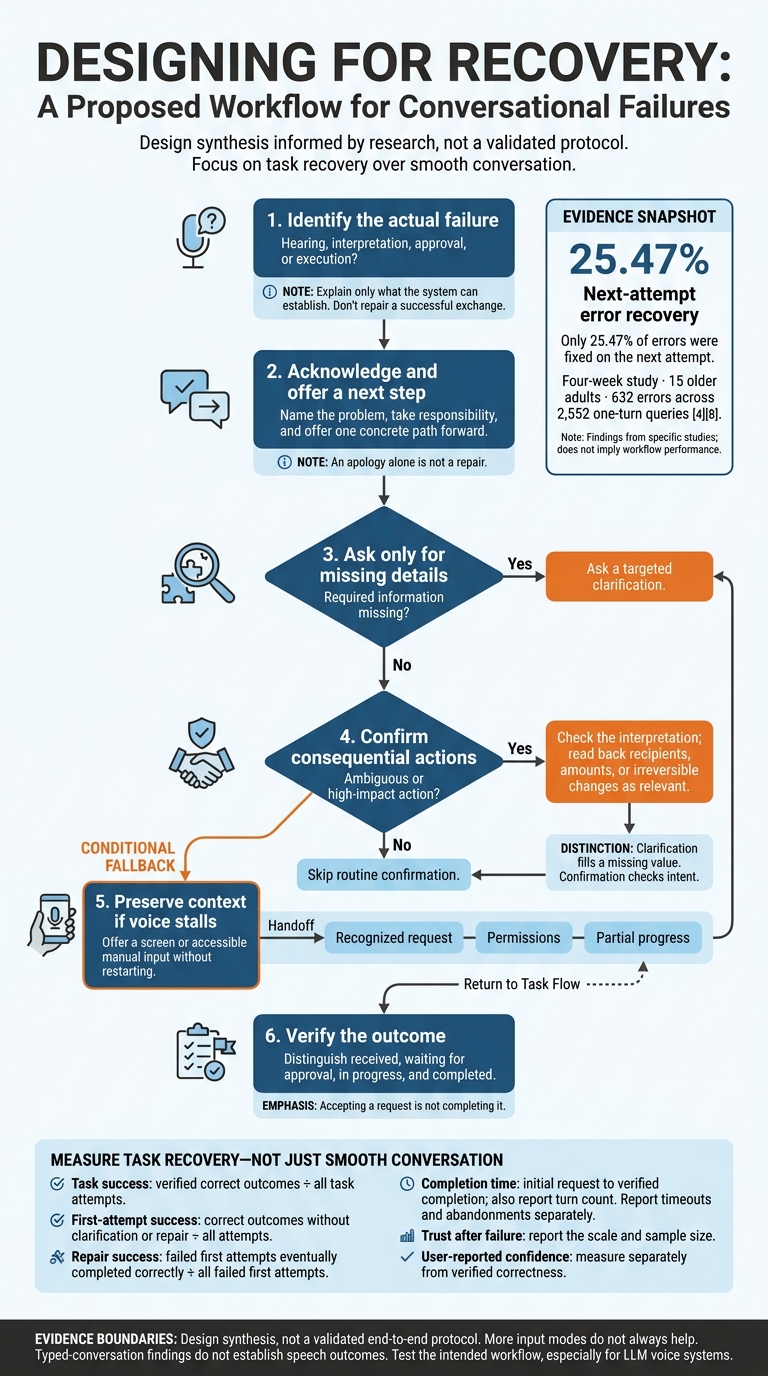
AI Voice UX: A Context-Preserving Recovery Flow
Error Recovery and Trust After Failure
Self-Correction in Experiments and Home Use
In “My Bad! Repairing Intelligent Voice Assistant Errors Improves Interaction,” 101 participants asked Amazon Alexa to complete four tasks. Researchers compared correction, undercorrection, overcorrection, and a no-error control. Self-correction improved evaluations after an actual error. Unnecessary correction lowered evaluations compared with the control, but still scored better than leaving an error unfixed. The lesson: repair a real failure; don’t “fix” a successful exchange.
A four-week study of 15 older adults recorded 632 errors across 2,552 one-turn queries. Of those errors, 25.47% were fixed on the next attempt. Users mostly recovered by retrying on their own. But familiarity did not reduce errors or improve recovery.
These findings put the burden of repair on the system rather than the user. The design task is to match the repair to the failure.
Recovery Patterns: Findings and Trade-Offs
Different failures call for different repair moves.
| Pattern | Research support or proposed gain | Cost |
|---|---|---|
| Self-correction | Improves ratings after an actual error. | Unnecessary repair makes successful exchanges seem unreliable. |
| Targeted clarification | Ask for the missing detail or suggest a specific rephrasing rather than requiring repeated retries. | Broad questions add effort; rewording cannot fix every failure. |
| Confirmation | Checks intent before ambiguous or high-impact actions. | Routine confirmation slows low-risk tasks. |
| Apology or acknowledgment | Shows that the system noticed the failure. | Without repair, apologies can feel performative; unnecessary apologies risk overcorrection. |
A good repair turn names the problem, asks only for missing details, offers one path to a fix, and keeps the context. Measure extra turns and abandoned tasks - not just eventual success. Field research linked abandonment to lower satisfaction, while successfully repaired requests did not produce a statistically significant increase in satisfaction.
Don’t blame the speaker. Take responsibility and offer a concrete next step. The evidence does not establish a direct spoken-language comparison between apologies that take responsibility and those that shift blame. One study found that apology lowered perceived competence without improving integrity or benevolence. Words alone do not repair a failure.
The response also needs to account for where things went wrong: hearing, interpretation, or execution.
Trust Signals for Different Failures
Mixed-method research found that trust depended on the type of failure. Incorrect execution, missed triggers, and overcapture were harder to forgive than ambiguity or false wake-ups. Users also tried low-risk tasks, such as playing music, before returning to tasks with greater consequences. This concerns repairing trust after failure, not baseline trust. Success on a low-risk task does not prove readiness for high-stakes actions.
Use the following cues to respond to specific failure types, not as standalone fixes for trust.
| Trust signal | Concrete response | Boundary to preserve |
|---|---|---|
| Specific uncertainty | Name the ambiguous detail and ask the user to resolve it. | Do not present a guess as settled intent. |
| Accurate acknowledgment | State whether the failure involved hearing, understanding, approval, or execution. | Explain only what the system can establish. |
| Responsibility | Acknowledge the system’s failure and offer the next repair step. | Do not blame the user. |
| Consequence-based confirmation | Read back recipients, amounts, or irreversible changes before execution. | Request only the permissions needed. |
| Clear status | Distinguish received, waiting for approval, in progress, and completed. | Never equate accepting a request with completing it. |
| Context-preserving fallback | Carry task details into a screen or manual fallback and show the outcome. | Let users verify completion without restarting. |
| Visible listening and recording status | Signal activation, explain when recording starts and stops, and offer cancellation. | Make unintended listening easy to stop. |
sbb-itb-124fdbf
Request Length, Follow-Up Questions, and Task Success
After recovery, the next question is whether brief prompts or more detailed requests lead to better task completion.
Short Commands vs. Detailed Requests
Match the request structure to the task’s complexity - not a fixed word count. Short commands can work for routine tasks. Detailed requests can provide constraints for multistep work. But longer reformulations may also reflect repair effort or a harder task. Measure user-request length separately from assistant-question length and dialogue-turn counts.
| Study | Pattern it supports | Main limitation |
|---|---|---|
| Push-to-talk/free-to-talk | Longer speech turns can occur alongside fewer dialogue turns without a statistically significant change in completion time. | Initial request length was not isolated. |
| Let’s Go | Include confirmations and additional turns when evaluating completion. | Bus-schedule dialogues do not isolate request-length effects. |
| Voice-query clarification | Clarification can preserve satisfaction compared with a correct direct answer. | Small mock-up study with 14 participants and ambiguous information needs. |
| SIGdial repair experiment | Report repair effort alongside completion: acoustic problems increased utterances and elapsed time. | Induced acoustic problems, not request length, drove the comparison. |
Asking for Missing Details
Break the task into required fields, then ask only for what’s missing. In task-oriented dialogue research, explicit clarification was associated with higher completion and fewer user turns. In the Alexa mock-up study, satisfaction was similar for clarification and direct answers when the system inferred the user’s meaning correctly.
Clarification fills a missing value; confirmation checks an interpretation before a high-impact action. Evaluate assistant questions by word count, duration, required details, and answer accuracy.
Ask only for missing fields, then confirm any high-impact detail before execution.
First-turn success means completing the task without clarification or reformulation. Count repair turns separately from required task steps. Use each study’s completion denominator; one study divided completed goals by started goals.
Track abandonment before finalization, and specify whether timing covers speech, the full dialogue, or execution. Vary request structure and task difficulty separately, then report both completion and repair effort. Missing word counts and limited spoken-versus-typed comparisons restrict what we can say about request length.
When voice still leaves details unresolved, the next pattern is switching channels without losing context.
Multimodal Support and Task Completion
After recovery and clarification, the next test is whether users can switch channels without losing their place in the task.
Comparing Voice, Screens, and Manual Fallback
Match the channel to the task. More modes aren't always better. Multimodal interaction can help with visual-spatial tasks, but the evidence does not show that it always works better - or improves recovery after speech failure.
| Modality | Direct research support | Strengths | Failure risks | Measured outcomes |
|---|---|---|---|---|
| Voice-only | Dynamic map comparison and simulated-driving workload study | Hands-free input; useful when users cannot look at a screen or use their hands | Ambiguous references; lengthy spoken descriptions; recognition errors | Speech-only map tasks averaged 278 seconds, compared with 249 seconds for multimodal interaction. Speech also produced more errors and disfluencies. |
| Voice plus display or pointing | Dynamic map comparison; separate eight-participant visual-search study | Shows options, locations, and precise referents | Requires usable screen access; recognition delays can offset gains | Multimodal map tasks averaged 249 seconds, a statistically shorter time than speech-only. In a separate eight-participant visual-search study, voice assistance reduced average total completion time from 384 seconds to 176 seconds. |
| Voice plus manual fallback | Manual fallback supports precise correction, but the supplied studies do not directly test recovery after speech failure. | Allows precise correction or selection | Switching effort; inaccessible controls; possible loss of task state | In the driving study, touch produced the least cognitive strain for simple tasks. Voice alone or voice plus visual aids performed better for complex, multi-step tasks. No fallback-specific recovery metric was reported. |
These are separate studies, not a three-way benchmark. Faster task times do not prove better completion, confidence, or trust. In one counterexample, a speech-and-gesture visualization task took 10.1 minutes, compared with about 3.5 minutes using a mouse.
Speed is only part of the picture. The interface also needs to preserve task state when users move between voice and screen.
Switching Channels Without Losing Context
Muxi displayed the user's command and next steps, then confirmed completion aloud. Its conversational condition had a median task time of 40.5 seconds, compared with 61 seconds for a menu-based condition. That comparison tests the interface as a whole. It does not show that spoken confirmation caused the shorter task time.
Design takeaway: Show the recognized request, a small set of clearly distinguished options, and the current status. Let users select visually, confirm by voice, or use another accessible input without losing task state. These patterns fit the visual-search and Muxi findings, but the supplied evidence does not test this exact recovery flow.
For fallback, keep the recognized request, permissions, and partial progress intact. Then test whether users resume at the correct step and whether task state survives the handoff. Measure completion, errors, repair turns, time, workload, and confidence rather than assuming results from task-specific systems apply to LLM voice systems.
Conclusion: Supported Patterns and Evaluation Checklist
Link Design Patterns to Research
Smooth conversation is not proof of task success. The supported approach combines task-matched clarification, system-supported repair, calibrated trust, and accessible fallback.
Across the studies, the question isn't which pattern sounds best. It's which one gets the task back on track with the fewest extra turns.
| Pattern | Practical use |
|---|---|
| Error acknowledgment | Name the failure and the next step. Use it after actual errors, not successful turns. |
| Targeted clarification | Ask only for the missing detail. The wording still needs testing. |
| Constrained repair options | Offer a small set of likely fixes rather than a generic retry. |
| Selective confirmation | Confirm only actions with meaningful consequences. Skip routine confirmation. |
| Responsibility-taking language | Don't blame the user. Match the wording to the type of failure. |
| Context retention | Carry prior details forward and verify them during repair. |
| Multimodal fallback | Switch to another modality or human support when repair stalls. |
Judge evidence by quality, consistency, and task relevance, not study type alone. For LLM voice systems, directly test multi-turn repair, tool-call accuracy, hallucinated confirmations, latency, and whether the system mistakes clarification for authorization.
Measure Recovery and Task Success
Test whether the pattern improved the task, not just the dialogue. Define each measure before testing:
- Task success: verified correct outcomes ÷ all task attempts.
- First-attempt success: correct outcomes without clarification or repair ÷ all attempts.
- Repair success: failed first attempts eventually completed correctly ÷ all failed first attempts.
- Abandonment: attempts ended without the intended outcome ÷ all attempts.
- Trust after failure: post-failure trust score, intention to use the system again, or willingness to retry a comparable task. Report the scale and sample size.
- Completion time: time from the initial request to verified completion, plus turn count. Report timeouts and abandonments separately.
- User-reported confidence: belief that the task succeeded, measured separately from verified correctness.
Compare equivalent tasks while keeping complexity, risk, and success criteria constant. Report participant experience, accents and dialects, noise, accessibility needs - including hearing, speech, and motor access - and cognitive load.
Include people who use captions, screen readers, text input, switch access, or alternative communication methods. Check subgroup results, not just averages: high confidence can still mask wrong outcomes.
FAQs
When should a voice assistant stop retrying and offer fallback?
A voice assistant should stop retrying and offer a fallback after giving generic error messages two or more times in a row. Repeated failures show that recovery isn’t working and can make users hesitate or abandon the task. To maintain trust, detect these error loops and offer a human handoff, a clarifying question, or a fallback language pipeline rather than repeating the failed interaction.
How can I test voice prompt length fairly?
Look beyond task completion and assess cognitive accessibility. Review conversation logs for signs of hesitation, rephrasing, or users leaving after dense or complex prompts.
Test with a diverse group of users in everyday conditions, including background noise and varied lighting - not just controlled settings. Watch for pauses, misreading, and confusion. Check whether the prompt structure helps users get back on track on their own, without having to remember information from earlier screens.
How can I detect misplaced trust in AI voice systems?
Track when users repeatedly dismiss suggestions, override outputs, rephrase requests, hesitate, or abandon tasks. These patterns can point to low trust or confusion about the system’s output.
Use comprehension tests to check whether users understand AI decisions and recognize when AI is involved. Survey their confidence before and after interactions. Then compare user inputs with system outputs to spot gaps between what users expect and what they get.