
How to design NLP search for enterprise tools
Map tasks to intent, enforce permissions, make query interpretations editable, and preserve search context in enterprise NLP.


I design enterprise NLP search to find the right information - not just generate an answer. I start with employee tasks, check permissions before showing results, and make query interpretations editable. Finding a record should never trigger an approval or other change.
Here’s what I cover:
- Tasks and query entry: Map user goals, define entities, and ask for clarification when ambiguity affects the outcome.
- Results and sources: Match layouts to intent, cite supporting documents, and preserve search context.
- Filters and recovery: Keep the original query intact, let users remove constraints, and separate zero matches from system failures.
- Testing and handoff: Check permissions, keyboard access, and screen-reader use; then assign owners and pass/fail criteria.
I measure success by completed tasks - not clicks alone. A team might target 90% task completion, but that’s a proposed target, not an industry benchmark. My release rule: <u>permission leaks block launch</u>.
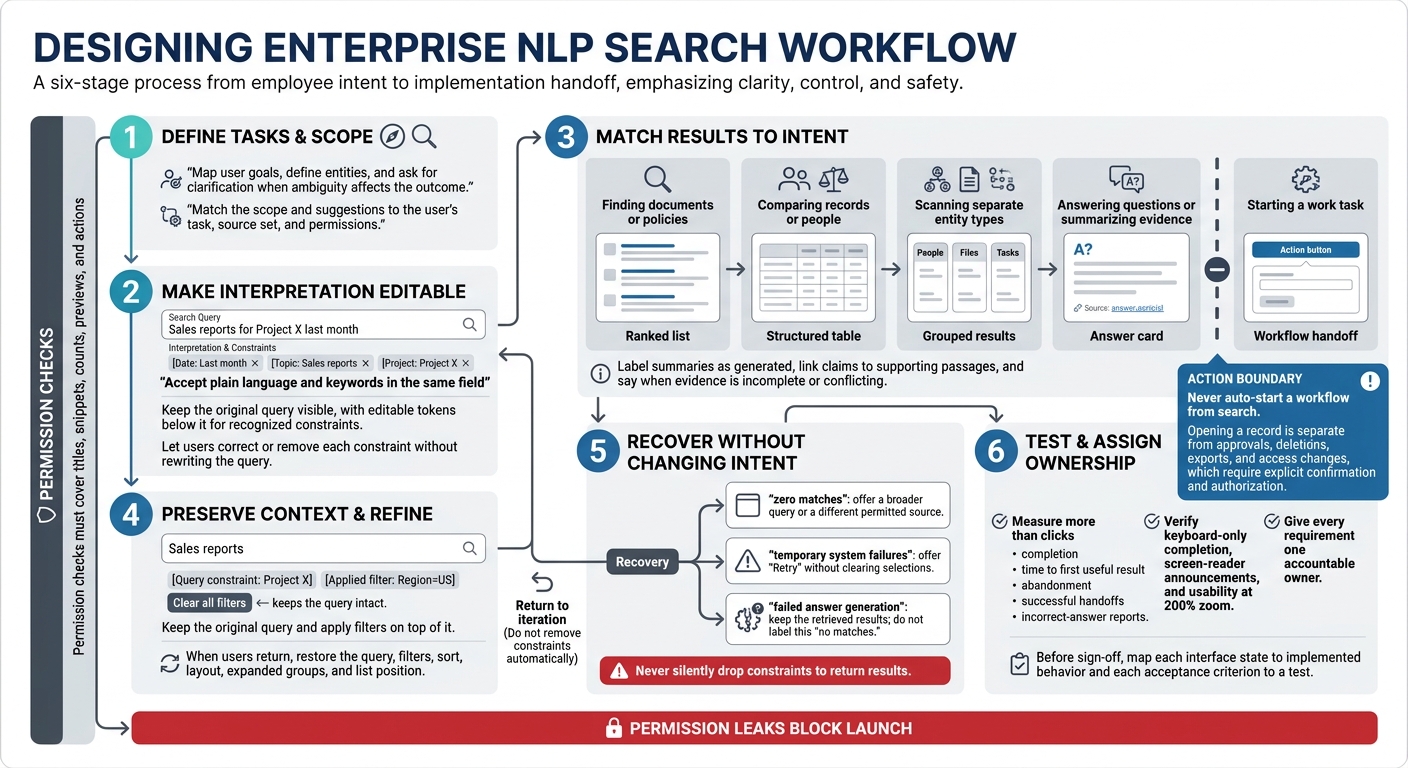
Enterprise NLP Search Design Workflow
2. Design the search box and query entry
Show search scope and suggestions
Once entities and clarification rules are defined, make those interpretations visible and editable in the search box. Clearly label the field, display the active scope beside it, and let users change that scope. Match the scope and suggestions to the user’s task, source set, and permissions. Accept plain language and keywords in the same field, without requiring special syntax.
Focus suggestions on matches and completions the user has permission to access. Keep submission behavior predictable. Make it clear whether selecting a suggestion fills the field or navigates elsewhere.
Make query interpretations editable and accessible
Keep the original query visible, with editable tokens below it for recognized constraints. Let users correct or remove each constraint without rewriting the query. Use inline prompts to clarify ambiguous dates or other constraints. Flag syntax outside the accepted format as a validation issue - not ordinary language.
Give the field and token controls accessible names, visible focus, and a logical tab order. Define keyboard controls for opening suggestions, moving between them, selecting one, and dismissing the menu. Provide loading and error messages as text that screen readers can announce.
Once the query is interpreted, the results layout should reflect the same constraints and retain the original context.
Assign query-entry design and development tasks
Design owns field states, suggestions, token editing, error copy, and keyboard behavior. Development owns syntax support, suggestion data, interpretation signals, permission checks, and analytics.
Define what happens when interpretation is slow or unavailable: keep the query, explain the state, and offer a retry. These ownership decisions shape how results should display the interpreted query.
sbb-itb-124fdbf
3. Match result layouts to search intent
Choose the right result layout
Choose the layout based on the intent interpreted from the search box. Design around what the user needs to do next: read, compare, verify, or start work. Keep secondary actions separate from the main task. Never auto-start a workflow from search.
| Result layout | Best use case | Strengths | Risks | Required metadata | Next action |
|---|---|---|---|---|---|
| Ranked list | Finding documents or policies | Easy-to-scan relevance ranking | Similar titles make selection harder | Title, content type, owner, last updated, excerpt, relevance explanation, access state | View document |
| Structured table | Comparing records or people | Field comparison and sorting | Dense columns hide context | Record ID, status, key fields, units, source, update time, row permissions | Open record |
| Grouped results | Scanning separate entity types | Keeps different purposes separate | Unneeded groups obscure ranking | Group label, result count, source system, group ranking rule, item metadata | View all or open item |
| Answer card | Answering questions or summarizing evidence | Short response with sources | Unsupported or outdated claims can look authoritative | Generated-answer label, citations, source dates, limitations | View source |
| Workflow handoff | Starting a work task | Connects search to task completion | Misread intent can cause unwanted changes | Destination and required inputs shown before entry, interpreted inputs, permissions, explicit confirmation before changes with material effects | Start workflow |
Keep comparable records together. Then show the metadata and actions users need for their next step.
Show sources, metadata, and allowed actions
Give each result a title, content type, owner, last-updated date, and excerpt. Show access indicators only when disclosure is permitted. Permission checks must cover titles, snippets, counts, previews, and actions - not just the destination page. Explain why actions are disabled without exposing protected metadata.
Keep generated answers separate from retrieved sources. Label summaries as generated, link claims to supporting passages, and say when evidence is incomplete or conflicting. Highlights show matching text; they don't prove relevance. Label the order as Most relevant, Newest, or Recently updated so users know how results are sorted.
Keep that context intact when users open a result.
Preserve search context after opening a result
Keep the query interpretation, filters, and sort order visible after navigation. When users return, restore the query, filters, sort, layout, expanded groups, and list position. Return keyboard focus to the result they opened.
Store state in navigation history or a recoverable URL only when security permits. Do not put confidential query terms or record IDs in the URL.
Define each state clearly: loading uses stable placeholders; partial results identify permitted sources still pending; stale results explain the known indexing delay; and restricted states use neutral wording that doesn't confirm protected records exist.
Announce loading and result-count changes accessibly. Format dates as Nov 2, 2026. Add a time zone when timing matters, such as Nov 2, 2026, 3:30 PM ET.
4. Add filters and search recovery
When a search returns too many results - or none - use filters and recovery options to narrow it without changing the user’s intent.
Make filters visible and easy to remove
Start with common filters: date range, owner, status, department, type, location, and source system. Filters should refine the interpreted task, not replace it. Show only options and counts that match the current scope, permissions, and indexing state.
Keep the original query and apply filters on top of it. Show editable constraints near the results. Label them Query constraint or Applied filter so users can tell NLP interpretations from their own selections. Give each constraint its own remove control. Include Clear all filters, which keeps the query intact. Explain whether multiple values use OR within a filter and AND across filters.
If filters still leave users with no results, shift from refinement to recovery.
Distinguish empty results from system failures
For zero matches, keep the query, filters, and scope visible. Offer a broader query or a different permitted source. If filters are too restrictive, let users remove them individually or expand the date range. Name conflicting filters when you can identify them. If the system can estimate a result count, display it beside the recovery action - but don’t imply success without a known count. Never silently drop constraints to return results.
For spelling errors, suggest a correction without replacing the original wording. Favor exact matches for record IDs and project codes. For ambiguous requests, ask one focused clarification question. For unsupported requests, explain the limits and suggest a supported search.
For access limits, use neutral wording. Offer an access-request path when appropriate, but don’t confirm that protected records exist. Check permissions for recovery suggestions, too.
Search failure and answer failure are separate states. For temporary system failures, explain that the search didn’t finish and offer Retry without clearing selections. For failed answer generation, keep the retrieved results and label the answer failure - not no matches. Results may exist even when an answer can’t be generated. Show accessible sources and suggest a narrower question when the evidence can’t support a reliable answer.
5. Test the design and prepare the handoff
Test common enterprise search tasks
Once the search flow is designed, test the full path from intent to result to handoff. Include the search box, result layout, filters, and recovery. Build a test matrix covering each task, role, interpretation, scope, result, and allowed action.
Test retrieval and ambiguity, zero matches and access limits, restrictive filters, temporary failures, and workflow handoffs. Measure more than clicks: track completion, time to first useful result, abandonment, successful handoffs, and incorrect-answer reports.
Set product-specific release targets, such as 90% completion for common tasks and a median time to the correct result under 60 seconds. These are proposed targets, not industry benchmarks.
Run the same queries with employee, finance manager, auditor, and administrator accounts. Test revoked access, too. Documents a user cannot access must never appear in results, suggestions, counts, previews, exports, cached responses, or generated answers. Check direct links and access across tenants or departments.
Verify keyboard-only completion, screen-reader announcements, and usability at 200% zoom. Automated accessibility checks do not replace human testing.
Create a shared implementation specification
Turn the test findings into one shared implementation spec that engineering can build against. Use a checklist to document the earlier sections’ design choices: supported intents; entity and filter schemas; date and currency handling; result types; ranking signals; source requirements and how current sources must be; permission and scope rules; clarification behavior; interface states; accessibility; and analytics.
Attach fixed test queries with expected outcomes and pass/fail criteria. Set a response-time budget for stated load conditions, and make permission leaks release blockers. Separate opening a record from actions with further effects: approvals, deletions, exports, and access changes require explicit confirmation and authorization.
Assign ownership clearly:
- Design: interaction rules and usability tests.
- Frontend: states, focus, filters, and confirmations.
- Search and backend engineering: parsing, ranking, indexing, sources, and permission enforcement.
- Security/privacy: authorization tests and log controls.
- Product: thresholds and rollout decisions.
Give every requirement one accountable owner. Document analytics events, query-log redaction, access, encryption, retention periods, and deletion rules. Queries can contain sensitive information. Keep them only as long as needed, then de-identify or delete them under the applicable policy.
Before sign-off, map each interface state to implemented behavior and each acceptance criterion to a test.
Conclusion: Review the search design checklist
Before release, confirm that representative tasks pass, design decisions are documented, accessibility and recovery checks pass, permission tests show no leaks, and implementation owners are assigned. Repeat this review after major ranking, model, index, or permission changes.
FAQs
Which search tasks should I prioritize first?
Start with core “find what I need” queries that support critical workflows. Next, address incomplete or unclear queries: use confidence-based language detection, ask clarifying questions only when needed, and provide a clear handoff to a human when unsure.
Then focus on fast lookup with autocomplete and accessible, ARIA-compliant suggestions and results. Cap these at 4–8 on mobile and 10 on desktop.
Finally, use filtering and progressive disclosure to help users narrow results without adding cognitive load.
When should search ask me to clarify my intent?
When the NLP system can’t reliably interpret your search, it should ask rather than guess - especially when confidence falls below a set threshold. One focused question, paired with quick-reply options, lets you clarify what you mean without retyping. That helps you get back on track after a misunderstanding and protects trust.
How can I detect permission leaks before launch?
Check required inputs in real time. When access is denied, explain why and how to fix it. Provide recovery steps, but don’t let users proceed until authorization checks are complete and successful.
For NLP search, route requests based on confidence instead of guessing. Send unclear requests to a human or offer a fallback path.
Test on real devices to confirm that recovery steps are clear and that users who are denied access can’t bypass the UI to view restricted results.