
How to Choose State Management Patterns for Scalability
Compare hooks, Context, Redux, Zustand and query tools to pick state patterns by state type, team size, performance, and scalability.


Choosing the right state management pattern can make or break your app’s scalability. Whether you're handling UI interactions, business logic, or server data, the approach you take will directly affect performance, debugging, and team collaboration. Here's the quick takeaway:
- UI State: Use
useStateoruseReducerfor local, component-specific data like modal visibility. - Domain State: Opt for tools like Redux Toolkit for complex, shared logic (e.g., shopping carts).
- Server State: Use libraries like React Query for caching and API data management.
Key Factors:
- System Needs: Simple apps can rely on hooks; larger apps benefit from structured tools like Redux.
- Team Size: Small teams thrive with lightweight tools like Zustand; enterprise teams need Redux’s predictability.
- Performance: Context API struggles with frequent updates; Zustand and Redux scale better.
- Debugging: Redux’s DevTools make tracing bugs easier, especially for large-scale systems.
Quick Comparison:
| Pattern | Best For | Scalability | Performance | Debugging |
|---|---|---|---|---|
useState/useReducer |
Local state in small apps | Low | High (local scope) | Basic (React DevTools) |
| Context API | Shared static data (e.g., themes) | Medium | Low (re-renders) | Moderate |
| Redux Toolkit | Complex, global state | Very High | High (selective updates) | Excellent (time travel) |
Start simple with hooks and Context API, then scale up with Redux or Zustand as your app and team grow. Proper state management ensures your application remains efficient, maintainable, and scalable.
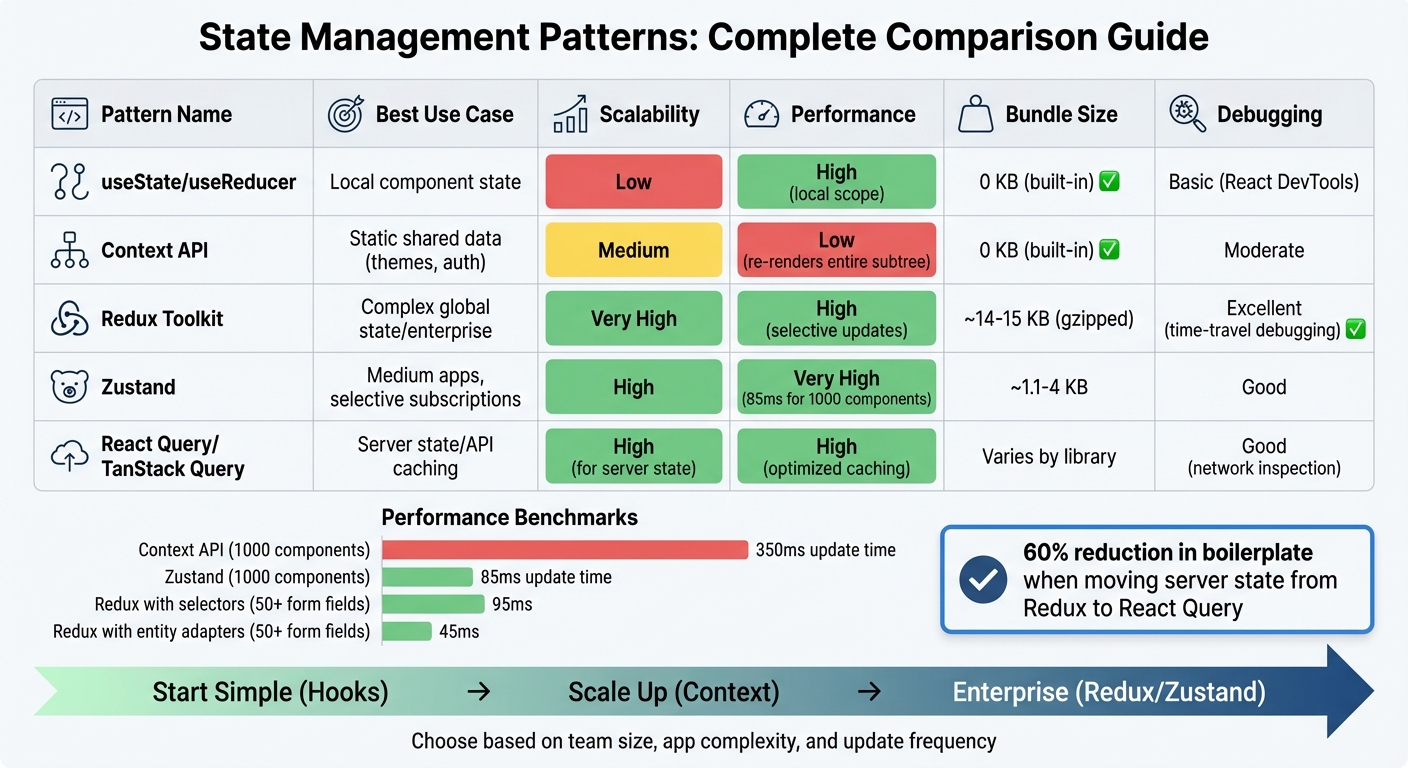
State Management Patterns Comparison: Performance, Scalability, and Use Cases
Factors to Consider When Choosing a State Management Pattern
System Requirements and Complexity
The type of state your application handles plays a big role in choosing the right pattern. For example, UI state (like modal visibility) is best kept local, while domain state (such as shopping carts or user permissions) is better shared across components. On the other hand, server state benefits from tools designed for caching and refetching, like React Query or similar libraries.
If your app relies on real-time updates, like live tickers or animations, subscription-based patterns (like Zustand) are a better choice than the Context API. The latter can lead to excessive re-renders, which can hurt performance. For instance, benchmarks show that with 1,000 components, Context averages 350 ms for updates, while Zustand handles the same in just 85 ms.
As your app grows in complexity, managing state can become a challenge. A common strategy is to consolidate multiple flags into a single status (e.g., "idle", "loading", "success") to reduce the likelihood of errors. Noro Avetisyan, a Senior Architect, explains:
"Context is a dependency injection mechanism, not a state management library. It lacks the sophisticated subscription optimizations required to handle high-frequency updates efficiently".
Keeping these considerations in mind can help you build scalable and efficient state management solutions.
Team Size and Collaboration Needs
Technical requirements aside, the size and structure of your team heavily influence the choice of a state management pattern.
For small teams (1–3 developers), lightweight tools like Jotai or Zustand can speed up development and keep things simple. However, larger teams, especially enterprise-level ones (20+ developers), often benefit from Redux Toolkit. Its strict, predictable state changes make it easier to navigate and maintain codebases.
That said, Redux has a steeper learning curve, requiring developers to grasp concepts like dispatching, reducers, and middleware. While Zustand’s flexibility is appealing for small teams, it can lead to inconsistencies in larger organizations. Without clear internal guidelines, developers might scatter logic across components, the store, or services, resulting in fragmented code.
For multi-team setups, adopting Feature-Sliced Design can help. This approach promotes decoupling by allowing features to share data through repositories or an event bus, rather than creating direct dependencies.
Choosing the right pattern based on team dynamics can streamline collaboration and reduce friction during development.
Debugging, Testing, and Maintainability
A good state management pattern should make debugging and maintenance easier, not harder.
Patterns with unidirectional data flow, like Redux, excel in this area. Tools like Redux DevTools allow you to trace actions and even "time travel" through state changes, making it easier to pinpoint bugs. As Abi Farhan, a Principal Software Engineer, emphasizes:
"Where you place your state matters far more than how you manage it".
Testing is another critical factor. Separating business logic from the UI makes it easier to test reducers and view models as pure functions, without relying on complex UI automation. Feature-Sliced Design also helps by isolating state within specific modules, reducing the risk of changes in one area causing problems elsewhere.
The React documentation underscores this point:
"Structuring state well can make a difference between a component that is pleasant to modify and debug, and one that is a constant source of bugs".
Common State Management Patterns Compared
useState and useReducer (React Hooks)
React's built-in hooks, useState and useReducer, offer a straightforward way to handle local component state without adding extra weight to your app. Use useState for simple tasks like controlling a modal's visibility or tracking form inputs. For more complex scenarios, such as managing multiple related state variables or implementing intricate update logic, useReducer is a better fit.
That said, these hooks shine in isolated components but can become a headache when dealing with larger apps. The problem? Prop drilling - passing state through layers of components that don't directly use it - can make your code harder to maintain. If your state needs to be shared widely, it's worth exploring other options.
Context API with Hooks
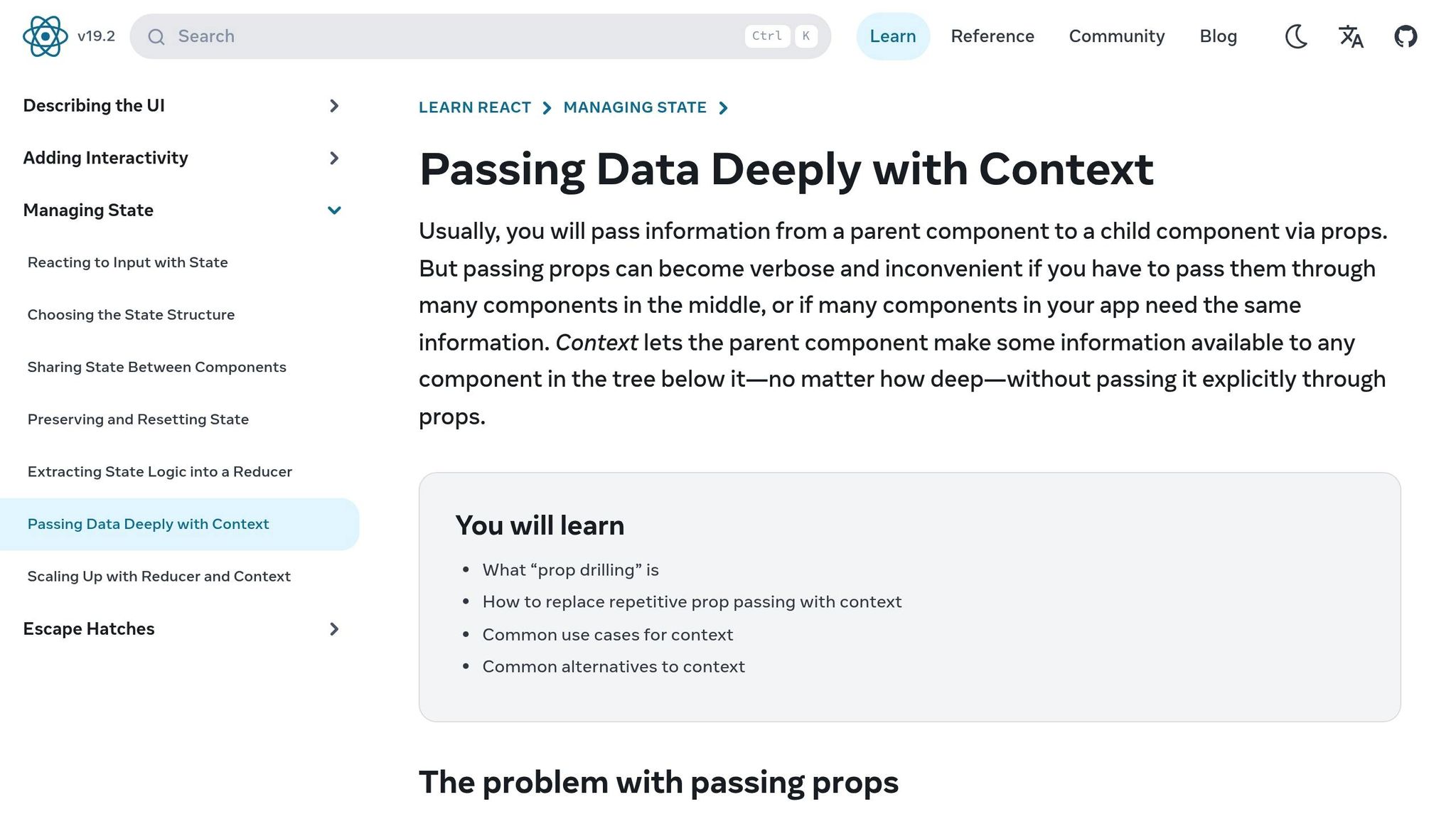
The Context API solves the prop-drilling problem by letting you share data across the component tree without manually passing props. It works well for data that doesn't change often, like themes, user preferences, or authentication details. However, Context isn't a full-fledged state management library; it's more like a dependency injection tool.
One big drawback? Any update to a context value causes all consuming components to re-render. For example, in a test with 1,000 components, Context had a re-render time of 156 ms, compared to just 12–15 ms for libraries using subscriptions. This makes Context less suitable for high-frequency updates, like tracking mouse movements or managing complex forms.
To mitigate these issues, consider splitting context into smaller, domain-specific providers (e.g., UserProvider, ThemeProvider) to minimize unnecessary re-renders.
Redux and Redux Toolkit
For apps where local state and Context fall short, Redux Toolkit (RTK) steps in as a powerful solution. Designed for large-scale applications, RTK enforces a strict unidirectional data flow: Action → Dispatch → Middleware → Reducer → Store. This makes it ideal for teams managing complex state logic.
While RTK adds about 14 KB–15 KB (gzipped) to your bundle size and slightly increases load times (e.g., 210 ms vs. 180 ms for Context), it offers advanced features like time-travel debugging. This allows you to replay actions and inspect state snapshots, making bug reproduction much easier. RTK also supports middleware for handling complex async operations. In production tests with apps featuring 50+ form fields, Redux hooks and memoized selectors delivered update times averaging 95 ms, which dropped to 45 ms when entity adapters were used.
"In large-scale enterprise applications with teams of 20+ developers, this strictness [of Redux] is a feature, not a bug. It ensures that every state change follows a predictable path".
State Management Patterns Comparison Table
| Pattern | Best Use Case | Scalability | Performance | Bundle Size | Debugging |
|---|---|---|---|---|---|
| useState/useReducer | Local component state | Low | High (local scope) | 0 KB | Basic (React DevTools) |
| Context API | Static shared data (e.g., theme) | Medium | Low (subtree re-renders) | 0 KB | Moderate |
| Redux Toolkit | Complex global state/enterprise | Very High | High (selective subscriptions) | ~14 KB–15 KB | Excellent (time-travel) |
Choosing the right state management pattern is all about understanding your app's needs. Hooks are perfect for local state, Context works for infrequent updates to shared data, and Redux Toolkit excels in complex, team-driven projects. Each tool has its place - use them wisely.
Architecture Patterns for Scalable State Management
Picking the right state management tool is just the beginning. The way you structure your code plays a huge role in determining whether your app can grow seamlessly - or crumble under its own weight. Architectural patterns provide a framework for organizing your code, ensuring state logic stays contained and doesn’t leak across your codebase, which could lead to fragile and unmanageable systems.
Feature-Sliced Design (FSD)
Feature-Sliced Design divides your code into well-defined layers that reflect business responsibilities. These layers include:
- App: Handles initialization and global concerns.
- Pages: Focuses on route-specific compositions.
- Features: Manages user actions and workflows.
- Entities: Represents core business data and logic.
- Shared: Contains reusable design system resources, utilities, and primitives.
A key principle of FSD is that each layer can only depend on the layers below it, avoiding circular dependencies. To maintain clear boundaries, each slice exposes a single public API - usually through an index.ts file. This means you can change the internal implementation of a module without impacting the rest of your codebase, as long as the API remains consistent. For example, you could switch the entities/user slice from using Redux to another state management library without breaking the app, provided the external interface stays the same.
Here’s how state maps to FSD layers:
| Layer | State Content | Example |
|---|---|---|
| Entities | Domain data (e.g., users, products) | Normalized user profiles keyed by ID |
| Features | Workflow logic | "Add to cart" or "login" status |
| Pages | Route-scoped filters | Search filters on a product listing page |
| App | Global providers | Theme, routing, authentication context |
To further enforce boundaries, lint rules can block cross-slice imports of internal files, ensuring modules interact only through their defined APIs. This level of organization not only keeps your code clean but also supports predictable state changes.
Unidirectional Data Flow
Once you’ve established clear architectural boundaries, unidirectional data flow ensures state updates follow a straightforward, predictable path. In this model, state is immutable, and changes happen exclusively through explicit actions processed by pure functions (reducers). Instead of directly modifying state, you dispatch actions like ADD_TO_CART, which flow through middleware and produce a new state. This approach makes debugging easier and prevents unexpected "ripple effects" where changes in one part of the app inadvertently affect others.
Separating reads (via selectors) from writes (via actions) further simplifies tracking state transitions. Many popular state management tools, such as Redux and Zustand, follow this pattern, making them reliable choices for scalable applications.
Separation of Concerns
Not all state is created equal, and managing different types of state with the same strategy often leads to unnecessary complexity. Instead, each type of state benefits from a tailored approach:
- UI state: Best handled locally using hooks (e.g., modal visibility, hover effects).
- Domain state: Managed in feature or entity-specific stores (e.g., cart items, user sessions).
- Server state: Ideally managed with query tools like TanStack Query for API responses or product lists.
Mixing these types of state can result in maintenance headaches. For instance, moving server state from a global Redux store to React Query has been shown to reduce boilerplate by as much as 60%. Additionally, placing business rules close to the data - inside reducers or entity models - makes the code more testable and prevents duplication across components.
"React hooks are primitives; architecture is about boundaries." – Feature-Sliced Design Documentation
Step-by-Step Guide to Selecting a State Management Pattern
Assess Your Current and Future Needs
Before choosing a state management tool, start by categorizing your state and defining ownership. Examples of state types include Local UI (like modals or tabs), Shared Client (such as session data or themes), Entity (normalized domain objects), and Server state (remote data). Consider these questions: Who owns the state? Who uses it? What should its "public API" look like? Keeping state close to where it's used helps maintain low coupling.
If you notice a component juggling multiple boolean states like isLoading, isError, and isSuccess, it’s a sign you might need to switch from useState to useReducer or even a state machine to manage complex transitions more effectively.
Another key factor is update frequency. High-frequency updates, like animations or real-time data, can cause performance issues with the Context API due to re-render cascades. Team size also matters: smaller teams often benefit from the flexibility of Zustand or Context, while larger enterprise teams may need the structure and discipline of Redux Toolkit to keep the codebase organized.
Start Small with Hooks and Context
Begin with the simplest tools that meet your needs. Use useState for state managed by a single component and useReducer for more complicated flows or multi-step interactions. If prop drilling becomes an issue, consider restructuring components by passing children or breaking widgets into smaller parts to keep state localized. As noted in the Feature-Sliced Design documentation:
"Prop drilling isn't a failure; it's feedback that your boundaries don't match your state scope".
For data that changes infrequently - like themes, localization settings, or authentication sessions - the Context API is a great starting point. It’s built into React (so it doesn’t add to your bundle size) and works well for stable dependencies. However, Context isn’t ideal for high-frequency updates. Before adding a Context Provider, identify all its consumers and assess how often the value will change. This step helps avoid unnecessary re-renders.
Move to Advanced Patterns as Needed
When your project grows, it’s time to separate server state from client state. Tools like TanStack Query or SWR are excellent for managing remote data caching, preventing your global stores from becoming overloaded with server data. For example, moving server state management from Redux to React Query can cut boilerplate by up to 60%.
For medium-to-large applications, where selective subscriptions and minimal boilerplate are priorities, Zustand is a solid choice. It adds only about 1.1KB to 4KB to your bundle. On the other hand, if you’re in a large enterprise setting that requires strict patterns, time-travel debugging, and auditability across teams, Redux Toolkit is a better fit, though it adds roughly 14KB to 15KB to your bundle. No matter the tool, make sure to expose state through stable public APIs - for instance, via an index.ts file in a feature slice. This approach reduces the cost of future refactoring.
If your team is adopting Feature-Sliced Design, start by reorganizing your most complex feature into the FSD structure (features/, entities/, shared/). Use lint rules to enforce boundaries and prevent state leaks between slices. This gradual migration allows your team to adapt without disrupting existing workflows. These more advanced patterns build naturally on earlier steps, helping you scale your application as it grows.
Conclusion
Main Points Recap
When it comes to state management, the key is to choose a pattern that works well within your system's constraints. Start by organizing your state into clear categories: UI state for local interactions, domain state for business logic, and server state for remote data. As Abi Farhan, Principal Software Engineer, aptly says:
"Where you place your state matters far more than how you manage it".
Equally important is strategically deciding where to locate your state. Small teams might find lightweight tools like Zustand or Context API sufficient, while larger teams often benefit from the structure and predictability of Redux Toolkit. Keep in mind that complexity can escalate quickly as features are added, so it's critical to design boundaries early. These boundaries can be enforced through stable public APIs, exposing selectors for reading state and actions for modifying it. This approach ensures internal changes don't ripple through and break your application.
By focusing on these principles, you can create a state management strategy that evolves with your project.
Final Thoughts on Scalability and State Management
State management isn't a one-and-done decision - it needs to grow alongside your system. What works for a simple prototype won't necessarily support a large-scale production app with multiple teams and hundreds of components. For example, in September 2025, technical consultant Satish Pednekar shared how a SaaS dashboard team transitioned from a monolithic Redux store to a Micro Frontend architecture using React Query. This shift not only reduced boilerplate but also improved mobile load times by 40%. This highlights the importance of revisiting and refining your approach as your system matures.
Treat state management as a foundational part of your system's architecture. Start small - use hooks and Context for simpler needs. Separate server state early with specialized libraries like TanStack Query. Only adopt advanced patterns when the cost of not doing so outweighs the effort of implementation. As Feature-Sliced Design emphasizes:
"React hooks are primitives; architecture is about boundaries".
State management requires ongoing attention. Regularly audit your state, make iterative adjustments, and align your strategy with your team's dynamics and your system's complexity. By staying flexible and proactive, you can ensure your state management approach remains effective as your project scales.
FAQs
When should I move from Context to a dedicated store?
When managing state in your app starts feeling overwhelming - like dealing with endless prop-drilling or constant re-renders - it might be time to move from Context to a dedicated state management solution. If your app needs to share global state across multiple components or demands better performance through selective re-renders, tools like Zustand or Redux can be game-changers. Making this switch helps keep your app scalable and easier to maintain as it grows.
How do I split UI, domain, and server state in one app?
To manage state effectively in your application, it's crucial to classify it by responsibility and scope. Here's a simple breakdown:
- Use hooks like
useStatefor state tied directly to the UI, such as managing form inputs or toggling modals. - Opt for state libraries like Redux when dealing with shared domain data that needs to be accessible across multiple components.
- Leverage tools like React Query to handle server state, such as fetching and caching API data.
This approach creates clear boundaries between different types of state, reduces unnecessary coupling, and makes your application easier to scale. Each layer gets the state management tool that fits its role best.
What’s the simplest way to avoid prop drilling without global state?
One of the simplest ways to sidestep the hassle of prop drilling - without jumping into global state management - is by using React's Context API. This handy tool allows a parent component to directly share data with any child component in the tree, no matter how deeply nested it is.
Instead of passing props through multiple layers, Context provides a straightforward way to manage and access data across your component hierarchy. It's an efficient solution when you want to avoid the overhead of more complex global state management systems.