Best Practices for Remote Design System Teams
Async-first workflows, unified tokens, clear ownership, and health metrics to keep remote design systems aligned and drift-free.


Remote design system teams stay on track when they do four things well: write decisions down, keep design and code in sync, set clear review rules, and track a small set of health metrics.
If I had to sum up the article in plain English, it’s this: remote teams do not need more calls. They need a clear system for how work moves from idea to shipped component. That means using async updates by default, keeping Figma, Storybook, docs, and the issue tracker aligned, assigning one owner per asset, and reviewing changes in a consistent way.
A few numbers from the article make the point clear:
- Teams using token-based UI libraries can speed up prototyping by about 40%
- Only 54% of teams had tokens connected across design tools, code, and docs
- Only 40% had an automated token pipeline
- Sync time should stay around 4–6 hours per week per person
- A shared Slack channel should get a reply within 24 business hours
- Blockers should be acknowledged within 4 business hours
- RFC comments should get a response within 48–72 hours
What matters most:
- Async-first communication with written decision records
- One shared source of truth across design, code, tokens, and docs
- Clear ownership for libraries, components, and token changes
- Formal contribution rules for behavior, accessibility, APIs, and shared patterns
- Regular checks for adoption, drift, defects, and doc accuracy
Here’s the simplest way I’d frame it: if a remote team can’t tell what changed, why it changed, who approved it, and where the current version lives, the system will drift. If those answers are easy to find, the team can move with less confusion and less duplicate work.
The rest of the article explains how to put those rules into day-to-day work.
Set Communication Rules and Team Rituals
Remote Design System Collaboration: Async vs. Sync Methods Compared
Remote teams work best when async is the default. Meetings still matter, but they should be saved for calls that need live back-and-forth. Why? Because teams need a record they can come back to later - not just a chat that vanishes when the call ends.
Use Async-First Communication with Written Decisions
Start routine updates, component reviews, and approvals in writing.
Any meaningful component or token change should have a decision record that includes the decision, the reason behind it, the owner, and the date. A ticket like "DS / Buttons / Hover and focus states update" with a short summary at the top gives people context fast.
Async only works when people know what to expect. A simple starting point looks like this:
- A shared design system Slack channel gets a response within 24 business hours
- Blocker tickets get acknowledged within 4 business hours
- RFC comments get a response within 48–72 hours
Pair that with basic comment habits: lead with a clear ask, link the right Figma frame or Storybook story, and keep replies in threads so the context stays in one place. Consistent ticket names like "DS / Forms / Web – Radio Group v3 spacing" also make search and reporting much easier later.
No component or token change should be approved unless the decision record lives in the ticket or docs. If the discussion starts in a DM, the outcome still needs to be posted in a public thread with a short recap and links.
Once that habit is in place, a small set of recurring meetings can handle the few topics that need live alignment.
Build Meeting Rhythms That Protect Deep Work
Too many meetings break up design time, writing time, and review time. A healthy rhythm keeps synchronous time to about 4–6 hours per week per person and leaves the rest for async work.
Three recurring rituals usually cover most coordination needs:
- Weekly design critiques (60–90 min): Review new components, token changes, and documentation updates. Put them on the calendar at the same time each week and include time zone context.
- Monthly governance reviews (60 min): Triage contribution requests, approve or decline changes, and update decision records. Mid-month works well because it avoids release crunch.
- Quarterly retrospectives (90 min): Review what’s working across communication, tooling, and contribution workflows with a simple agenda: Start, Stop, Continue, Risks.
Use clear U.S. date and time formats in invites. Also protect focus blocks, like "Design system focus: Tue/Thu 9:00 AM–12:00 PM local time", so people know immediate replies aren’t expected. Async pre-work before each live session helps keep meetings about decisions, not status updates.
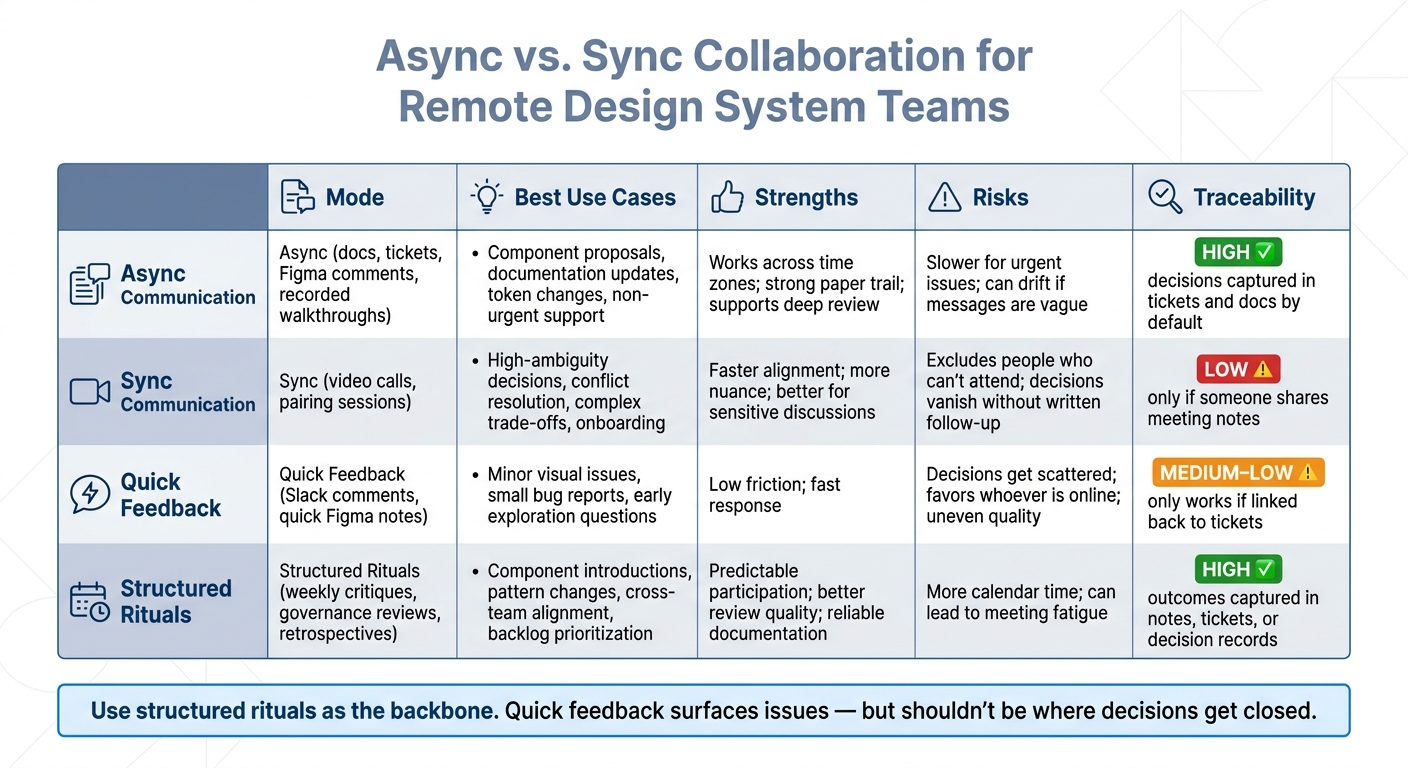
Async vs. Sync Collaboration for Design System Work
Use these rules to choose the lightest collaboration mode that still leaves a written record.
| Mode | Best Use Cases | Strengths | Risks | Traceability |
|---|---|---|---|---|
| Async communication (docs, tickets, Figma comments, recorded walkthroughs) | Component proposals, documentation updates, token changes, non-urgent support | Works well across time zones; strong paper trail; supports deep review | Slower for urgent issues; can drift if messages are vague | High - decisions are captured in tickets and docs by default |
| Sync communication (video calls, pairing sessions) | High-ambiguity decisions, conflict resolution, complex trade-offs, onboarding | Faster alignment; more nuance; better for sensitive discussions | Leaves people out if they can’t attend; decisions vanish if no one writes them down afterward | Low unless someone shares meeting notes |
| Quick feedback (Slack comments, quick Figma notes) | Minor visual issues, small bug reports, early exploration questions | Low friction; fast response | Decisions get scattered; favors whoever is online; uneven quality | Medium to low - only works if people link back to tickets |
| Structured rituals (weekly critiques, governance reviews, retrospectives) | Component introductions, pattern changes, cross-team alignment, backlog prioritization | Predictable participation; better review quality; reliable documentation | More time on the calendar; can lead to meeting fatigue | High - outcomes are captured in notes, tickets, or decision records |
Use structured rituals as the backbone. Quick feedback is useful for surfacing issues, but it shouldn’t be where decisions get closed.
sbb-itb-124fdbf
Build a Shared Source of Truth Across Design and Code
Once decisions are documented, the team needs one shared reference for the assets those decisions touch.
A shared source of truth isn't a single app. It's a coordinated system. When teammates in different time zones work on the same component, drift can creep in fast. The Figma button no longer matches the coded one. That leads to bugs, rework, and less trust in the system. According to zeroheight's 2026 Design Systems Report, only 54% of teams had tokens in design tools, code, and documentation together.
Organize Figma Libraries, Storybook, and Tokens Around Ownership
Every asset needs one owner and one review path. If not, updates happen piecemeal, and product teams start building side libraries of their own.
A practical model looks like this:
- A Design System Lead owns core Figma libraries and approves changes through design reviews.
- A Design System Engineer owns the Storybook component library and merges updates only after at least one design and one dev approval.
- Design tokens are a shared artifact, managed by a working group, with proposals logged as RFCs in an issue tracker before any change goes live.
Naming also has to line up across all three tools. Use semantic token names like color-bg-primary or space-md instead of raw values. Match Figma component names to Storybook component names too. For example, use Button/Primary in both places. Stick with semantic versioning, such as v2.3.0, and record it in Figma, Storybook, and the token repo so teams can trace what changed and when. Publishing rules should also block any Figma library update from going live until the matching code change is merged or at least scheduled.
Standardize the Handoff from Design Files to Component Code
Ownership only holds up when the handoff follows the same rules.
A repeatable handoff flow cuts out guesswork for distributed teams. If someone picks up a component ticket several hours later in another time zone, they shouldn't need to DM anyone just to figure out what to build.
The flow has five steps: Draft in WIP Figma, review async and in critique, package the handoff, build in Storybook, and run a joint review before release notes. The handoff package is where many remote teams get sloppy, so it's worth spelling out what it needs:
- Explicit token references
- All interactive states: hover, focus, active, disabled, loading, and error
- Keyboard interaction patterns
- Minimum contrast ratios
- ARIA roles
- Usage constraints
- Responsive behavior
If the joint review finds a mismatch, document it. Don't just fix it quietly and move on.
Figma, Storybook, and Design Tokens: How They Compare
These assets do different jobs, so it helps to compare them by function, not by tool.
| Asset | Primary purpose | Collaboration benefit | Risk when outdated |
|---|---|---|---|
| Figma libraries | Visual system, reusable design components, and variables for designers | Gives designers a shared visual vocabulary and a place to review proposed UI changes | Designers work from stale components or styles, creating implementation drift |
| Storybook | Coded component library and documentation for developers and designers | Lets teams inspect real component behavior, states, and variants in isolation | Developers ship UI that no longer matches the documented pattern or approved design |
| Design tokens | Named design decisions that power both design tools and code | Keeps values consistent across tools and platforms by centralizing primitives and semantics | Colors, spacing, and typography diverge between Figma and production code |
Token adoption is going up, but only 40% of teams have an automated token pipeline. That's the gap where drift tends to show up. Keep one canonical token source in version control, then generate Figma, CSS, and other outputs from it instead of typing values by hand across tools.
Define Documentation, Governance, and Contribution Workflows
Once the tools line up, teams need clear rules for keeping docs current and making changes visible. Utilizing curated design system resources can help establish these standards more efficiently. Documentation records the system. Governance decides how that system can change.
Document Components, Patterns, and Changes in One Place
Organize documentation around tasks and decisions, not file types.
Each component page should help both users and contributors. That means covering the component’s purpose, anatomy, states, accessibility, code links, usage examples, and release history.
Pattern pages do a different job. They don’t explain one UI element. They explain the problem being solved, the components involved, the recommended layout, content guidance, and known edge cases. That difference should be obvious right away.
Change documentation needs the same level of care. Deprecated pages should spell out what changed, why it changed, what it affects, and what teams should do next. For deprecated patterns, include the replacement pattern, screenshots or examples showing old versus new behavior, and migration steps for both design files and code so teams can move safely.
Once the docs are clear, set rules for who can change them and how.
Use a Formal Contribution and Review Process
Save ad hoc edits for small stuff: typos, light copy edits, or minor visual tweaks that don’t change shared behavior. Any change tied to behavior, accessibility, APIs, tokens, or broad reuse should go through formal review.
Start with a problem statement and proof that the issue is real, such as repeated requests, friction shown in analytics, or accessibility gaps. Then submit a proposal with Figma files, research, and notes on accessibility and performance for review by maintainers, engineering, accessibility, and, when needed, product or QA before merge or release. In remote teams, formal review rules take the place of hallway conversations that distributed groups simply don’t have.
Define three roles:
- Contributors draft changes
- Maintainers steward the system and check readiness
- Approvers make final calls on shared patterns, accessibility, and APIs
Governance Models and Documentation Types Compared
Choose a governance model based on team size and contributor count. Use the simplest setup that keeps the system consistent.
| Centralized | Federated | |
|---|---|---|
| Who owns decisions | Single core team (often DesignOps) | Distributed across product teams, coordinated by a guild or council |
| Consistency | High - easier to enforce standards | Variable - requires strong standards to prevent fragmentation |
| Speed of change | Slower - all changes route through one team | Faster - teams have local autonomy within guardrails |
| Best for | Smaller orgs or early-stage systems | Larger orgs with multiple product teams actively contributing |
| Main risk | Becomes a bottleneck as the system grows | Fragmentation if coordination is weak |
Many remote organizations use a hybrid model. They keep core tokens, foundations, and standards centralized, while giving domain teams limited autonomy within guardrails.
Different doc types serve different jobs, so they should be updated on their own cadence:
| Documentation type | Primary audience | Update frequency | Risk if missing |
|---|---|---|---|
| Component pages | Designers, engineers, QA | When the component changes | Teams build inconsistent or inaccessible implementations |
| Pattern pages | Product, design, content | As patterns evolve | Repeated one-off solutions that should be systematized |
| Contribution & governance docs | All contributors | When process changes | Informal changes bypass review, creating silent regressions |
| Changelog / release notes | All consumers | Every release | Distributed teams miss breaking changes or deprecations |
Measure Adoption, Improve Practice, and Keep Learning
Once ownership and workflows are set, the next step is simple: check whether people are using the system and keeping it in good shape. Measurement is the feedback loop for the communication, ownership, and governance work covered earlier.
Track Metrics That Show System Health
Use a small, steady set of metrics to spot adoption, reliability, and friction.
| Metric | What It Indicates | Role to Act |
|---|---|---|
| Component adoption rate | Share of eligible UI built with system components rather than custom one-offs | Design system PM / Design lead |
| Token consistency rate | How closely design and code align to shared color, spacing, typography, and motion tokens | Tokens engineer / Front-end tech lead |
| Implementation lead time | Whether the system speeds up delivery for common flows | Engineering manager / UX engineering lead |
| Documentation coverage & freshness | How well remote contributors can self-serve accurate guidance without live help | Design ops / Docs steward / UX writer |
| System-related defect rate | How often misused or missing components cause bugs, accessibility issues, or UX regressions | QA lead / Accessibility specialist |
| Support questions by volume and theme | Where designers and developers are confused or blocked | Design system PM / Developer advocate |
Track adoption and token consistency every month with automated scans. Review defects, documentation freshness, and implementation lead time every quarter. For each metric, write down the formula, source, scope, cadence, owner, and thresholds.
Run Audits, Retrospectives, and Training to Close Gaps
Use the metrics to decide what needs an audit first.
Audit Figma libraries on a regular basis. Look for duplicate or legacy components, hard-coded values that should be tokens, naming drift, and missing accessibility notes on high-impact patterns. In Storybook, check that published components include stories for their main states - hover, focus, error, and disabled - and confirm those stories still match what’s live in production. Keep audit checklists in a shared template so someone in any time zone can pick one up without waiting for a handoff meeting.
For retrospectives, async-first formats tend to work best. Pre-fill a shared doc with current metric snapshots. Then use prompts such as where teams had to go off-system and why, or which component caused the most confusion or rework. Give designers, engineers, QA, and PMs a few days to add input. After that, group the themes and turn them into clear fixes, each with an owner and target date.
Short surveys a few times a year help you catch things metrics miss. Numbers can show a pattern, but they don’t always show how people feel when they’re stuck. Keep surveys short, post them in the main design and engineering channels, and make them easy to answer asynchronously. Questions like how easy it is to find the right component for a use case, or what people do when they hit a roadblock, can surface patterns a dashboard won’t show on its own. Regular training also helps build a shared vocabulary, which makes async reviews and implementation calls much smoother.
Conclusion: The Operating Model That Keeps Remote Design Systems Reliable
A remote design system stays reliable when the team agrees on how to communicate, where the source of truth lives, how changes get reviewed, and how health gets measured.
Clear communication norms, a shared source of truth across design and code, formal contribution and governance workflows, and regular health metrics help turn the system from a static artifact into something the team actively maintains. Ongoing education keeps designers and developers aligned as the system changes. Treat the design system as a living product, not a one-time deliverable.
FAQs
How do we start going async-first?
Start by deciding which work needs a live meeting and which work can happen async. Save live time for complex decisions and project kickoffs. Use written reviews for routine feedback.
Then set clear expectations for response times and communication formats. Back that up with inline notes, recorded video walkthroughs, detailed documentation, and central tools so updates, decisions, and action items stay easy to find.
What should be our single source of truth?
Your single source of truth should be a centralized design system knowledge base or repository for components, documentation, and technical specs, including tokens.
That cuts down on conflicting variants, keeps product, design, and engineering on the same page, and gives everyone one clear reference for the latest status and constraints.
Which metrics matter most first?
Start with speed and quality metrics. Focus on design cycle time first, because it helps you spot slowdowns in the process. Then track post-handoff revision requests and defect rates to see how the work holds up once it leaves the team.
As the team gets more seasoned, add engagement metrics like team satisfaction scores. That helps you keep the process workable over time, not just fast on paper. These indicators give you a clear starting point for continuous improvement before you move into deeper analytics.